Live screenshots from the Play Store, captured by our snapshot worker. Tap any image to enlarge.
Switch Access's revenue trajectory
Forecast revenue from snapshot history. Last 1 months.
App spec
Version
1.17.0.892789133
Last update
Jun 16, 2026
Launched
Oct 28, 2026
Price
Free
Monetization
Free
What Switch Access actually does (from store listing)
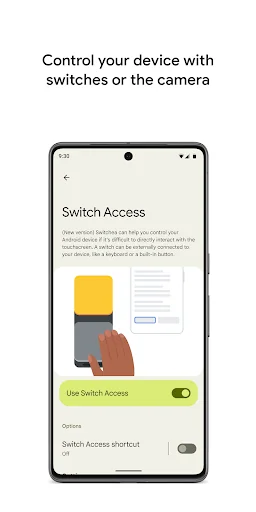
Control your phone or tablet using switches or the front camera. You can use switches to select items, scroll, enter text, and more.
Switch Access helps you interact with your Android device using one or more switches instead of the touchscreen. Switch Access can be helpful if you can't interact directly with your device.
To get started:
1. Open your device's Settings app.
2. Tap Accessibility > Switch Access.
Set up a switch
Switch Access scans the items on your screen and highlig…
Control your phone or tablet using switches or the front camera. You can use switches to select items, scroll, enter text, and more.
Switch Access helps you interact with your Android device using one or more switches instead of the touchscreen. Switch Access can be helpful if you can't interact directly with your device.
To get started:
1. Open your device's Settings app.
2. Tap Accessibility > Switch Access.
Set up a switch
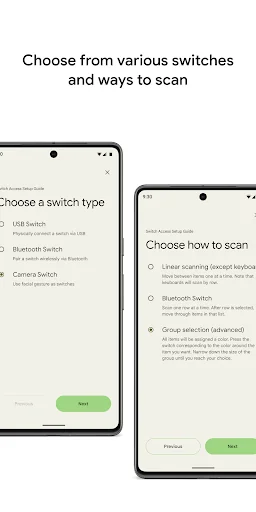
Switch Access scans the items on your screen and highlights each item until you make a selection. You can choose from a few kinds of switches:
Physical switches
• USB or Bluetooth switches, like buttons or keyboards
• On-device switches, like volume buttons
Camera switches
• Open your mouth, smile, or raise your eyebrows
• Look left, right, or up
Scan your device
After setting up a switch, you can scan and interact with things on the screen.
• Linear scanning: Move between items one at a time.
• Row-column scanning: Scan one row at a time. After a row is selected, move through items in that list.
• Point scanning: Use moving lines to select a specific horizontal and vertical location, then press "Select".
• Group selection: Assign switches to different color groupings. All items on the screen will be assigned a color. Press the switch corresponding to the color around the item you want. Narrow down the size of the group until you reach your choice.
Use the menus
When an element is selected, you'll see a menu with available interactions, like select, scroll, copy, paste, and more.
There will also be a menu at the top of the screen to help you move around your device. For example, you can open notifications, go to the home screen, change the volume, and more.
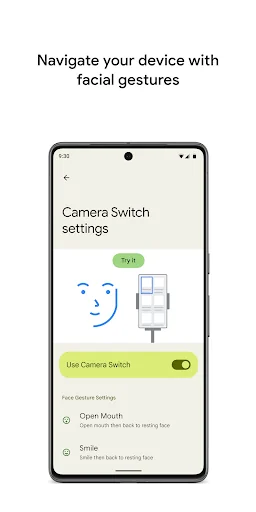
Navigate with Camera Switches
You can use Camera Switches to navigate your phone with facial gestures. Browse or select apps on your phone with the use of your phone’s front camera.
You can also customize the sensitivity and duration of each gesture to better fit your needs.
Record shortcuts
You can record touch gestures that can be assigned to a switch or started from a menu. Touch gestures can include pinching, zooming, scrolling, swiping, double tapping, and more. You can then start frequent or complex actions with a single switch, for example, recording a gesture that swipes left twice to turn two pages of an ebook.
Permissions Notice
• Accessibility Service: Because this app is an accessibility service, it can observe your actions, retrieve window content, and observe text that you type.
Own Switch Access? Replace our estimate with your real revenue via Stripe Connect or ASC. Get a public Verified badge.
Each forecast combines App Store rating, ratings count, monetisation model, pricing tier, IAP signals and ad-supported flag.
The base estimate is then multiplied by a per-category scaling factor learned from apps with founder-verified MRR.
Every number on this page comes from public APIs and Bumetric's own snapshot history.
Full methodology covers input variables, accuracy bands per category and how we treat apps without comparable anchors.
See also the live data on Switch Access's tracker page for current rating, reviews and snapshot timeline.
Building something similar? Get a free AI audit with $-revenue forecasts for every recommendation.