Android app
from Dilip Master Apps
· Communication
ML forecast★ 3.2 · 1KFree
~386/mo
ML revenue forecast.
Calibrated against 22864 apps in this category.
Confidence band
±15%
High — many comparable apps with verified data
At a glance
Earns 2.38× more than the category median (162/mo).
Ranks #3,397 of 22,864 in Communication (top 14.9% by revenue).
Launched Dec 19, 2017 · last updated Apr 17, 2026.
What the app looks like
Live screenshots from the Play Store, captured by our snapshot worker. Tap any image to enlarge.
Text Reader: Text to Voice's revenue trajectory
Forecast revenue from snapshot history. Last 1 months.
Where Text Reader: Text to Voice sits in Communication
Revenue distribution of 22864 comparable apps. Text Reader: Text to Voice highlighted.
Text Reader: Text to Voice vs comparable apps
Revenue trajectory side-by-side. Bold = Text Reader: Text to Voice, ghosted = peers.
App spec
Version
Varies with device
Last update
Apr 17, 2026
Launched
Dec 19, 2017
Price
Free
Monetization
Free
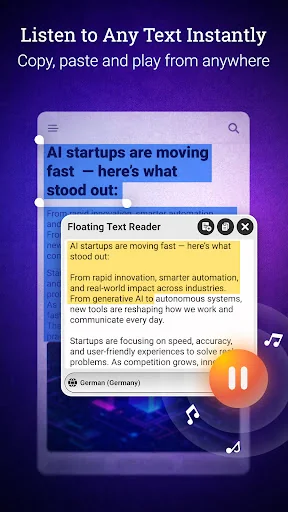
What Text Reader: Text to Voice actually does (from store listing)
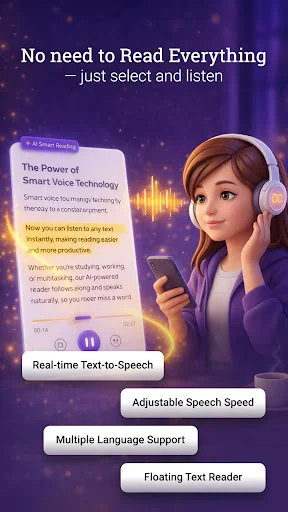
Transform text into speech with ease. Voice Reader is a powerful text-to-speech (TTS) app that converts written text into natural-sounding audio. Whether you need to listen to documents, eBooks or notes, this app makes reading effortless.
🔹 Key Features:
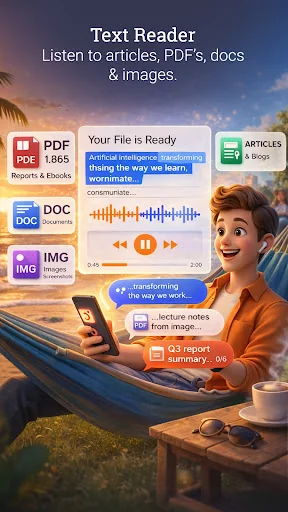
🔊 Reads Any Text – Open PDFs, text files or paste content to hear it aloud.
🌍 Supports Multiple Languages – Listen in your preferred language.
🎙 Customizable Speech Settings – Adjust voice speed, pitch & type.
📂 Read & Save Documents – …
Transform text into speech with ease. Voice Reader is a powerful text-to-speech (TTS) app that converts written text into natural-sounding audio. Whether you need to listen to documents, eBooks or notes, this app makes reading effortless.
🔹 Key Features:
🔊 Reads Any Text – Open PDFs, text files or paste content to hear it aloud.
🌍 Supports Multiple Languages – Listen in your preferred language.
🎙 Customizable Speech Settings – Adjust voice speed, pitch & type.
📂 Read & Save Documents – Works like an audiobook reader.
📌 Copy & Paste Reading – Instantly reads copied text.
🎧 Save as Audio File – Convert text to speech & listen later.
⏯ Control Playback – Play, pause & resume anytime.
🖥 Modern, Simple UI – A clean & easy-to-use design.
♿ Accessibility Friendly – Helps visually impaired & speech-impaired users.
* Voice Message Module
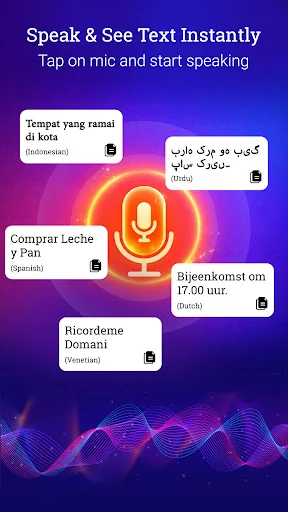
- Speech recognition input
- Real-time voice to text conversion
- Language selector with voice options and Auto Language Detect
- Adjust the reading Speed control slow to fast
- Text-to-speech with Play/Pause controls
- Save all Text to Audio File
- Share text content directly
* Floating Reader Module
- Drag and reposition floating window anywhere on screen
- Paste text directly into the floating reader
- File import support for TXT and PDF files
- Language selector with auto language detection
- Read content while using other apps simultaneously
* Saved File Module
- View your saved text files and saved audio files
- Text File preview and Read
- Play audio files with seekbar
- Delete individual files or delete all files at once
- Share files with other applications
- Copy text content to clipboard
📌 Perfect For :
📚 eBook & Article Reading – Listen instead of reading.
📝 Productivity & Note-Taking – Convert notes into speech.
🎓 Language Learning – Improve pronunciation & comprehension.
🛠 Assistive Technology – Support for those with reading difficulties.
🎶 Audio File Creation – Save text as an MP3 & listen anytime.
🔔 Important Note :
Voice Reader requires a Text-to-Speech (TTS) engine. If your device doesn’t have one, you can download it from the Google Play Store.
📲 Download now & let your device read for you.
Required Permissions :
RECORD_AUDIO
Why we need it:
- To convert your voice into text and allow note write.
If not allowed:
- Voice input and speech recognition features will not work
CAMERA
Why we need it:
- To capture images for text extraction (OCR)
If not allowed:
- Camera capture and text extraction from images will not work
POST_NOTIFICATIONS
Why we need it:
- To show notification for background playback
- To display service notification when floating view is active
- To send users important app updates
If not allowed:
- Background playback notification will not be visible
- New update notifications will not be received
SYSTEM_ALERT_WINDOW (Display over the app):
Why we need it:
- To display the floating reader window over other applications
If not allowed:
- Floating reader window cannot be created or displayed over other apps
Comparable Android apps
The five apps in Communication with the closest revenue to Text Reader: Text to Voice. Click any to see its detail page.
Each forecast combines App Store rating, ratings count, monetisation model, pricing tier, IAP signals and ad-supported flag.
The base estimate is then multiplied by a per-category scaling factor learned from apps with founder-verified MRR.
Every number on this page comes from public APIs and Bumetric's own snapshot history.
Full methodology covers input variables, accuracy bands per category and how we treat apps without comparable anchors.
See also the live data on Text Reader: Text to Voice's tracker page for current rating, reviews and snapshot timeline.
Building something similar? Get a free AI audit with $-revenue forecasts for every recommendation.

 Мой POWERNET
 Rocket.Chat Experimental
 HablaCuba - Cubacel and More
 TalonView
 In The Rooms