What Theme Pink Pony GO SMS PRO actually does (from store listing)
Theme Pink Pony GO SMS PRO - works only with GO SMS Pro application, if you don't have it, download for free from Google Play.
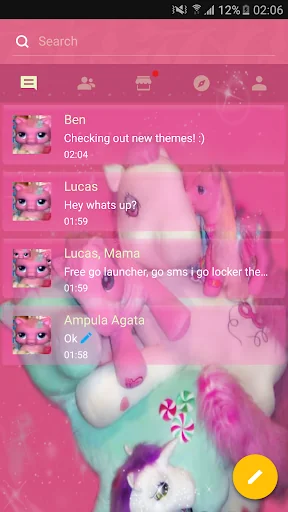
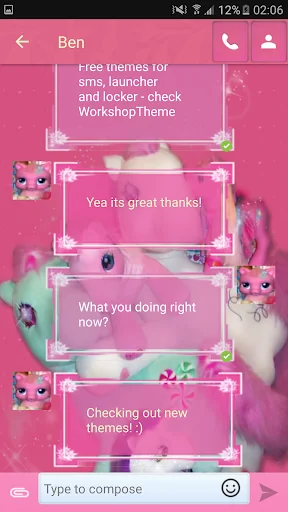
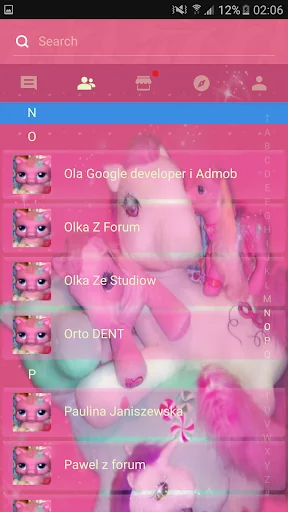
New GO SMS Pro Theme Pink Pony = toy horse pink sweet theme, emo, pink, and they are specially designed for girls / girly and style.
If you like cats or dogs, or other animals, cute theme, we hope that you will also love this pink, raspberry, ruby style.
All that has been specifically designed for those who like pink, red velvet, and magenta, indygo colors.
This…
Theme Pink Pony GO SMS PRO - works only with GO SMS Pro application, if you don't have it, download for free from Google Play.
New GO SMS Pro Theme Pink Pony = toy horse pink sweet theme, emo, pink, and they are specially designed for girls / girly and style.
If you like cats or dogs, or other animals, cute theme, we hope that you will also love this pink, raspberry, ruby style.
All that has been specifically designed for those who like pink, red velvet, and magenta, indygo colors.
This application helps You customization and personalization your GO SMS Pro with beautiful, pink wallpaper, fonts and icons. This theme is about cute and sweet white stars and plush pink with stuffed animal and red very nice flowers.
To apply the theme(also for GO Chat):
1. Download this theme from Google Play for free
2. Download GO SMS Pro for free
3. Install and launch GO SMS app
3. Press right to see options and press: theme pattern
4. Press "Installed" tab
5. Tap the cute sweet GO SMS PRO Theme pink pony Theme
Sweet pink poppet and purple tailstock will captivate you! Beautiful colors, such as roseate and also ruddy, blushing or rose - rose.
Try now beautiful, dear heavenly styled with tons of customization options.
Feel like you are now in heaven, be happy every time when you post an SMS message!
Make Your Android world a brighter pink, brilliant and stunning, love and happiness.
No matter if you are a man or a woman ... just try out this beautiful theme, download and sweet rose-coloured coloring of the device, cherry, flowers and rouge cute horses.
To change appearance settings about conversation list
1. Press Menu
2. Press Advanced
3. Press Appearance Settings.
4. Press Conversation List Customization
And now You can adjust for each other, you can change:
- Background in messages.
- Displayed contact pictures.
- Contact font.
- Contact font color.
- Time and message fonts.
- Or reset this setting as to default.
To change appearance settings about conversation style
1. Press Menu
2. Press Advanced
3. Press Appearance Settings.
4. Press Conversation customization
And now You can adjust for each other, you can change:
Conversation style ( bubble setting or list style)
- Background
- Incoming font
- Outgoing font
- Hyperlink color in text
If you want to use avatar icon for any contact simply change it and the new image for each contact are visible on conversation list and messages SMS list.
Disclaimer: this application uses interstitial ads and banners.
Check other our GOSMSPro Themes, GO Locker Themes, and GO Launcher EX, free themes.
Themes are published all the time, so remember to check our developer account regularly.
Style was created by WorkshopTheme
Comparable Android apps
The five apps in Personalization with the closest revenue to Theme Pink Pony GO SMS PRO. Click any to see its detail page.
Each forecast combines App Store rating, ratings count, monetisation model, pricing tier, IAP signals and ad-supported flag.
The base estimate is then multiplied by a per-category scaling factor learned from apps with founder-verified MRR.
Every number on this page comes from public APIs and bumetric's own snapshot history.
Full methodology covers input variables, accuracy bands per category and how we treat apps without comparable anchors.
See also the live data on Theme Pink Pony GO SMS PRO's tracker page for current rating, reviews and snapshot timeline.
Building something similar? Get a free AI audit with $-revenue forecasts for every recommendation.


 Calculator: Photo Vault, Video
 -Dreamy Flowers- +HOMEテーマ
 Dragon 3 Wallpapers: Hiccup
 Best Friends Floral Keyboard T
 Black cats Live Wallpaper