ML revenue forecast.
Calibrated against 77129 apps in this category.
Confidence band
±15%
High — many comparable apps with verified data
At a glance
Earns 9.06× more than the category median (189/mo).
Ranks #3,056 of 77,129 in Tools (top 4.0% by revenue).
Launched Jun 04, 2018 · last updated Oct 01, 2026.
6 months of snapshot history tracked.
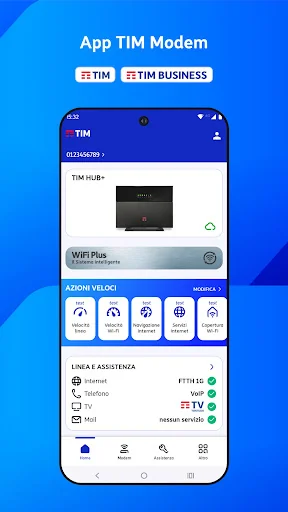
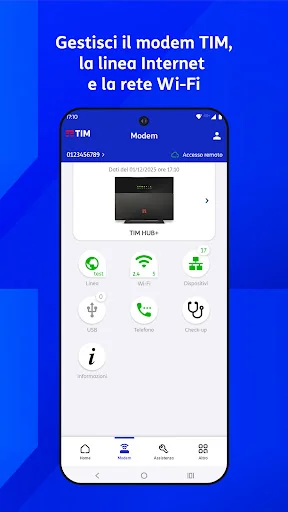
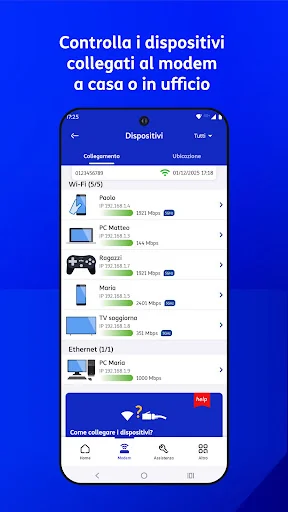
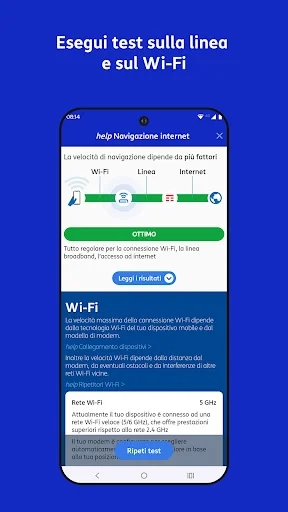
What the app looks like
Live screenshots from the Play Store, captured by our snapshot worker. Tap any image to enlarge.
TIM Modem's revenue trajectory
Forecast revenue from snapshot history. Last 6 months.
Where TIM Modem sits in Tools
Revenue distribution of 77129 comparable apps. TIM Modem highlighted.
TIM Modem vs comparable apps
Revenue trajectory side-by-side. Bold = TIM Modem, ghosted = peers.
App spec
Version
9.4
Last update
Oct 01, 2026
Launched
Jun 04, 2018
Price
Free
Monetization
Free
What TIM Modem actually does (from store listing)
Manage your TIM modem when connected via Wi-Fi or remotely, check your landline, and submit technical support requests.
To access the TIM Modem app, use your MyTIM credentials if you're a residential customer, or your TIM BUSINESS credentials.
Here's what you can do with the TIM Modem app.
In the "Modem" tab
1. View, manage, update, and reboot your TIM modem at home or work.
2. Check your internet connection status; run the line speed test, the internet service reachability test, and …
Manage your TIM modem when connected via Wi-Fi or remotely, check your landline, and submit technical support requests.
To access the TIM Modem app, use your MyTIM credentials if you're a residential customer, or your TIM BUSINESS credentials.
Here's what you can do with the TIM Modem app.
In the "Modem" tab
1. View, manage, update, and reboot your TIM modem at home or work.
2. Check your internet connection status; run the line speed test, the internet service reachability test, and the browsing test; on FWA lines, run the 4G/5G signal test for the guided installation of the indoor modem or check the external antenna.
3. Check and change your modem's Wi-Fi configuration, turn Wi-Fi networks on and off, and optimize them, manage and share your Guest Wi-Fi network, monitor traffic and the Wi-Fi quality of connected devices, check your Wi-Fi speed, perform a Wi-Fi backup/restore (useful if you're replacing your TIM modem), and view and share your network's Wi-Fi QR code.
4. View connected TIM Wi-Fi repeaters and the EasyMesh network.
5. Check and simulate the Wi-Fi coverage of your modem and any repeaters; measure the actual Wi-Fi signal received in different rooms with the Wi-Fi Coverage Test.
6. WiFi Plus Service: Check the operation of your Wi-Fi network and verify the optimizations performed automatically by TIM.
7. Control and manage the devices connected to your modem. Draw a floor plan of your home and view the devices by room after assigning each to the correct location.
8. Check the status of USB sharing services on your TIM modem (only when connected to Wi-Fi).
9. Check the status of the voice service (VoIP) on the modem; view and share the VoIP configuration parameters of the telephone line.
10. Perform a periodic check-up of your home network.
In the "Assistance" tab (currently only complete with MyTIM login)
1. Perform a home line diagnosis, report a problem to technicians, or resolve the most common Internet, email, and telephone issues online.
2. Perform a diagnosis of active TV services (TIMvision), resolve online, or report a problem to technicians.
3. Receive notifications of any service disruptions on the TIM landline in your area, and request an SMS when the problem is resolved.
4. Manage your Reports and monitor their processing status.
5. Ask Angie: TIM's digital assistant helps you resolve technical issues on your line.
In the "More" tab,
1. View useful information, guides, and technical support videos.
2. Quickly access other TIM services.
3. Find TIM stores.
4. Simplify Wi-Fi network setup on your device by scanning the TIM modem's QR code.
To use the app, you need a TIM residential or business landline and an Android smartphone/tablet with any mobile operator (TIM or other carriers). The Privacy Policy and License Terms are accessible in the Settings menu.
To help us improve the app, write to: appmodem@telecomitalia.it
Comparable Android apps
The five apps in Tools with the closest revenue to TIM Modem. Click any to see its detail page.
Each forecast combines App Store rating, ratings count, monetisation model, pricing tier, IAP signals and ad-supported flag.
The base estimate is then multiplied by a per-category scaling factor learned from apps with founder-verified MRR.
Every number on this page comes from public APIs and Bumetric's own snapshot history.
Full methodology covers input variables, accuracy bands per category and how we treat apps without comparable anchors.
See also the live data on TIM Modem's tracker page for current rating, reviews and snapshot timeline.
Building something similar? Get a free AI audit with $-revenue forecasts for every recommendation.


 GluePics Unlocker
 Deleted Photo Recovery
 Multi Calculator
 Yandex Browser (alpha)
 Z's Caller Name Announcer