What TipType Keyboard Lite actually does (from store listing)
PLEASE READ! ALSO: CHECK SENSITIVITY ISSUES, AS EXPLAINED IN LAST PARAGRAPH
CAN YOU BEAT TIPTYPE WITH YOUR OTHER NON-PREDICTIVE KEYBOARD (GUINNESS GUIDELINES)? WIN USD 500 IF YOU DO! https://www.youtube.com/watch?v=yd3-otoMkpY
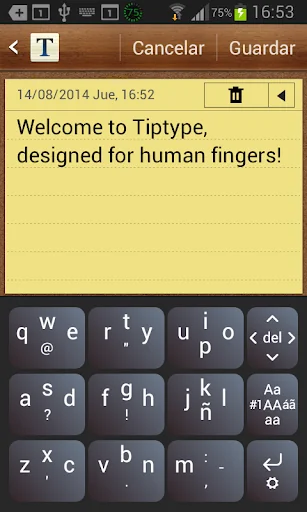
It's always hard to write in a screen, but that's because keys are always impossibly small for human fingers.
Enter TipType, the keyboard for cellphones and tablets where typing is easier and faster because keys are huge.
Each key can produce up to 5 characters…
PLEASE READ! ALSO: CHECK SENSITIVITY ISSUES, AS EXPLAINED IN LAST PARAGRAPH
CAN YOU BEAT TIPTYPE WITH YOUR OTHER NON-PREDICTIVE KEYBOARD (GUINNESS GUIDELINES)? WIN USD 500 IF YOU DO! https://www.youtube.com/watch?v=yd3-otoMkpY
It's always hard to write in a screen, but that's because keys are always impossibly small for human fingers.
Enter TipType, the keyboard for cellphones and tablets where typing is easier and faster because keys are huge.
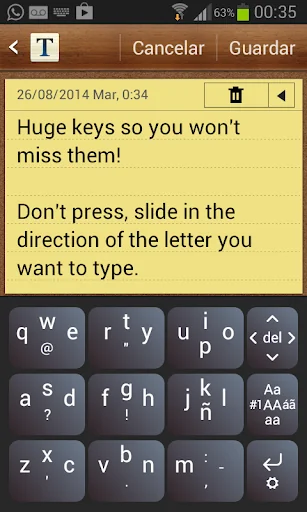
Each key can produce up to 5 characters, depending on the movement of the finger on top of it. Sliding --starting from anywhere in the key-- up, down, left, right or pressing generates a different character. There are just 9 big writing keys.
To generate a space, just press on any of the 9 writing keys, thus avoiding the long trip of your finger to the spacebar. Recommended: press the key where you just ended your word to get a space.
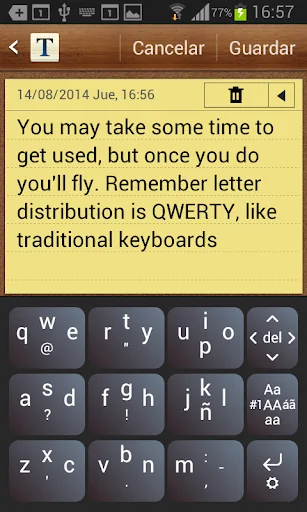
You'll soon get used to the letter distribution: it is esentially the same as in your traditional QWERTY keyboard.
The three keys on the far right column are Function Keys. They also work by sliding or pressing.
The DEL key deletes when pressing, but moves the cursor (like the arrows in a computer keyboard) when sliding in each direction.
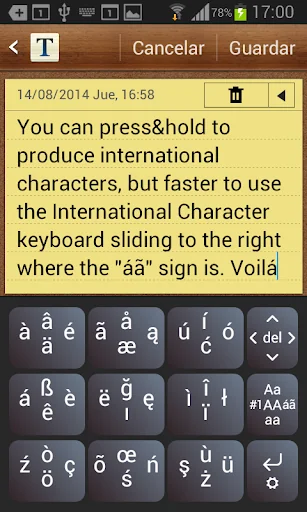
The Alternate Keyboards key is used to write characters that are not in the main keyboard. Slide left (towards "#1") for numbers and additional symbols, upwards ("Aa") for a capitalized initial, right ("áã") for international characters, downwards ("aa") to go back to the small letter keyboard and press ("AA") to turn on CAPS.
The Enter key produces Enter when pressing. When sliding downards you get Help and Options. An important Option is "Sensitivity to Slides". Devices differ in their sensitivity. If your device sometimes recognizes a slide as a tap, increase sensitivity. If it sometimes recognize a tap as a slide, reduce sensitivity.
Comparable Android apps
The five apps in Productivity with the closest revenue to TipType Keyboard Lite. Click any to see its detail page.
Each forecast combines App Store rating, ratings count, monetisation model, pricing tier, IAP signals and ad-supported flag.
The base estimate is then multiplied by a per-category scaling factor learned from apps with founder-verified MRR.
Every number on this page comes from public APIs and Bumetric's own snapshot history.
Full methodology covers input variables, accuracy bands per category and how we treat apps without comparable anchors.
See also the live data on TipType Keyboard Lite's tracker page for current rating, reviews and snapshot timeline.
Building something similar? Get a free AI audit with $-revenue forecasts for every recommendation.


 AYD
AYD
 DynamicG Dropbox Plugin
 KOSTAL Solar App
 Creativity
 Turtl
Turtl