ML revenue forecast.
Calibrated against 77129 apps in this category.
Confidence band
±15%
High — many comparable apps with verified data
At a glance
Earns 1.64× more than the category median (189/mo).
Ranks #20,620 of 77,129 in Tools (top 26.7% by revenue).
Launched Mar 10, 2019 · last updated Mar 20, 2025.
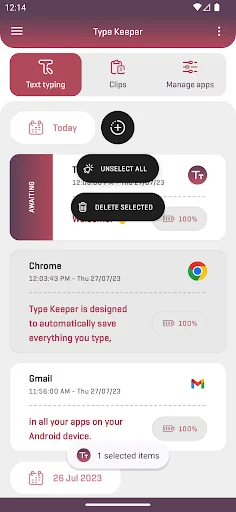
What the app looks like
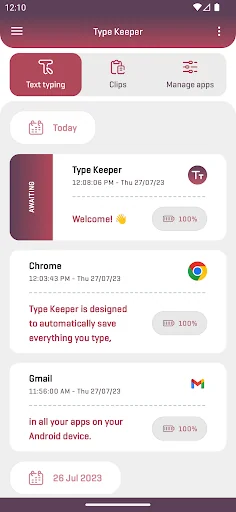
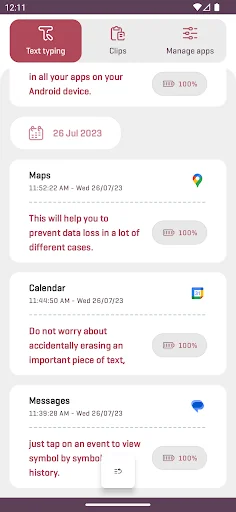
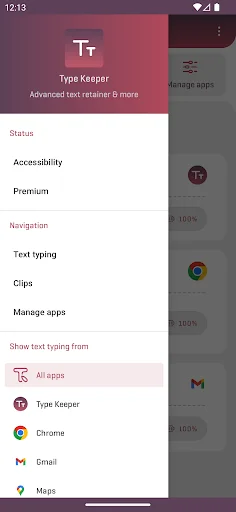
Live screenshots from the Play Store, captured by our snapshot worker. Tap any image to enlarge.
Type Keeper - Your keylogger's revenue trajectory
Forecast revenue from snapshot history. Last 1 months.
Where Type Keeper - Your keylogger sits in Tools
Revenue distribution of 77129 comparable apps. Type Keeper - Your keylogger highlighted.
Type Keeper - Your keylogger vs comparable apps
Revenue trajectory side-by-side. Bold = Type Keeper - Your keylogger, ghosted = peers.
App spec
Version
2.8.0
Last update
Mar 20, 2025
Launched
Mar 10, 2019
Price
Free
Monetization
Free
What Type Keeper - Your keylogger actually does (from store listing)
Have you typed something and then accidentally erased it? Do you want to find an important piece of text you have written in past? An app just stopped and now all your text typing is lost? Or just your want to check your "copy to clipboard" history?
Type Keeper is here! It is designed to automatically save everything you type and copy, in all your apps on your Android device. Just open it whenever you want to take a look at your old input entries & copy to clipboard events. By using it you wi…
Have you typed something and then accidentally erased it? Do you want to find an important piece of text you have written in past? An app just stopped and now all your text typing is lost? Or just your want to check your "copy to clipboard" history?
Type Keeper is here! It is designed to automatically save everything you type and copy, in all your apps on your Android device. Just open it whenever you want to take a look at your old input entries & copy to clipboard events. By using it you will never lose text typing and clipboard data again.
What Type Keeper automatically does for you:
• It saves your text typing as events and sorts them by date and time.
• It saves your clips as events and sorts them by date and time.
• It requests and saves location on each text typing event start (only if device Location is enabled).
• It deletes old events (and their data) in order to free up storage and provide you better overall performance.
Type Keeper automatically monitors and saves all text fields inputs and copy to clipboard actions. It works with an accessibility service that you need to setup (enable) manually on your Android device.
Text typing features:
• Explore your text typing in detail. Drag the slider to view symbol by symbol history.
• Show text typing events only from a specific app.
• Search in history for specific text typing events.
• Manage your text typing events. Copy, share, and delete them with one tap.
• View the location of each text typing event (displayed on a map).
• Easily enable/disable Type Keeper text typing storing globally or for specific apps.
Clips features:
• Take a look at your last clips.
• Search in history for specific clip events.
• Manage your clips. Copy, share, and delete them with one tap.
Additional features & options:
• Easily enable/disable Type Keeper events storing.
• Adjust the automatic cleanup interval.
• Choose a preferred provider for location tracking.
• Require screen lock confirmation right after app opening.
Technical information:
• Important: This Android app uses an accessibility service that must be enabled to ensure primary functionality.
Accessibility information disclosure:
The application uses the accessibility service and its API to enable text typing and copy to clipboard events monitoring. To provide such functionality, this Android application has access to nodes, visible on your screen. This app and it's accessibility service can observe your actions, retrieve window content, and detect text that you type.
This app is not designed to track you in any way whatsoever. Type Keeper isn't a password manager and isn't acting like such. It will never save any text typing from password input fields. All device data, which being recorded, is stored internally on your device, and only you have access to it. The developer and publisher of this software product care about user privacy and don't collect or share any kind of personal information and data, result of your usage of this product.
Permission(s):
• Notifications - Allows the app to notify you about important events (e.g., something went wrong with the accessibility service and future data won't be stored).
• Location (incl. background) - Allows the app to request a location (while in foreground or background), save it locally on your device, and then make it appear for you when you need it (e.g., when viewing text typing event).
Other information:
• Contact us by email if you have any issues or feature requests.
• Email address: typekeeper@gmail.com
Agreements texts (terms of service, privacy policy) available at: https://www.type-keeper.com
Thank you for stepping by and choosing Type Keeper!
Written with passion to help you out.
Comparable Android apps
The five apps in Tools with the closest revenue to Type Keeper - Your keylogger. Click any to see its detail page.
Each forecast combines App Store rating, ratings count, monetisation model, pricing tier, IAP signals and ad-supported flag.
The base estimate is then multiplied by a per-category scaling factor learned from apps with founder-verified MRR.
Every number on this page comes from public APIs and Bumetric's own snapshot history.
Full methodology covers input variables, accuracy bands per category and how we treat apps without comparable anchors.
See also the live data on Type Keeper - Your keylogger's tracker page for current rating, reviews and snapshot timeline.
Building something similar? Get a free AI audit with $-revenue forecasts for every recommendation.

 Telugu Voice Typing Keyboard
 Space VPN - Unlimited VPN
 Pet Pregnancy Calculator
 TENVISTY
 Ethiopian apps