What Uninstaller actually does (from store listing)
NOTE: This app cannot uninstall system apps
Free and easy to use Uninstaller for Android.
Manage your apps and save memory space on your phone or tablet.
You can delete multiple applications in one go and see more details about each of them.
It's a good habit (from time to time) to delete unused apps that occupy storage and consume other resources (battery and RAM memory).
Features:
• Uninstall apps easily by single click
• Support for remove apps individually or batch uninstall (lo…
Free and easy to use Uninstaller for Android.
Manage your apps and save memory space on your phone or tablet.
You can delete multiple applications in one go and see more details about each of them.
It's a good habit (from time to time) to delete unused apps that occupy storage and consume other resources (battery and RAM memory).
Features:
• Uninstall apps easily by single click
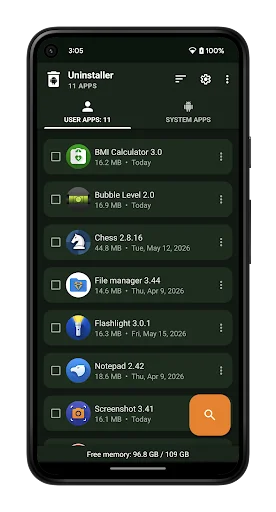
• Support for remove apps individually or batch uninstall (long press support)
• Display application info: name, version, installation time and size
• Searching apps (also by voice search)
• Sorting by name, size and installation date (ascending and descending)
• Status bar (in notification area) for quick access, which can be switched off in settings
• Option menu with context actions for each app
• Details of the applications
• Search your apps in Google Play
• Create application shortcuts on your home screen
• Information about available memory space
• Usable and user-friendly interface
• Note: system apps can not be uninstalled using this app
About Us
• Visit SplendApps.com: http://splendapps.com/
• Our Privacy Policy: http://splendapps.com/privacy-policy
• Contact Us: http://splendapps.com/contact-us
Each forecast combines App Store rating, ratings count, monetisation model, pricing tier, IAP signals and ad-supported flag.
The base estimate is then multiplied by a per-category scaling factor learned from apps with founder-verified MRR.
Every number on this page comes from public APIs and bumetric's own snapshot history.
Full methodology covers input variables, accuracy bands per category and how we treat apps without comparable anchors.
See also the live data on Uninstaller's tracker page for current rating, reviews and snapshot timeline.
Building something similar? Get a free AI audit with $-revenue forecasts for every recommendation.





 Stopwatch Timer
 CALCU Stylish Basic Calculator
 dtac
dtac
 Remote AC Universal
 Smart Tools 2