ML revenue forecast.
Calibrated against 77129 apps in this category.
Confidence band
±15%
High — many comparable apps with verified data
At a glance
Tracks close to the Android app category median (189/mo).
Ranks #30,547 of 77,129 in Tools (top 39.6% by revenue).
Launched Jan 29, 2020.
What the app looks like
Live screenshots from the Play Store, captured by our snapshot worker. Tap any image to enlarge.
Urdu Text To Speech's revenue trajectory
Forecast revenue from snapshot history. Last 1 months.
Where Urdu Text To Speech sits in Tools
Revenue distribution of 77129 comparable apps. Urdu Text To Speech highlighted.
Urdu Text To Speech vs comparable apps
Revenue trajectory side-by-side. Bold = Urdu Text To Speech, ghosted = peers.
App spec
Version
Varies with device
Launched
Jan 29, 2020
Price
Free
Monetization
Free
What Urdu Text To Speech actually does (from store listing)
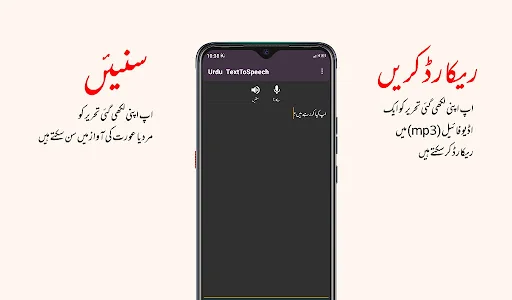
Copy any Urdu text and listen to it like an audio recording. You can also record the text to an audio (mp3) file without any ambient noise!
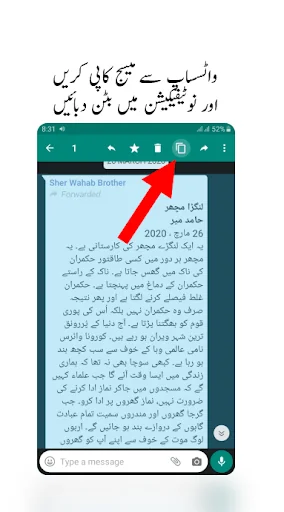
With this tiny app, you can listen to Urdu text anywhere in your phone. Copy any text and click the button in your notification bar to listen to it. You can also listen to the text by selecting the text and clicking on Urdu Speech in the popup action menu.
Ways this app can be used:
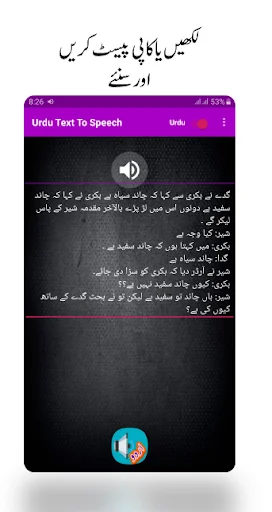
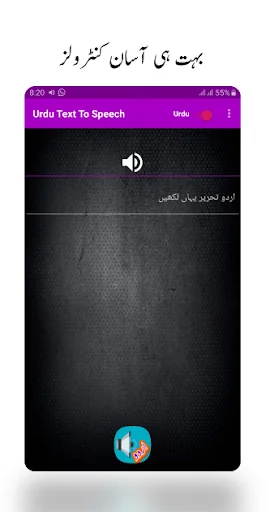
1: Open this app and write Urdu text and click on the speech button.
…
Copy any Urdu text and listen to it like an audio recording. You can also record the text to an audio (mp3) file without any ambient noise!
With this tiny app, you can listen to Urdu text anywhere in your phone. Copy any text and click the button in your notification bar to listen to it. You can also listen to the text by selecting the text and clicking on Urdu Speech in the popup action menu.
Ways this app can be used:
1: Open this app and write Urdu text and click on the speech button.
2: Open this app and write Urdu text and click on the MIC button to save the Urdu text in an Audio(.mp3) file in a computer-generated voice.
3: Open this app and go back to any app you use and copy any text in there and open notification panel and click on the Speak button so this app can speak the text for you.
4: Open any app and select a text and an option menu should appear saying (Copy, Select All etc.), in that menu, click on the 3 dots(options) button to see "Urdu To Speech" button and click on that.
IMPORTANT NOTICE In some devices, This application will try to download some support files in the background to be in a workable condition after you first install and try to convert text to speech. So you may need to be patient after first installing it.
For more info about how to use the app, watch the video on the app's main page.
Comparable Android apps
The five apps in Tools with the closest revenue to Urdu Text To Speech. Click any to see its detail page.
Each forecast combines App Store rating, ratings count, monetisation model, pricing tier, IAP signals and ad-supported flag.
The base estimate is then multiplied by a per-category scaling factor learned from apps with founder-verified MRR.
Every number on this page comes from public APIs and Bumetric's own snapshot history.
Full methodology covers input variables, accuracy bands per category and how we treat apps without comparable anchors.
See also the live data on Urdu Text To Speech's tracker page for current rating, reviews and snapshot timeline.
Building something similar? Get a free AI audit with $-revenue forecasts for every recommendation.


 MySubaru
 Portal Del Colaborador
 Bouygues Telecom - Entreprises
 RPN Calculator
 Faseyha Dhivehi Keyboard ⌨️🇲?