ML revenue forecast.
Calibrated against 51929 apps in this category.
Confidence band
±15%
High — many comparable apps with verified data
At a glance
Earns 2.01× more than the category median (168/mo).
Ranks #9,477 of 51,929 in Lifestyle (top 18.2% by revenue).
Launched May 08, 2016 · last updated Jan 10, 2026.
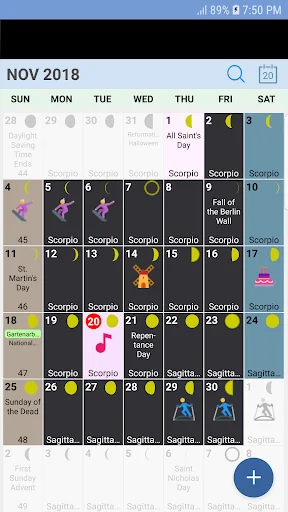
What the app looks like
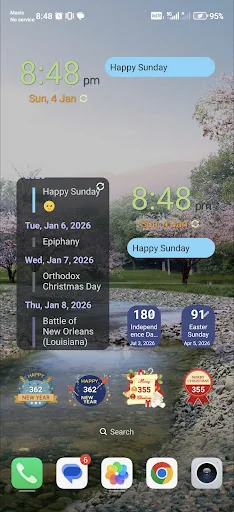
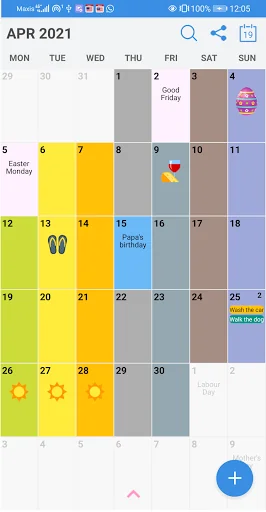
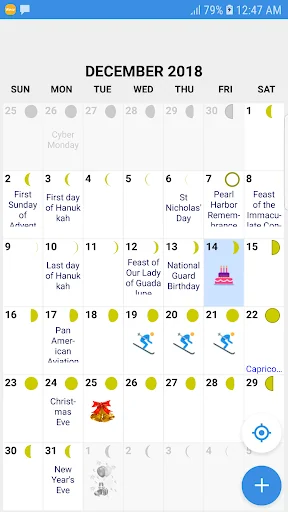
Live screenshots from the Play Store, captured by our snapshot worker. Tap any image to enlarge.
USA Calendar's revenue trajectory
Forecast revenue from snapshot history. Last 1 months.
Where USA Calendar sits in Lifestyle
Revenue distribution of 51929 comparable apps. USA Calendar highlighted.
USA Calendar vs comparable apps
Revenue trajectory side-by-side. Bold = USA Calendar, ghosted = peers.
App spec
Version
4.188.190
Last update
Jan 10, 2026
Launched
May 08, 2016
Price
Free
Monetization
Free
What USA Calendar actually does (from store listing)
The calendar contains the National Holidays and observations for 2024, 2025 and 2026. There are also season events, daylight saving time changes, full moon time and school holidays.
The calendar is available in English and Spanish. Korean and Chinese UI translations are available as well. You may change the language in "Settings"
Week Number and Moon Phases are also available. You may enable/ disable these in the "Settings".
Add individuality to the calendar with colors and icons. You m…
The calendar contains the National Holidays and observations for 2024, 2025 and 2026. There are also season events, daylight saving time changes, full moon time and school holidays.
The calendar is available in English and Spanish. Korean and Chinese UI translations are available as well. You may change the language in "Settings"
Week Number and Moon Phases are also available. You may enable/ disable these in the "Settings".
Add individuality to the calendar with colors and icons. You may set the background and font color of your choice. Make it colorful to brighten up your day.
You may set the USA Calendar as widget. There are widgets with date and time as well as count down widgets for Christmas and New Year or any events of your choice.
You may also add your own daily, weekly, monthly or annual events. You can use it to track your own diary of events such as planning your vacation, sports events or your friends and families' birthdays. The events are tagged with colorful icons for easy reference. It is simple to create the events. You may create events within a short duration as well, by specifying the start and end dates of the event.
There is option to set the start of the week to either Monday or Sunday.
It is possible to show only relevant events, such as National Holiday, State Holidays by selecting particular states in the United States, Observances or Daylight Saving Time. You may easily find the events by searching using keywords. It is also possible to set notifications of events.
There is a monthly calendar view as well as listing view. You may use it for simple diary or personal journal.
Show more on calendar:
1. Week of year
2. Zodiac Sign
3. Buddhist Calendar
4. Chinese Calendar
5. Coptic Calendar
6. Ethiopic Calendar
7. Hebrew Calendar
8. Indian Calendar
9. Islamic Calendar
10. Japanese Calendar
11. Taiwanese Calendar
12. Vietnamese Calendar
In app icons courtesy of Icons8 (https://icons8.com/).
New features:
- Backup and restore of user events. Go to "Maintenance"
Please "Allow USA Calendar to access photos, media and files on your device" to enable the backup and restore.
The backup file is stored in your mobile phone. We do not store the file in any servers.
- Option to create new repeated events using a user defined interval.
- Added the option to delete a single user event, or a series of user events. To delete an event, swipe left and you may choose to delete either single event or the entire series. At the month view, you may also hold longer on a particular day, and delete all events on that day.
- Moon phase feature. Enable this feature from "Settings".
- Theme for calendar. You may use dark or light theme. You may set your background and font with your preferred color.
- Events filter can be set with your preferred color.
- Lock time zone feature, useful if you are travelling.
- List view for events in a month.
- You may add tasks and track the status of the tasks.
- You may categorize events as "Birthday"
- Search feature. Able to filter search results by birthdays, events or tasks. It is also possible to filter by year range.
- Heart icon is added to mark an event as 'Favourite'. Favourites can easily be filtered.
- For security, it is possible to enable biometrics option in 'Settings'
- Able to set daily notification time with sound. To set up notifications: Go to Settings → Maintenance → Android Notification Settings.
- Able to adjust the calendar date font size.
- Able to view Google calendar events.
User Manual in Spanish:
https://www.youtube.com/watch?v=3XjIKmk6z9s
Connect with us on Facebook:
https://www.facebook.com/Deventz-Studio-309792656473878
Each forecast combines App Store rating, ratings count, monetisation model, pricing tier, IAP signals and ad-supported flag.
The base estimate is then multiplied by a per-category scaling factor learned from apps with founder-verified MRR.
Every number on this page comes from public APIs and bumetric's own snapshot history.
Full methodology covers input variables, accuracy bands per category and how we treat apps without comparable anchors.
See also the live data on USA Calendar's tracker page for current rating, reviews and snapshot timeline.
Building something similar? Get a free AI audit with $-revenue forecasts for every recommendation.

 WiTV Viewer
 Hair Removal - Silk'n
 Kawaii Cat Girl Theme
 Shotgun: Live Music Experience
 Life Wheel