What VerbTeX Pro LaTeX Editor actually does (from store listing)
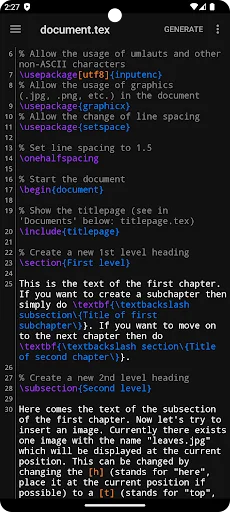
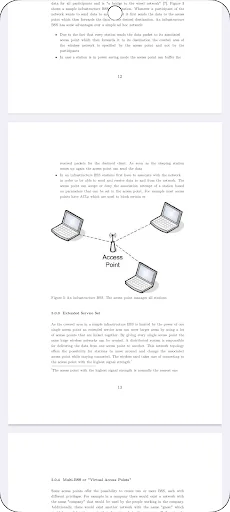
VerbTeX is a collaborative LaTeX Editor for your Android device. It allows you to create and manage LaTeX projects directly on your Android device and generate a PDF offline (Verbnox) or online (Verbosus).
This software is provided "as is" without warranties or conditions of any kind, either expressed or implied.
Pro version:
* Code completion (commands)
* Encrypted transmission (TLS) of your content
* Unlimited number of projects (Local Mode)
* Unlimited number of documents (Local Mod…
VerbTeX is a collaborative LaTeX Editor for your Android device. It allows you to create and manage LaTeX projects directly on your Android device and generate a PDF offline (Verbnox) or online (Verbosus).
This software is provided "as is" without warranties or conditions of any kind, either expressed or implied.
Pro version:
* Code completion (commands)
* Encrypted transmission (TLS) of your content
* Unlimited number of projects (Local Mode)
* Unlimited number of documents (Local Mode)
* Unlimited number of projects (Cloud Mode)
* Unlimited number of documents (Cloud Mode)
Features:
* Use PdfLaTeX, XeLaTeX or LuaLaTeX to generate a PDF
* Use BibTeX or Biber for bibliographies
* Offline compilation (Local Mode, enable in Settings)
* Automatic Dropbox synchronization (Local Mode)
* Automatic Box synchronization (Local Mode)
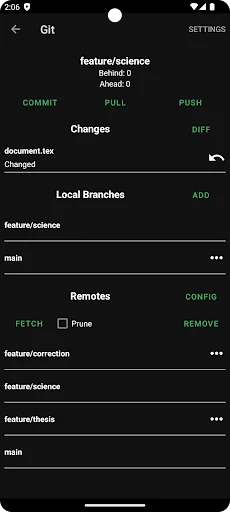
* Git integration (Local Mode)
* Zotero integration (Local Mode)
* Mendeley integration (Local Mode)
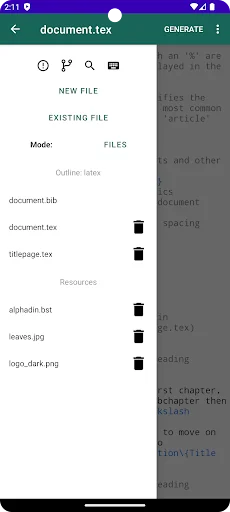
* 2 Modes: Local Mode (stores .tex documents on your device) and Cloud Mode (synchronizes your projects with Verbosus)
* Full LaTeX distribution (TeXLive)
* Inverse search (jump from PDF to .tex file)
* No account needed (Local Mode)
* Syntax highlighting
* Code completion (commands)
* Hotkeys (see below)
* Web-Interface (Cloud Mode)
* Collaboration (Cloud Mode)
* Two factor authentication (Cloud Mode, in combination with Copiosus)
* Autosave (Local Mode)
Import and export existing projects in Local Mode:
* Link to Dropbox or Box (Settings -> Link to Dropbox / Link to Box) and let VerbTeX automatically synchronize your projects
OR
* Use Git integration: Clone or track an existing repository
Use any .ttf/.otf font:
Put your font file inside your project and reference it in your document:
\documentclass{article}
\usepackage{fontspec}
\setmainfont{fontname.otf}
\begin{document}
\section{Main Heading}
Это тест
\end{document}
You can write chinese in PdfTeX using the CJKutf8 package as shown in the following example:
If you experience any performance issues while using the editor please try
* to disable syntax highlighting and line numbers by choosing Menu -> Syntax Highlighting: ON and Line Numbers: ON
* to split up your project into multiple .tex files by using the \include{...} command of LaTeX
Hotkeys in editor:
ctrl+s: Save
ctrl+g: Generate PDF
ctrl+n: New document
ctrl+d: Delete document
ctrl+.: Next document
ctrl+,: Previous document
Comparable Android apps
The five apps in Productivity with the closest revenue to VerbTeX Pro LaTeX Editor. Click any to see its detail page.
Each forecast combines App Store rating, ratings count, monetisation model, pricing tier, IAP signals and ad-supported flag.
The base estimate is then multiplied by a per-category scaling factor learned from apps with founder-verified MRR.
Every number on this page comes from public APIs and bumetric's own snapshot history.
Full methodology covers input variables, accuracy bands per category and how we treat apps without comparable anchors.
See also the live data on VerbTeX Pro LaTeX Editor's tracker page for current rating, reviews and snapshot timeline.
Building something similar? Get a free AI audit with $-revenue forecasts for every recommendation.


 POPdiary+ : diary, journal
 LifeUp: Gamify Tasks & Habits
 Calculator PanecalST Plus
 Scientific Calculator Plus
 Password Manager Pro