What Video Slimmer App actually does (from App Store listing)
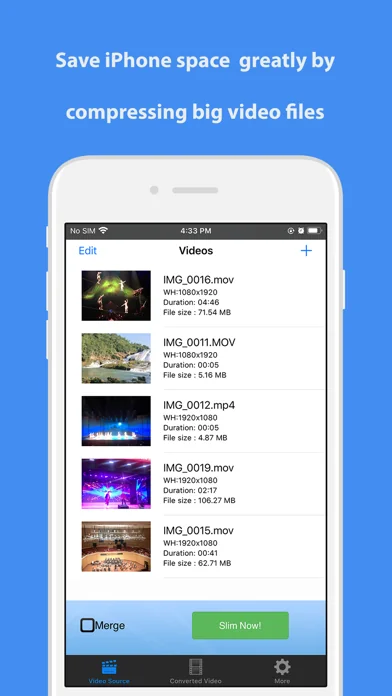
Video Slimmer App lets you shrink video files filmed on your iOS device to smaller file size while keeping good video quality. With just several taps, you will greatly save the precious space on iPhone iPad or iPod. This video compressor tool makes it possible to easily share, publish and email your iOS videos. It can also merge small video clips or split long videos.
The video files you shot with iPhone, iPad or iPad Pro are very huge. A 5 minutes video can take up to 0.5G space, with Video Sl…
Video Slimmer App lets you shrink video files filmed on your iOS device to smaller file size while keeping good video quality. With just several taps, you will greatly save the precious space on iPhone iPad or iPod. This video compressor tool makes it possible to easily share, publish and email your iOS videos. It can also merge small video clips or split long videos.
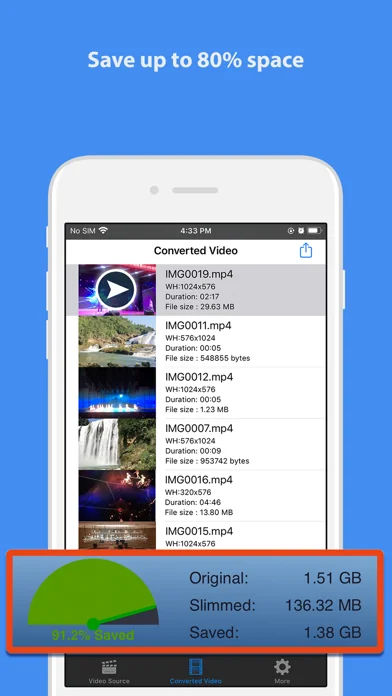
The video files you shot with iPhone, iPad or iPad Pro are very huge. A 5 minutes video can take up to 0.5G space, with Video Slimmer App, you can save up to 80% space in a snap.
*) Easily Save up to 80% Space Directly compress or trim videos on your iPhone/iPad/iPod. Generates small videos and movies with fair quality.
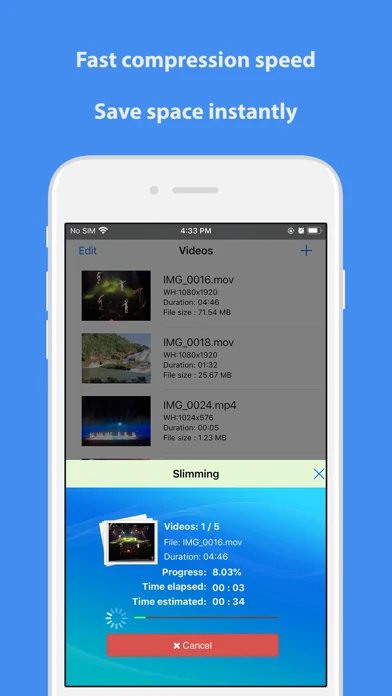
*) Batch and Fast Processing
Support multiple thread video processing. You can batch add video sources and slim them down at the same time. Output high quality videos at blazing fast processing speed.
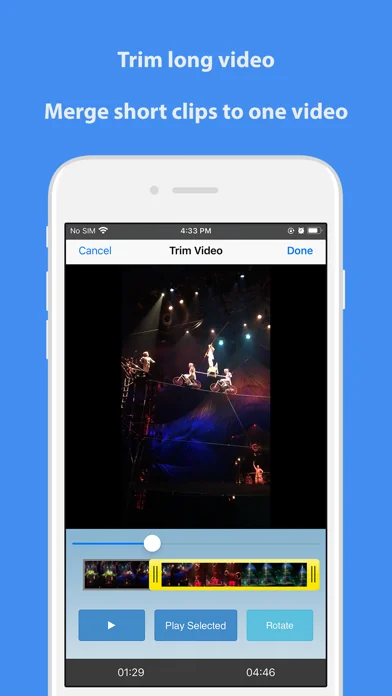
*) Trim or Merge Videos
You can trim long video or merge short video clips. To join short video clips or remove unwanted part of videos with this Video Slimmer App becomes so easy.
*) Rotate Videos
When you play some videos shot with iPhone/iPad on Windows PC, they are in wrong orientation because the Windows Media player software does not process the orientation information in the video file correctly.
With this app, the videos can be adjusted to the correct orientation automatically so they could be played on Windows without any problems.
*) Customize Videos You can make custom videos using this video tool. For example, you can adjust video dimensions (width/height), video file size, video quality. Various optimized presets, simple tap to apply.
*) Share your Videos on iOS and more
Easier to share converted videos. You can save compressed videos to Camera Roll on iPhone/iPad/iPod, wirelessly transfer to computers using your wi-fi network or open and edit with third party video apps and editors, like the notable iMovie.
🆕 What's new · v3.0
Support latest iOS
Fixed some issues while loading video file
Comparable iOS apps
The five apps in Photo & Video with the closest revenue to Video Slimmer App. Click any to see its detail page.
Each forecast combines App Store rating, ratings count, monetisation model, pricing tier, IAP signals and ad-supported flag.
The base estimate is then multiplied by a per-category scaling factor learned from apps with founder-verified MRR.
Every number on this page comes from public APIs and bumetric's own snapshot history.
Full methodology covers input variables, accuracy bands per category and how we treat apps without comparable anchors.
See also the live data on Video Slimmer App's tracker page for current rating, reviews and snapshot timeline.
Building something similar? Get a free AI audit with $-revenue forecasts for every recommendation.


 Lighting Designer
 Aquarella
 Analog Seoul
 PICSPLAY Classic
 Leonardo - Photo Layer Editor