What Visual Aid - Alignment Overlay actually does (from store listing)
<h1>Visual Aid - Alignment Overlay – Simple On-Screen Reference Tool</h1>
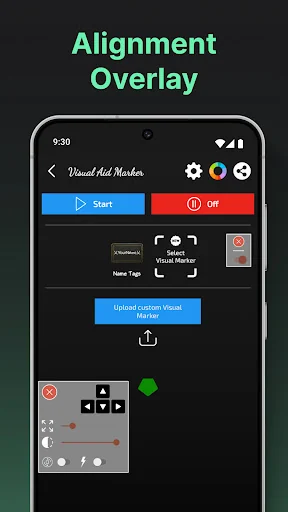
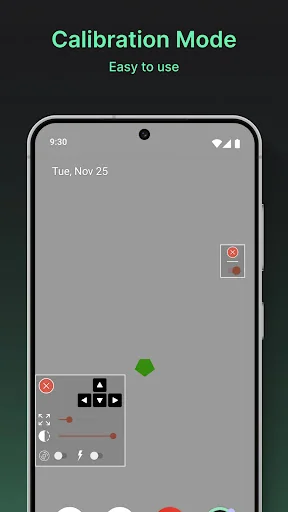
<h2>A lightweight way to add a visual guide on your screen</h2>Visual Aid - Alignment Overlay provides a small on-screen reference overlay that you can place anywhere on your display. It’s meant to help with general screen alignment and visual consistency while you use your device.
The overlay is optional, easy to turn on/off, and does not require root. It works as a simple visual aid that you control at all times.
…
Visual Aid - Alignment Overlay – Simple On-Screen Reference Tool
A lightweight way to add a visual guide on your screen
Visual Aid - Alignment Overlay provides a small on-screen reference overlay that you can place anywhere on your display. It’s meant to help with general screen alignment and visual consistency while you use your device.
The overlay is optional, easy to turn on/off, and does not require root. It works as a simple visual aid that you control at all times.
⭐ Why Choose Visual Aid - Alignment Overlay?
✅ Safe Visual Overlay ✅ Simple Reference Guide – Use a consistent visual marker to help with screen alignment for everyday tasks.
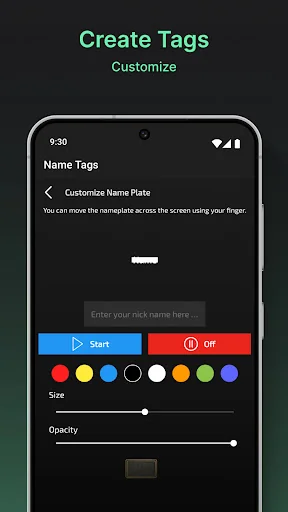
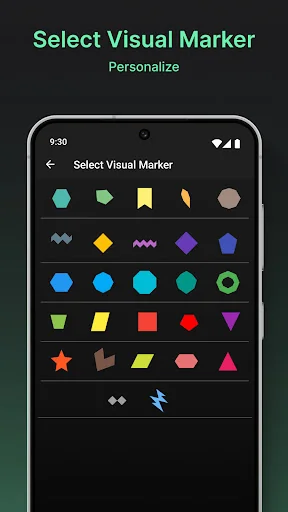
✅ Custom Overlay Design – Personalize the overlay’s size, shape, and color to fit your preference.
✅ Easy Control – Turn the overlay on or off anytime, and adjust placement as needed.
✅ Adjustable Appearance – Change thickness, opacity, and style for comfortable visibility.
✅ No Root Required – Works on most phones and tablets without changing system settings.
✅ Fast Setup – Straightforward interface lets you start in seconds.
🔧 Personalization at Your Fingertips
Choose a minimal look or a more visible guide — you decide. Visual Aid - Alignment Overlay lets you adjust the overlay to your needs: thickness, opacity, position, and alignment style. It’s designed to stay unobtrusive while still being useful.
Designed for Simple, Everyday Use
This app is built to be lightweight and easy to use. There are no special tricks or “performance” promises — just a basic on-screen guide that can help you keep things visually aligned when you want it.
🔍 Placement You Control
Set the overlay where it feels most helpful for you. Move it, resize it, or hide it anytime. The goal is to give you a steady visual reference without interrupting how you normally use your device.
💡 Clear, Optional Visual Support
Visual Aid - Alignment Overlay is meant as a general visual helper. If you don’t need it, you can disable it instantly. If you do, it’s there as a simple guide to support your preferred screen layout.
📲 Get Set Up in Seconds
No complicated setup. Download, open the app, choose your overlay style, and place it where you want. It’s compatible with different screen sizes and can be adjusted anytime.
🔓 Try Visual Aid - Alignment Overlay Today
If you want an optional on-screen reference for display alignment and everyday screen use, Visual Aid - Alignment Overlay offers a simple way to do that — with clear controls and customizable visuals.
Try Visual Aid - Alignment Overlay now and use your screen your way.
Comparable Android apps
The five apps in Tools with the closest revenue to Visual Aid - Alignment Overlay. Click any to see its detail page.
Each forecast combines App Store rating, ratings count, monetisation model, pricing tier, IAP signals and ad-supported flag.
The base estimate is then multiplied by a per-category scaling factor learned from apps with founder-verified MRR.
Every number on this page comes from public APIs and bumetric's own snapshot history.
Full methodology covers input variables, accuracy bands per category and how we treat apps without comparable anchors.
See also the live data on Visual Aid - Alignment Overlay's tracker page for current rating, reviews and snapshot timeline.
Building something similar? Get a free AI audit with $-revenue forecasts for every recommendation.


 Shop Of The Day
 Full Battery Charge Alarm
 Binary Code Translator
 Noon vpn fast & secure Proxy
 SetupVPN