What Volume control button actually does (from store listing)
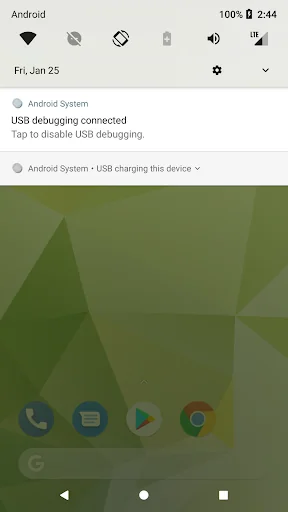
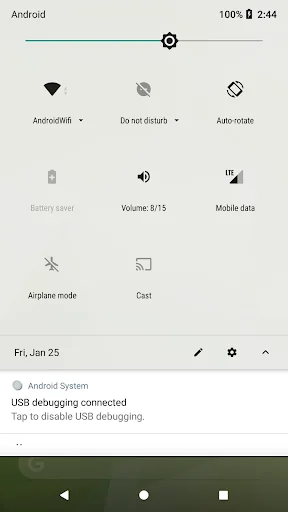
Three volume control buttons that can be accessed from the Quick settings pull down. One to bring up the volume control panel and the other two to control volume up/down directly. You don't need to press the physical device buttons to adjust the volume.
1. The function is simple, that is, adjust the volume and do not make any additional settings.
2. No ad. and to keep your privacy safe, we do not collect any data.
3. The buttons on Quick settings pull down can be accessed from any applica…
Three volume control buttons that can be accessed from the Quick settings pull down. One to bring up the volume control panel and the other two to control volume up/down directly. You don't need to press the physical device buttons to adjust the volume.
1. The function is simple, that is, adjust the volume and do not make any additional settings.
2. No ad. and to keep your privacy safe, we do not collect any data.
3. The buttons on Quick settings pull down can be accessed from any application.
4. You can use the device's original volume control panel which is the one you are familiar.
5. Applicable for most of the situations when you are adjusting the device sound volume.
6. Label under the buttons provides the current sound volume information.
7. It’s completely free forever.
In order to keep the application simple, there is no setup function provided. You will have to setup the button manually. Follow the instructions in the video to setup the volume control button on the Quick settings.
Please help to rate it and share it with your friends. Also, we have more products to share with you. Please visit the listing page: https://play.google.com/store/apps/developer?id=Pai-Hsiang,+Huang
If you feel any of our product helpful, in addition to sharing, commenting, please actually support us by buying the Well done product which gives us your greatest help.
Each forecast combines App Store rating, ratings count, monetisation model, pricing tier, IAP signals and ad-supported flag.
The base estimate is then multiplied by a per-category scaling factor learned from apps with founder-verified MRR.
Every number on this page comes from public APIs and bumetric's own snapshot history.
Full methodology covers input variables, accuracy bands per category and how we treat apps without comparable anchors.
See also the live data on Volume control button's tracker page for current rating, reviews and snapshot timeline.
Building something similar? Get a free AI audit with $-revenue forecasts for every recommendation.


 Chinese Calendar - 万年历
 VAT Calculator
 Flashlight Led with Clock
 Daylight World Map
 宝くじ機
宝くじ機