What Volume Notification actually does (from store listing)
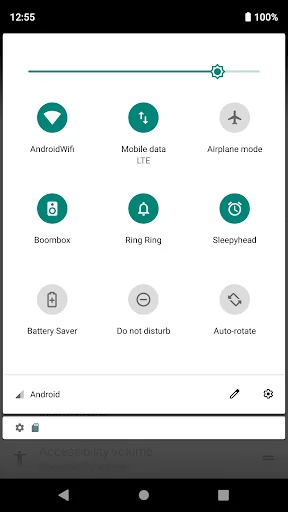
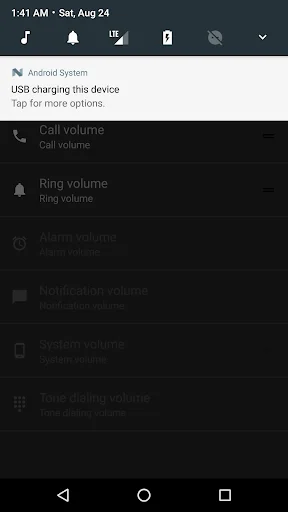
This app adds your phone's volume buttons to a customizable notification.
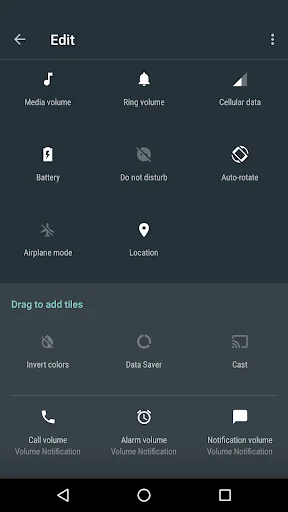
It also adds new buttons to your Android quick settings menu (✏️) to control the different system volumes:
1. Pull the drawer from the top bar on your phone.
2. Press the pencil in the corner.
3. Drag the new Volume Tile buttons up to enable them.
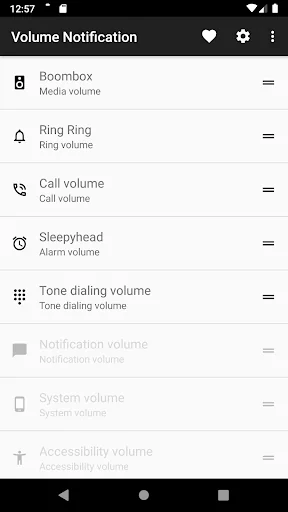
4. Configure the buttons in the app.
Access your device's sound sliders straight from the top bar!
This tight little app can be particularly useful when you want t…
This app adds your phone's volume buttons to a customizable notification.
It also adds new buttons to your Android quick settings menu (✏️) to control the different system volumes:
1. Pull the drawer from the top bar on your phone.
2. Press the pencil in the corner.
3. Drag the new Volume Tile buttons up to enable them.
4. Configure the buttons in the app.
Access your device's sound sliders straight from the top bar!
This tight little app can be particularly useful when you want to keep or share any media streaming during a voice call. Or simply when access to physical volume buttons is limited or you just fancy a full touch device.
But it can also be a life saver, when you need to quickly toggle any background audio. Never wished you had it? Well, now you do!
This application is open source and does not require any special permissions.
Please feel free to file any issues or feature requests. Your feedback is always appreciated!
* If your phone controls both the notifications and ringer volume with the same slider this app will not be able to control them separately.
* For Android 4.x download the v0.9.5 release directly from GitHub.
https://github.com/seht/volumenotification/releases/tag/v0.9.5
Comparable Android apps
The five apps in Tools with the closest revenue to Volume Notification. Click any to see its detail page.
Each forecast combines App Store rating, ratings count, monetisation model, pricing tier, IAP signals and ad-supported flag.
The base estimate is then multiplied by a per-category scaling factor learned from apps with founder-verified MRR.
Every number on this page comes from public APIs and Bumetric's own snapshot history.
Full methodology covers input variables, accuracy bands per category and how we treat apps without comparable anchors.
See also the live data on Volume Notification's tracker page for current rating, reviews and snapshot timeline.
Building something similar? Get a free AI audit with $-revenue forecasts for every recommendation.


 Web Tools
 DontKillMyApp: Make apps work
 XLSX Viewer: XLS Reader
 Turbo Alarm: Alarm clock
 Textcopy- Copy,Paste,Translate