What Volume Styles - Custom control actually does (from store listing)
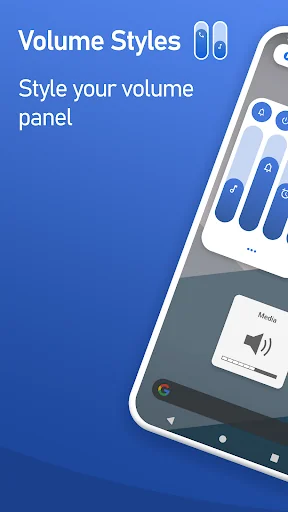
<b>Volume Styles</b> replaces your stock volume panel with a stunning custom design — pick from thousands of themes, apply iOS or HyperOS styles, and take complete control of every slider and shortcut.
The most powerful volume panel customization app on Android.
⭐ Trusted by 25+ million Android users worldwide ⭐
<font color="#2886eb"><b>🎨 VOLUME PANEL THEMES</b></font>
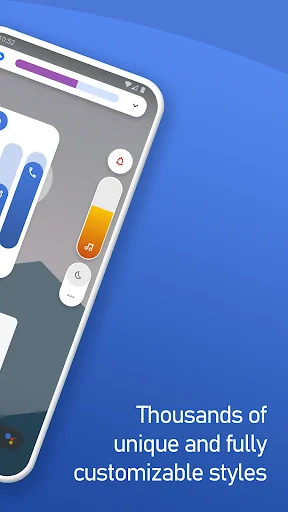
Transform your Android volume panel in one tap. Iconic styles from the world's most popular UIs — or discover thousand…
Volume Styles replaces your stock volume panel with a stunning custom design — pick from thousands of themes, apply iOS or HyperOS styles, and take complete control of every slider and shortcut.
The most powerful volume panel customization app on Android.
⭐ Trusted by 25+ million Android users worldwide ⭐
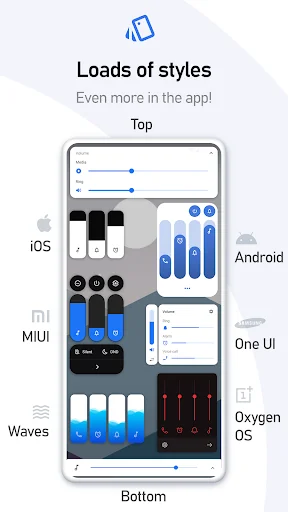
🎨 VOLUME PANEL THEMES Transform your Android volume panel in one tap. Iconic styles from the world's most popular UIs — or discover thousands of community-made designs:
• iOS
• Xiaomi HyperOS / MIUI
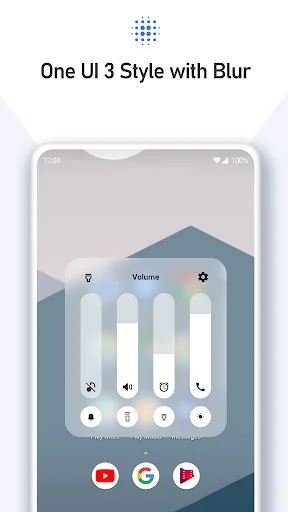
• Samsung One UI
• OnePlus OxygenOS
• Huawei EMUI, Color OS, Realme UI, Vivo Funtouch OS
• Horizontal sliders
• Windows 10, Windows Phone
• Ocean Wave, Fire, RGB, Volume Knob
• ... and thousands more inside the app
✨ STYLE CREATOR & COMMUNITY FEED Want something truly unique? Build your own volume panel theme from scratch with the Style Creator. Dial in colors, corner radius, transparency — every last detail.
Share your design in the Style Feed, a live community gallery of user-made volume panel themes. Browse, favorite, and apply any style with a single tap.
🔊 VOLUME SLIDERS & AUDIO CONTROL Choose exactly which audio sliders appear in your panel — add or remove any stream:
• Media volume
• Ring volume
• Notification volume
• Alarm volume
• Voice call volume
• System volume
• Bluetooth volume
• Cast volume
• Brightness slider
🖌️ DEEP CUSTOMIZATION Fine-tune your custom volume panel down to the last pixel:
• Custom colors & gradients
• Auto dark mode
• Adjustable corner radius
• Panel position — left, center, or right
• Panel show duration
• And much more
⚡ VOLUME PANEL SHORTCUTS Add powerful quick-action shortcuts directly inside your volume panel — no need to open settings:
• Live Caption
• Flashlight / Torch
• Toggle rotation
• Screenshot
• Split screen
• Do Not Disturb toggle
• Sound mode toggle (silent / vibrate / ring)
• Auto brightness toggle
• Open Settings
• Turn off screen
• Toggle media, notification, alarm, call & system volume
Volume Styles uses Accessibility Services to override volume buttons and display your custom volume panel.
Comparable Android apps
The five apps in Personalization with the closest revenue to Volume Styles - Custom control. Click any to see its detail page.
Each forecast combines App Store rating, ratings count, monetisation model, pricing tier, IAP signals and ad-supported flag.
The base estimate is then multiplied by a per-category scaling factor learned from apps with founder-verified MRR.
Every number on this page comes from public APIs and Bumetric's own snapshot history.
Full methodology covers input variables, accuracy bands per category and how we treat apps without comparable anchors.
See also the live data on Volume Styles - Custom control's tracker page for current rating, reviews and snapshot timeline.
Building something similar? Get a free AI audit with $-revenue forecasts for every recommendation.


 Andro 12 KWGT
 Illustration Theme for KLWP
 Red Silver Theme for Xperia
 Camo Dark Icon Pack
 Frost KWGT