What VoWiFi (WiFi Calling) actually does (from store listing)
No signal, no problem. You’re covered with VoWiFi(Wi-Fi Calling) from participating carriers. With this feature, you can make calls and send messages over a Wi-Fi connection when cell service isn't available. Now you’ll never be denied by a weak signal again.
What is VoWiFi(Wi-Fi Calling)?
It is regular calling on your cellphone, except your carrier routes the call over an available WiFi network instead of its cellular network. When you call, your phone automatically selects the best network…
No signal, no problem. You’re covered with VoWiFi(Wi-Fi Calling) from participating carriers. With this feature, you can make calls and send messages over a Wi-Fi connection when cell service isn't available. Now you’ll never be denied by a weak signal again.
What is VoWiFi(Wi-Fi Calling)?
It is regular calling on your cellphone, except your carrier routes the call over an available WiFi network instead of its cellular network. When you call, your phone automatically selects the best network — cellular or WiFi — you don't need to do anything.
How much does VoWiFi(Wi-Fi Calling) cost?
It doesn't cost anything extra. Carriers treat your WiFi calls as though you were making a regular cellular call from the U.S. So whatever rates and fees apply to your regular cellular calls will also apply to your WiFi calls, including deducting call minute from your monthly allotment if you don't have an unlimited plan.
How to make a WiFi call?
VoWiFi(Wi-Fi Calling) isn’t automatically enabled on smartphones. You can use the App to turn it on.
How to use the App?
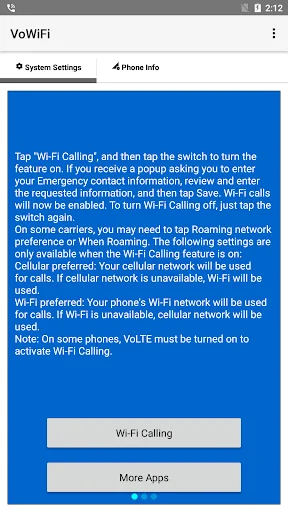
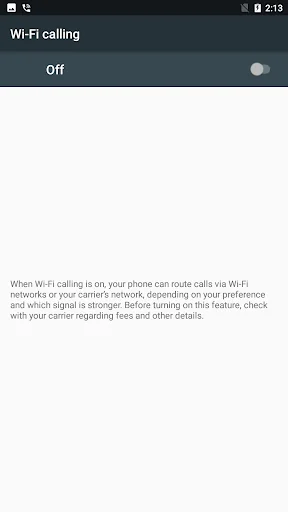
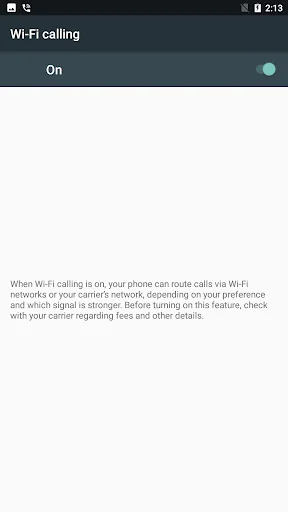
1. Tap "Wi-Fi Calling", and then tap the switch to turn the feature on. If you receive a popup asking you to enter your Emergency contact information, review and enter the requested information, and then tap Save. Wi-Fi calls will now be enabled. To turn Wi-Fi Calling off, just tap the switch again.
On some carriers, you may need to tap Roaming network preference or When Roaming. The following settings are only available when the Wi-Fi Calling feature is on:
Cellular preferred: Your cellular network will be used for calls. If cellular network is unavailable, Wi-Fi will be used.
Wi-Fi preferred: Your phone's Wi-Fi network will be used for calls. If Wi-Fi is unavailable, cellular network will be used.
Note: On some phones, VoLTE must be turned on to activate Wi-Fi Calling.
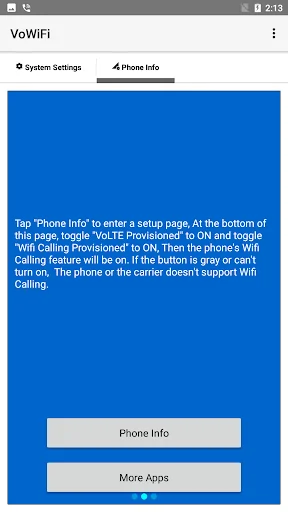
2. Tap "Phone Info" to enter a setup page, At the bottom of this page, toggle "VoLTE Provisioned" to ON and toggle "Wifi Calling Provisioned" to ON, Then the phone's Wifi Calling feature will be on. If the button is gray or can't turn on, The phone or the carrier doesn't support Wifi Calling.
Comparable Android apps
The five apps in Tools with the closest revenue to VoWiFi (WiFi Calling). Click any to see its detail page.
Each forecast combines App Store rating, ratings count, monetisation model, pricing tier, IAP signals and ad-supported flag.
The base estimate is then multiplied by a per-category scaling factor learned from apps with founder-verified MRR.
Every number on this page comes from public APIs and bumetric's own snapshot history.
Full methodology covers input variables, accuracy bands per category and how we treat apps without comparable anchors.
See also the live data on VoWiFi (WiFi Calling)'s tracker page for current rating, reviews and snapshot timeline.
Building something similar? Get a free AI audit with $-revenue forecasts for every recommendation.


 Physics Calculator & Solver
 Humantechnik:Alert
 RedStick311
 Assur&Detect
 STILL PreOp