What WebDAV Server Pro actually does (from store listing)
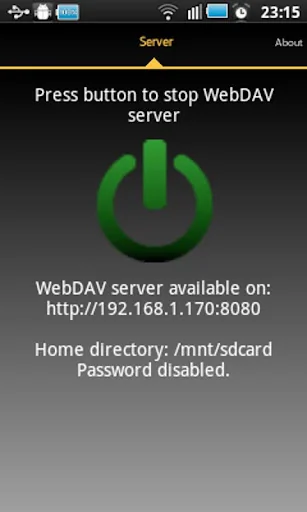
With this application you can mount any directory on your phone, including memory card, as a drive on Windows or Linux. You can also use a WebDAV client to browse a phone directory.
This application has been tested using Windows8 Explorer (should also work with Windows7 but it will not work on WindowsXP) and WebDAV client bitkinex. You can download it from http://www.bitkinex.com/
Special thanks to: Beatriz Vera, Peter Ulrich, Gabor Fodor, Manuela Merino García and Anna Rainieri.
Implem…
With this application you can mount any directory on your phone, including memory card, as a drive on Windows or Linux. You can also use a WebDAV client to browse a phone directory.
This application has been tested using Windows8 Explorer (should also work with Windows7 but it will not work on WindowsXP) and WebDAV client bitkinex. You can download it from http://www.bitkinex.com/
Special thanks to: Beatriz Vera, Peter Ulrich, Gabor Fodor, Manuela Merino García and Anna Rainieri.
You can find a lock setting to specify how the device should be kept awake while server is running. There are three modes available:
New locks used
*SCREEN_DIM_WAKE_LOCK : Existing mode. Screen is on so energy consumption is higher. Use this mode if connections is dropped.
*WIFI_MODE_FULL : New mode. Screen is off so device will use less energy while server is running but data connection can be dropped. It is not recommended to use this mode.
*WIFI_MODE_FULL_HIGH_PERF: New mode only available on Android >= 3.1. Screen is off so energy consumption should be less than in the first mode. This mode is recommended to save energy but you might find problems so you might to select default lock mode.
How to connect with WebDAV server using USB cable:
This can useful when you have USB cable and no network available.
1) On your phone go to Settings->Applications->Development and set option "USB debugging".
2) Connect your phone to your PC using USB cable.
3) Start adb server. On your PC run command "adb start-server".
adb is a program that you can find on android sdk. Usually you will find it on android-sdk\platform-tools\adb.
4) Forward needed ports from your PC to your phone. On your PC run command "adb forward tcp:8080 tcp:8080"
With this, any connection in your pc to 127.0.0.1:8080 will be forwarded to your phone in port 8080.
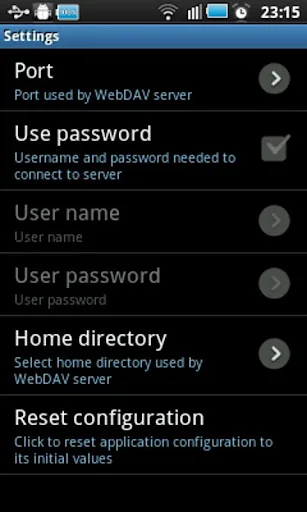
5) Run WebDAV server in your phone, open settings and in "Network interfaces" select "Loopback (127.0.0.1)"
6) Start WebDAV server.
7) In your PC connect your WebDAV client to http://127.0.0.1:8080 (port might be different, it depends on your WebDAV Server configuration).
Permissions needed:
INTERNET
ACCESS_NETWORK_STATE
ACCESS_WIFI_STATE
Network permission to enable server to open network communication with WebDAV clients.
WRITE_EXTERNAL_STORAGE
Enables WebDAV server write received files from WebDAV clients on sdcard.
WAKE_LOCK
Keeps phone wake only while server is running. If phone is not wake WebDAV server can not be accessed.
Problems with big files:
If you have problems handling big files it might be due to a limitation in Windows webdav client. You can try the following to increase the size of files that Windows webdav client is able to manage:
1) You have to turn on BasicAuth via regedit to allow accessing the App's server by username and password.
Each forecast combines App Store rating, ratings count, monetisation model, pricing tier, IAP signals and ad-supported flag.
The base estimate is then multiplied by a per-category scaling factor learned from apps with founder-verified MRR.
Every number on this page comes from public APIs and bumetric's own snapshot history.
Full methodology covers input variables, accuracy bands per category and how we treat apps without comparable anchors.
See also the live data on WebDAV Server Pro's tracker page for current rating, reviews and snapshot timeline.
Building something similar? Get a free AI audit with $-revenue forecasts for every recommendation.

 Lemon VPN - Smooth Browsing
 Translate All Languages
 Files to SD Card or USB Drive
 Opensignal - 5G, 4G Speed Test
 Light Flow (License Only)