What WeLove stickers (WASticker) actually does (from store listing)
💚 WeLove presents native stickers for chatting in WhatsApp (WASticker).
We selected the best of our love stickers. They are all absolutely free and in high resolution (HD).
Enjoy right now this romantic sticker app !
Our stickers celebrate all the types of love; passionate love, casual love, romantic love, funny love, maternal love, family love ....
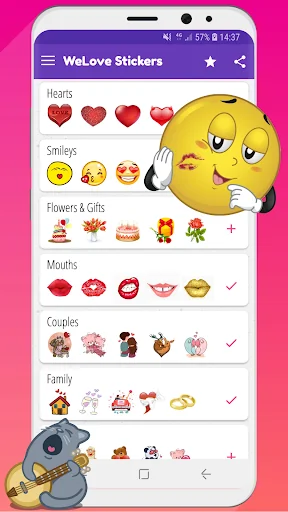
So, 💚 WeLove contains 300 love stickers in 10 categories:
1-❤ Hearts
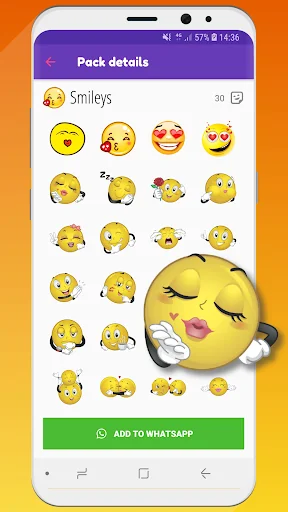
2-😘 Smileys emoji
3-💋 Mouth
4-👫 Cute couples
5-🌹 Flowers &…
💚 WeLove presents native stickers for chatting in WhatsApp (WASticker).
We selected the best of our love stickers. They are all absolutely free and in high resolution (HD).
Enjoy right now this romantic sticker app !
Our stickers celebrate all the types of love; passionate love, casual love, romantic love, funny love, maternal love, family love ....
So, 💚 WeLove contains 300 love stickers in 10 categories:
1-❤ Hearts
2-😘 Smileys emoji
3-💋 Mouth
4-👫 Cute couples
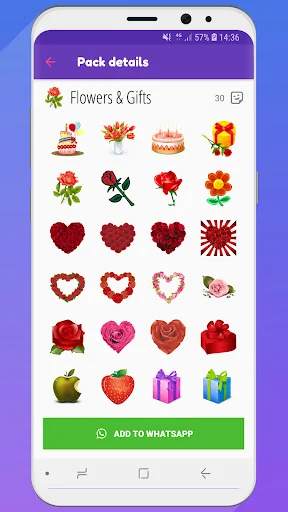
5-🌹 Flowers & Gifts for all Happy Birthdays, Valentine's Day, Mother's Day,…
6-🐻 Cute animals
7-🏠 Family & wedding
8-💏 Kissing couples
9-💬 Love talks 1
10-💬 Love talks 2
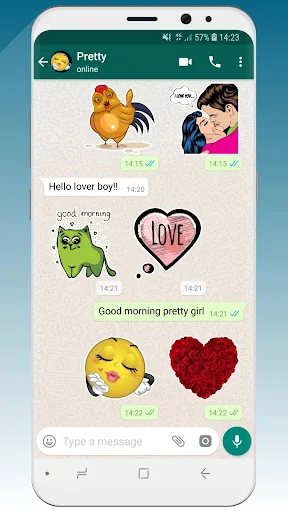
All our love stickers have a great sticker style, fitting nicely on all custom WhatsApp backgrounds.
We’ll update regularly and add new categories soon
How it works?
Add stickers to WhatsApp (WASticker) ★ Open the category you want to add. Tap on “Add to WhatsApp”.
★ Open WhatsApp, tap the smiley icon 😀
★ Tap the stickers icon 🗒 at the bottom.
★ You new sticker category will appear in the list with a small green dot indicating that it is new.
---> Now, you can enjoy and send your new stickers to your WhatsApp friends 👏
Add to / remove from favorites in WhatsApp (WASticker) ★ You can add a sticker to your favorites by long pressing on a sticker
★ You can remove a sticker from your favorites by opening the favorites category and long pressing on the sticker
Share stickers with your WhatsApp friends - Your friends do not need the app to see your stickers, but we will be happy if you share our app with our friends! 😉
- Your friends can open the app by long pressing on a sticker on their WhatsApp
- You can share the app link in the app via the “Share” menu
Remove stickers from WhatsApp (WASticker) - Open WhatsApp, tap the smiley 😀icon close to the keyboard, then tap the ✚ icon at the end of the sticker categories tab.
- Tap “My Stickers” tab and remove categories you don’t want anymore. Don’t worry you can add it again later.
My stickers disappeared from WhatsApp (WASticker) It can be caused by your phone manufacturer that tries to optimize your battery.
To avoid that you can try this solution, go in your device Settings / Battery / 💚 WeLove Stickers and select "Don't optimise" (or equivalent as it depends on the device/manufacturer)
💌 Contact us 📧 contact@shareitagain.co
🌍 http://www.shareitagain.co
🏃🏃 Follow us
https://www.facebook.com/EmojiShareItAgain
https://www.instagram.com/whatsmiley/
♡☮ App made with love & fun ☮♡
Comparable Android apps
The five apps in Social with the closest revenue to WeLove stickers (WASticker). Click any to see its detail page.
Each forecast combines App Store rating, ratings count, monetisation model, pricing tier, IAP signals and ad-supported flag.
The base estimate is then multiplied by a per-category scaling factor learned from apps with founder-verified MRR.
Every number on this page comes from public APIs and bumetric's own snapshot history.
Full methodology covers input variables, accuracy bands per category and how we treat apps without comparable anchors.
See also the live data on WeLove stickers (WASticker)'s tracker page for current rating, reviews and snapshot timeline.
Building something similar? Get a free AI audit with $-revenue forecasts for every recommendation.


 LivChat - live video chat
 ChatChaTalk - Chat Find Friend
 チャットアプリORCA - オルカ
 realme Community
 Siberalem: Arkadaşlık & Sohbet