What Who's Next?! actually does (from store listing)
Handy tool for teachers and professors. Useful whenever a student has to be selected randomly or sub-groups of students need to be assembled.
<b>Features:</b>
‣ Random generator
‣ Sound effects (optional)
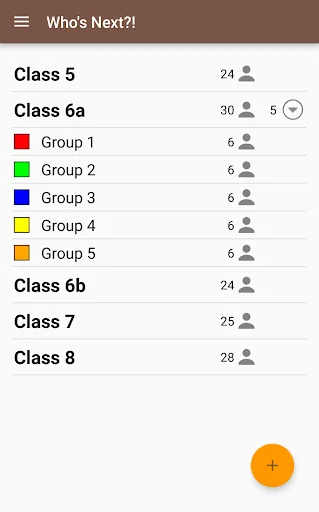
‣ Course and sub-course management
‣ Sub-course generator
<b>Random student selection with various display options:</b>
• Standard: Displayed student names will change in rapid sequence. When you tap the screen the sequence will stop and show the selected student.
• Spinner wheel: S…
Handy tool for teachers and professors. Useful whenever a student has to be selected randomly or sub-groups of students need to be assembled.
Features: ‣ Random generator
‣ Sound effects (optional)
‣ Course and sub-course management
‣ Sub-course generator
Random student selection with various display options: • Standard: Displayed student names will change in rapid sequence. When you tap the screen the sequence will stop and show the selected student.
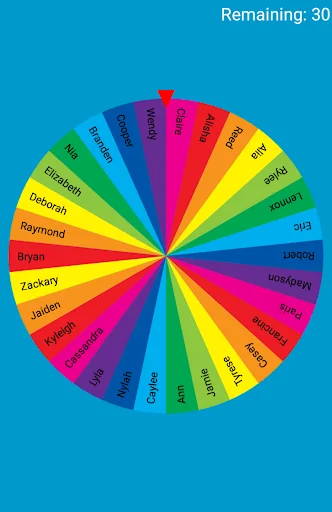
• Spinner wheel: Spin the wheel by swiping the screen. The wheel has all selectable students on it. When it stops the selected student will be displayed.
Selection modes in random mode: • Repeating: The selected students will stay available in the following random round.
• One-time only: Selected students will be removed from the available students and cannot be selected again in the following rounds.
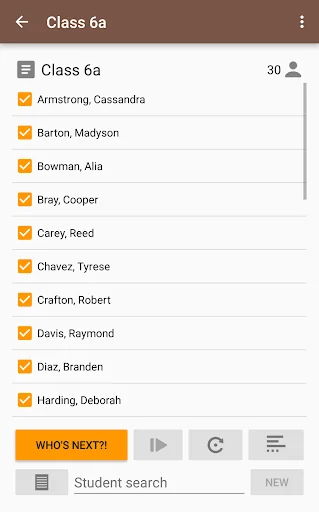
Absent students can be deselected before starting random mode.
Personalization: • Choose sound effects from your device to be played when starting or stopping the random generator.
• Select a color or image to be displayed in the background when using the random generator.
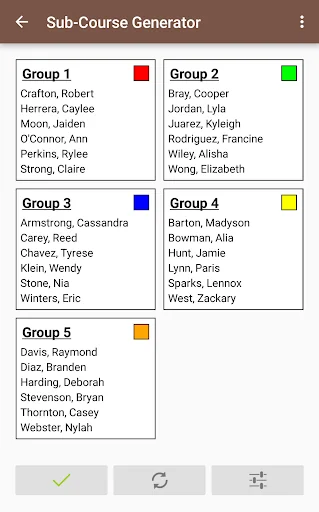
Forming groups: • Build a group (sub-course) from selected students or randomly generate sub-courses by specifying the number of groups or number of students per group.
• Optional assignment of colors to sub-groups for easier group organization or allocation of work materials to groups.
Student database: • Either manually enter your students or import them via CSV file from Tapucate.
• Assignment to multiple courses and sub-courses is possible.
• No confusion if students have got the same name by displaying the surname if necessary.
Who's Next is suitable for visualization on a tablet or smartphone, as well as broadcasting to a digital board or using a projector.
This app has been tested and developed in close collaboration with teachers of primary schools, secondary schools and colleges.
Each forecast combines App Store rating, ratings count, monetisation model, pricing tier, IAP signals and ad-supported flag.
The base estimate is then multiplied by a per-category scaling factor learned from apps with founder-verified MRR.
Every number on this page comes from public APIs and bumetric's own snapshot history.
Full methodology covers input variables, accuracy bands per category and how we treat apps without comparable anchors.
See also the live data on Who's Next?!'s tracker page for current rating, reviews and snapshot timeline.
Building something similar? Get a free AI audit with $-revenue forecasts for every recommendation.


 Soal Ujian Kelas 2 SD
 Indian Constitution in Hindi
 Australian Citizenship Test
 째깍악어 - 선생님용
 Learn Malayalam through Tamil