What Wi-Fi Info Widget actually does (from store listing)
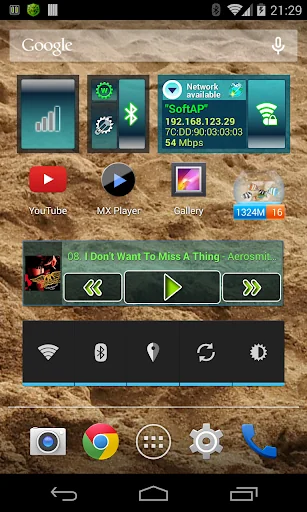
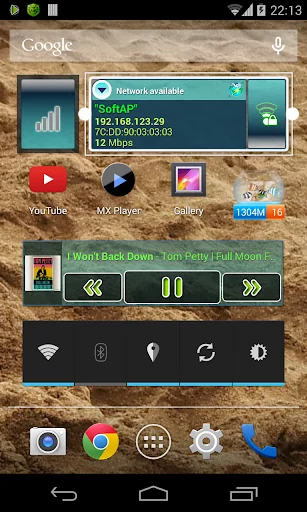
The widget is designed to enable/disable Wi-Fi adapter and display the state of the current connection.
Data updated as changes in the state of the Wi-Fi adapter.
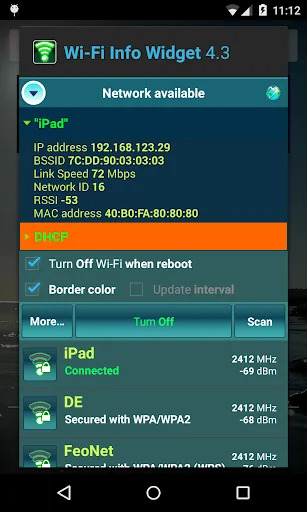
When you click on the indicator "Network availability" (launching widget configuration activity) displays the current connection state and obtained parameters (scan results, DHCP-assigned addresses from the last successful DHCP request). The receiver of the widget can be pushed out of memory for some time, the last received data …
The widget is designed to enable/disable Wi-Fi adapter and display the state of the current connection.
Data updated as changes in the state of the Wi-Fi adapter.
When you click on the indicator "Network availability" (launching widget configuration activity) displays the current connection state and obtained parameters (scan results, DHCP-assigned addresses from the last successful DHCP request). The receiver of the widget can be pushed out of memory for some time, the last received data is displayed.
Implemented:
• displays the state of "network availability";
• indicator of the cellular data network connection;
• option turn off the Wi-Fi adapter when device reboot;
• option enter a password to connect to a secured Wi-Fi network;
• ability to quickly switch between the previously configured Wi-Fi networks;
• ability to remove a network from the list of saved networks;
• start scan for access points;
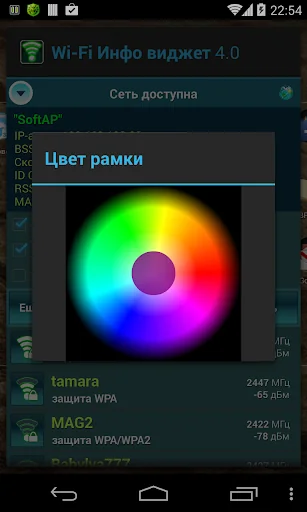
• ability to change the border color of the widget (for Android 2.2 and above);
• ability to change the horizontal and vertical size (for Android 3.1 and above);
• ability to change the widget text size (for Android 4.1 and above, button "More...");
• choise of the type of sorting the list of networks (button "More...").
Permission "Location" (network-based) is used to obtain the results of scanning available networks (for Android 6.0 and above). You must enable location on the device.
Cyclic Update Mode (sync with timer) is intended for the adapter's testing and operates prior to version Android 4.4.2. This mode is not recommended for prolonged use the widget.
Comparable Android apps
The five apps in Tools with the closest revenue to Wi-Fi Info Widget. Click any to see its detail page.
Each forecast combines App Store rating, ratings count, monetisation model, pricing tier, IAP signals and ad-supported flag.
The base estimate is then multiplied by a per-category scaling factor learned from apps with founder-verified MRR.
Every number on this page comes from public APIs and bumetric's own snapshot history.
Full methodology covers input variables, accuracy bands per category and how we treat apps without comparable anchors.
See also the live data on Wi-Fi Info Widget's tracker page for current rating, reviews and snapshot timeline.
Building something similar? Get a free AI audit with $-revenue forecasts for every recommendation.


 3D Skin Editor for MCPE
 My Security
 TN-ALERT
 Triangle and Right Angle Calc
 SMS Auto Forwarder & Messaging