What WiFi Overview 360 Pro actually does (from store listing)
WiFi Overview 360 - The universal WiFi tool, incl. Widgets
WiFi Overview 360 and the Pro version is not only a WiFI-Scanner, which shows all WiFis in range, the app is much more. This app is a "Swiss Army Knife" for WiFis.
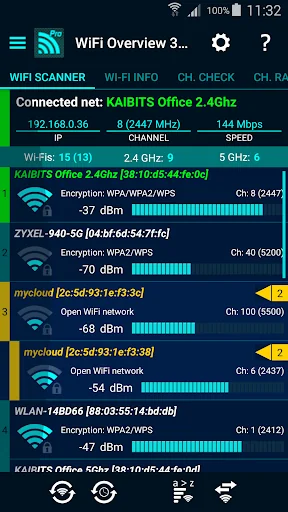
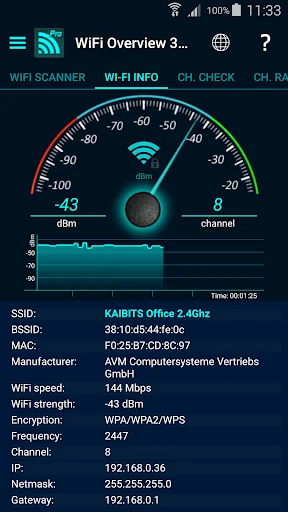
With this tool you can manage and optimize your used wireless network and with one look you'll get detailed information of the WiFis (WiFi name (SSID), signal strength, channelnumber, encryptionin - open or not and much more) in your environment.
The tab "Ch Check" (…
WiFi Overview 360 - The universal WiFi tool, incl. Widgets
WiFi Overview 360 and the Pro version is not only a WiFI-Scanner, which shows all WiFis in range, the app is much more. This app is a "Swiss Army Knife" for WiFis.
With this tool you can manage and optimize your used wireless network and with one look you'll get detailed information of the WiFis (WiFi name (SSID), signal strength, channelnumber, encryptionin - open or not and much more) in your environment.
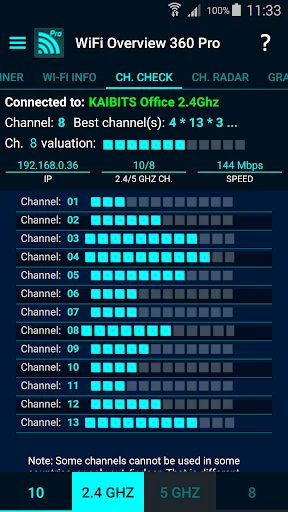
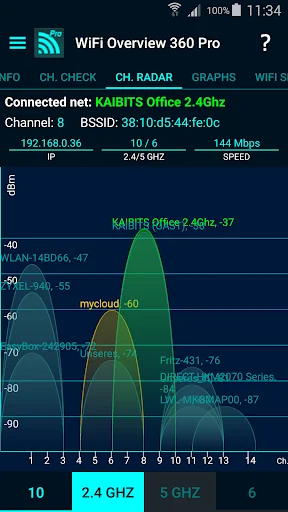
The tab "Ch Check" (Channel Checker) and "Ch. Radar" (Channel Radar) are powerful tools to optimize your own WiFi network. For best performance your network must use a channel or frequency range where are no other wireless networks or little as possible. WiFi Overview 360 gives you the best choice for the channel.
With a powerful "WiFi Detector/Sniffer" (only Pro Version), who expanded the Android function enormously. "WiFi Detector" looking for open WiFis, gives a notification (sound, pop-up text window, vibrate and text-to-speech - if you want) and can connect automatically.
Main features are:
- WiFi Detector - the powerful open network finder (only Pro version)
- "Quick connect shortcut", you can set a shortcut to switch/connect quick and easy between/to WiFis (only Pro version)
- change WiFi priority manually (only Pro version)
- included 1x1, 2x1 and 4x1 widgets with different styles
- WiFi scanner
- WiFi sorting options for "strength", "alphabetically", "channel" and "open/known Wi-Fis"
- automatic WiFi activation at startup - if off, and automatic turn-off at the end
- manual way to add a network
- detailed WiFi information
- graphical representation of all wireless networks in the operating range
- channel checker for the best channel choice
- Tablet support
- WiFi Internet connection check
- and much more ...
Comparable Android apps
The five apps in Tools with the closest revenue to WiFi Overview 360 Pro. Click any to see its detail page.
Each forecast combines App Store rating, ratings count, monetisation model, pricing tier, IAP signals and ad-supported flag.
The base estimate is then multiplied by a per-category scaling factor learned from apps with founder-verified MRR.
Every number on this page comes from public APIs and Bumetric's own snapshot history.
Full methodology covers input variables, accuracy bands per category and how we treat apps without comparable anchors.
See also the live data on WiFi Overview 360 Pro's tracker page for current rating, reviews and snapshot timeline.
Building something similar? Get a free AI audit with $-revenue forecasts for every recommendation.

 Google Family Link
 GravityBox Unlocker
 Central for DayZ - Pro Unlock
 Calcutronic PRO
 PDF editor & PDF converter pro