What wifi repeater setup guide actually does (from store listing)
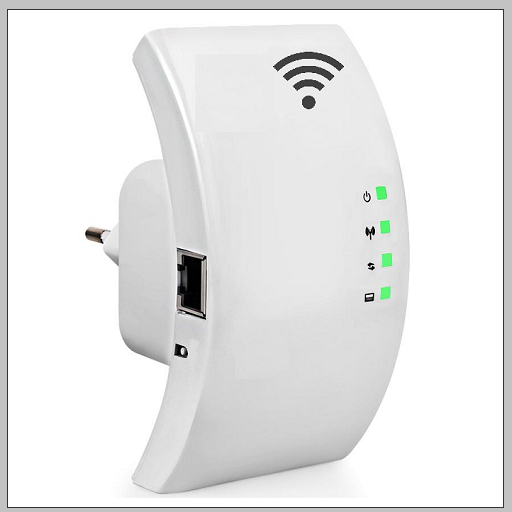
The wifi repeater allows the use of your wireless connection in larger areas by repeating the signal from your router. The location of the wifi repeater must be able to receive the signal from the router. The repeater, which receives the signal cleanly, transmits the signal to the wireless non-receiving areas of your home or office. Our mobile app explains "how to set up a wifi repeater" to help you. You can learn the repeater modes of the most used router brands in the world.
What's in the a…
The wifi repeater allows the use of your wireless connection in larger areas by repeating the signal from your router. The location of the wifi repeater must be able to receive the signal from the router. The repeater, which receives the signal cleanly, transmits the signal to the wireless non-receiving areas of your home or office. Our mobile app explains "how to set up a wifi repeater" to help you. You can learn the repeater modes of the most used router brands in the world.
What's in the application content
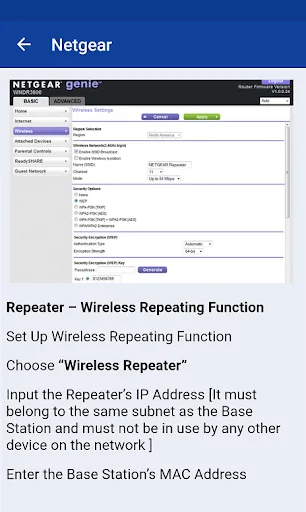
Netgear repeater (First make sure your device receives the signal from the router. Then you can position it anywhere in your home or office)
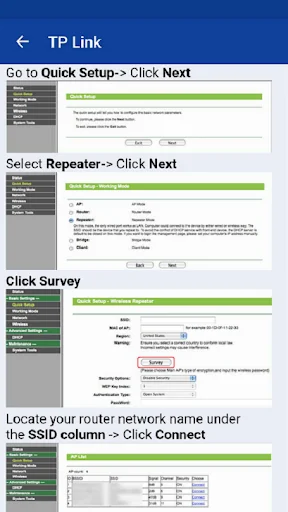
TP Link wifi repeater (The default ip address required to access the admin interface is 192.168.0.254 tp link, and the username and password are "admin".)
D Link repeater mode on (You can start using your router by activating the wifi repeater mode. Do not forget to create a strong password for wireless connection.)
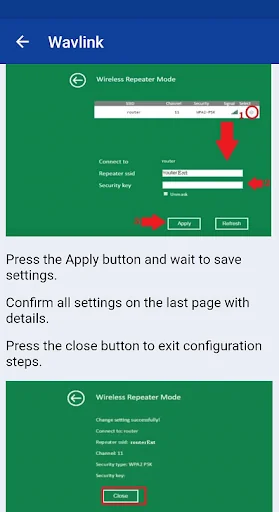
The wifi repeater brands in our mobile app content: wavlink, netgear, asus, digicom, tp link, mdealink, kogan, etisalat, iball, PLDT, Netcomm, Zyxel, Dlink, verizon, linksys, edimax, tenda, digisol, digitus
Comparable Android apps
The five apps in Tools with the closest revenue to wifi repeater setup guide. Click any to see its detail page.
Each forecast combines App Store rating, ratings count, monetisation model, pricing tier, IAP signals and ad-supported flag.
The base estimate is then multiplied by a per-category scaling factor learned from apps with founder-verified MRR.
Every number on this page comes from public APIs and Bumetric's own snapshot history.
Full methodology covers input variables, accuracy bands per category and how we treat apps without comparable anchors.
See also the live data on wifi repeater setup guide's tracker page for current rating, reviews and snapshot timeline.
Building something similar? Get a free AI audit with $-revenue forecasts for every recommendation.

 RECOIL
 Premier Tracker
 South Central Power
 Trimble Mobile Manager
 Sysctl GUI - Kernel parameters