How much does XML Viewer - Reader and Opener earn?
Android app
from Evansir
· Tools
ML forecast★ 3.1 · 1KFree
~319/mo
ML revenue forecast.
Calibrated against 77129 apps in this category.
Confidence band
±15%
High — many comparable apps with verified data
At a glance
Earns 1.68× more than the category median (189/mo).
Ranks #19,856 of 77,129 in Tools (top 25.7% by revenue).
Launched Apr 08, 2020 · last updated Jul 14, 2025.
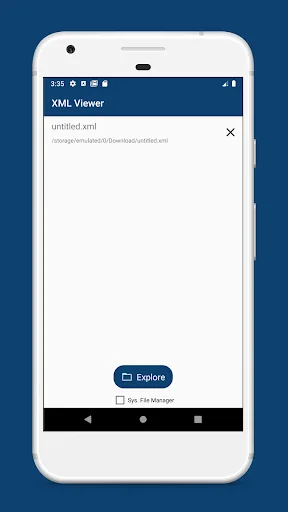
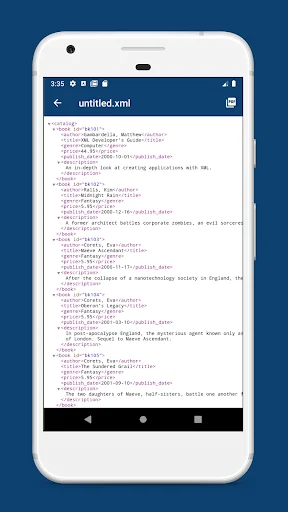
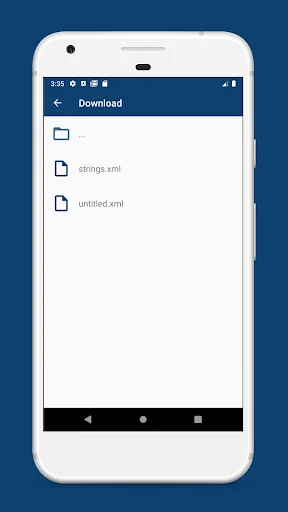
What the app looks like
Live screenshots from the Play Store, captured by our snapshot worker. Tap any image to enlarge.
XML Viewer - Reader and Opener's revenue trajectory
Forecast revenue from snapshot history. Last 1 months.
Where XML Viewer - Reader and Opener sits in Tools
Revenue distribution of 77129 comparable apps. XML Viewer - Reader and Opener highlighted.
XML Viewer - Reader and Opener vs comparable apps
Revenue trajectory side-by-side. Bold = XML Viewer - Reader and Opener, ghosted = peers.
App spec
Version
2.4.3
Last update
Jul 14, 2025
Launched
Apr 08, 2020
Price
Free
Monetization
Free
What XML Viewer - Reader and Opener actually does (from store listing)
Need an opener for .xml file? Use XML Viewer to read saved files. Intuitive tool what helps in your workflow.
XML Viewer and Editor features:
▪︎ Open .xml files like on PC
▪︎ Convert XML to pdf
▪︎ Edit XML files
▪︎ History of viewed files
▪︎ Comfortable XML view screen
▪︎ All text is selectable (copy, share)
Have you downloaded an important XML document from the Internet and don’t know how to open it? No problem! Go into the XML Viewer, navigate to the directory where you saved the …
Need an opener for .xml file? Use XML Viewer to read saved files. Intuitive tool what helps in your workflow.
XML Viewer and Editor features:
▪︎ Open .xml files like on PC
▪︎ Convert XML to pdf
▪︎ Edit XML files
▪︎ History of viewed files
▪︎ Comfortable XML view screen
▪︎ All text is selectable (copy, share)
Have you downloaded an important XML document from the Internet and don’t know how to open it? No problem! Go into the XML Viewer, navigate to the directory where you saved the file and tap on it. The app will open the selected file and automatically add it to the history.
The app can open any files with the extension .xml. You do not need additional tools or programs, because everything is already here. We can truly say: It's a real XML opener.
Need to convert XML to pdf or print? No problem, open the file in the application and click on the icon with the same name. It remains only to select the paper size and save the resulting file.
Have troubles with in-build in XML Viewer file explorer or can't open OTG USB? Use system default to navigate and open the desired file. Just enable checkbox on the bottom of the screen and tap the Explore button.
If you are tired of looking for your files among many others on the phone’s memory, the application will help with this, because it only shows files with the .xml extension.
The main screen contains the last opened files list, so you will never lose the path to your files. XML Viewer will save it for you. One-click and you will open it, without annoying folder by folder search.
XML Viewer easily opens any of the available eXtensible Markup Language files. Just point it where the file stored and app will reveal the content of it.
The application has dark tones that are pleasant to the eye, which will not distract you from reading the xml file.
Edit XML in a comfortable XML editor with syntax highlight and line count. Save it anytime and share with anyone you want.
Feel free to send your suggestions and wishes about the XML Viewer - Reader & Opener using the contact form with the developer
Comparable Android apps
The five apps in Tools with the closest revenue to XML Viewer - Reader and Opener. Click any to see its detail page.
Each forecast combines App Store rating, ratings count, monetisation model, pricing tier, IAP signals and ad-supported flag.
The base estimate is then multiplied by a per-category scaling factor learned from apps with founder-verified MRR.
Every number on this page comes from public APIs and Bumetric's own snapshot history.
Full methodology covers input variables, accuracy bands per category and how we treat apps without comparable anchors.
See also the live data on XML Viewer - Reader and Opener's tracker page for current rating, reviews and snapshot timeline.
Building something similar? Get a free AI audit with $-revenue forecasts for every recommendation.

 Analog Clock
 Converting Numbers into letter
 SatFinder Dish 2023
 Phonebook
 My QR code Reader