What Zapya - File Transfer, Share actually does (from store listing)
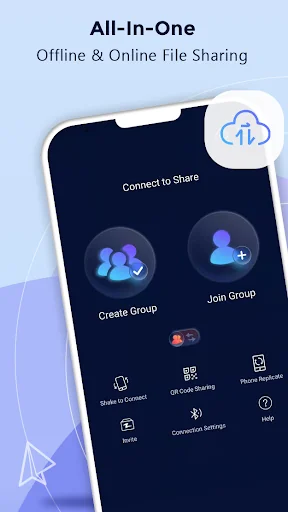
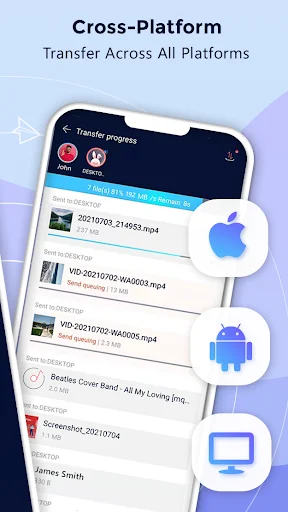
When you use <font color="FF3333"><b>Zapya</b></font>, you can rapidly <b>share files of ANY size and of ANY format to ALL platform</b> no matter if you are <b>offline or online</b>. You can transfer files from Android and iOS devices, and/or your computers (Windows PC and Mac) without using Wi-Fi or mobile data when you share offline with <font color="FF3333"><b>Zapya</b></font>. Transferring files now is super easy!
Also, when you share online using <font color="FF3333"><b>Zapya</b></font>,…
When you use Zapya, you can rapidly share files of ANY size and of ANY format to ALL platform no matter if you are offline or online. You can transfer files from Android and iOS devices, and/or your computers (Windows PC and Mac) without using Wi-Fi or mobile data when you share offline with Zapya. Transferring files now is super easy!
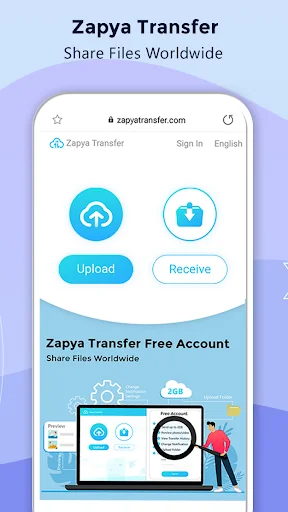
Also, when you share online using Zapya, you can transfer files from any device that has a web browser. By clicking on the Zapya Transfer icon on the Transfer page, you can easily share files with people from all around the world. Zapya Transfer is free to use and available in multiple languages.
Zapya provides four convenient offline sharing methods, allowing you to share files with people nearby:
1. Create a group and inviting others to join it,
2. Create a personalized QR code for others to scan,
3. Shake to connect to another device,
4. Send files to those nearby with the radar
Spotlight Features
⚡ Expand Storage with USB drives Zapya provides a new feature of USB storage and transfer. You can connect a single USB drive or multiple USB drives through a hub to your device, so you can view files on, save files to and send files from the USB drives!
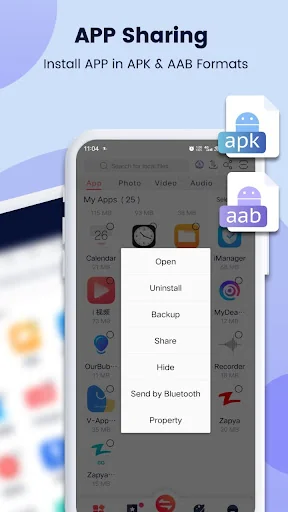
⚡ Enhanced APP Sharing Now Zapya helps you to share and install apps (an action called side-loading) in the old .apk format and new .aab format to friends nearby or on social media.
⚡ Improved Android Support Zapya supports the scoped storage so that users of Android 11 or higher can safely send and receive files. Additionally, Zapya continues to support devices that run Android 5 through Android 13.
⚡ Upgraded iOS to Android Sharing Connecting your iOS to an Android device just got easier! Now you can search for a Zapya group created on an Android device and connect with a single click on Zapya.
⚡ Phone Replication Instantly back up and easily transfer all the content and data from your old device to a new one.
⚡ Bulk File Transfer Share entire folders or multiple large files at once with just one click!
⚡ “Install All” Simultaneously download all the apps you want onto your device with the “Install All” feature.
✔ To learn why Zapya requires so many permissions, please visit:
https://youtu.be/o370YTbCdWc
✔ To read Zapya’s Privacy Policy in English, please visit:
https://zapya.app/policy_en.html
✔ For the application’s complete terms and conditions, please visit: https://www.zapya.app/v3/terms_of_service.html
✔ To download Zapya on other platforms, please visit:
https://www.zapya.app/v3/download
✔ For the latest news and updates, please visit:
http://blog.izapya.com/
Comparable Android apps
The five apps in Tools with the closest revenue to Zapya - File Transfer, Share. Click any to see its detail page.
Each forecast combines App Store rating, ratings count, monetisation model, pricing tier, IAP signals and ad-supported flag.
The base estimate is then multiplied by a per-category scaling factor learned from apps with founder-verified MRR.
Every number on this page comes from public APIs and bumetric's own snapshot history.
Full methodology covers input variables, accuracy bands per category and how we treat apps without comparable anchors.
See also the live data on Zapya - File Transfer, Share's tracker page for current rating, reviews and snapshot timeline.
Building something similar? Get a free AI audit with $-revenue forecasts for every recommendation.


 Video Player Phone
 Scientific Calculator Pro
 NordVPN – fast VPN for privacy
 Betternet: Secure VPN Hotspot
 Mi Browser