64
BU Score
Solid
Blur: Hintergrund Verschwommen
✍️ BU Analytics Review
“
Blur: Hintergrund Verschwommen is an iOS app from Sohel Ibna Saad in the Photo & Video category, currently rated 4.4★ across 10,382 ratings. Initial signal reads as mostly critical sentiment so far — users flag rough edges and unmet expectations.
Our BU Score puts it at 64 — Solid (established niche player). For a Photo & Video app, that means established niche player.
Track changes month-over-month in the Performance section below — live snapshot history and revenue forecast included.
creator
📊 Performance Tracking LIVE
Loading…
Rating
—
Reviews
—
Forecast Revenue / mo
—
Snapshots tracked
0
since first record
Range:
💰 Forecast Revenue / mo
MODELRevenue forecast computed from BU's 234 trigger model on each snapshot. Calibrated against ground-truth from 58 verified-revenue apps.
🔬Forecast Breakdown — Why This Estimate?Top 12 of 12 triggers
Our ML model uses 200+ signals from public data. These are the most influential for this app:
| Mid install base (10,382 ratings)METRIC | +$5,500 | |
| 5 starREVIEW | +$1,800 | |
| cancelledREVIEW | −$1,500 | |
| excellent appREVIEW | +$1,500 | |
| Mature app (10y old)METRIC | +$1,500 | |
| Multilingual (33 languages)METRIC | +$1,500 | |
| slowREVIEW | −$1,200 | |
| annoying adsREVIEW | −$1,100 | |
| too expensiveREVIEW | −$1,000 | |
| priceyREVIEW | −$800 | |
| Good rating (4.4★)METRIC | +$800 | |
| Ad-supported / freemiumMETRIC | +$600 |
METRIC = structural app data · REVIEW = mined from user reviews · ✓ VERIFIED = Stripe-verified anchor (TrustMRR)
📈 Reviews Growth
LIVECumulative review count from first BU snapshot. Each point = a tracked update.
💚Sentiment Over Time↑ green = positive · ↓ red = negative
Nov 24
Jan 25
Feb 25
Mar 25
Apr 25
May 25
Jun 25
Jul 25
Aug 25
Sep 25
Oct 25
Jan 26
⭐ Rating Trend
LIVEAverage rating evolution. Updates with each new review batch.
🗓️ Snapshot Timeline
HISTORYEach bar shows a tracked update and the metric delta from the previous snapshot.
App Specs
🔐 Own this app? Claim & verify MRR →💾 244 MB🔞 4+📱 iOS 15.0+🔖 v5.9.1🔄 updated 1w ago🌐 AR, CA, HR, CS, DA +28📂 Photo & Video💰 Free🚀 Launched 2015 (10y old)
📝 About this app
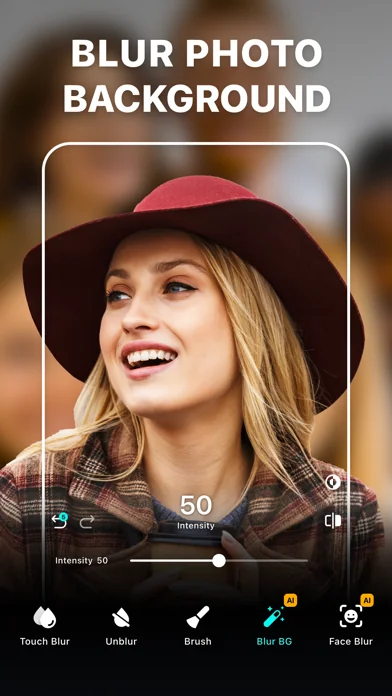
Blur Photo Editor is the best photo blurring and mosaic app for iPhone and iPad, designed to blur backgrounds and create professional-looking photos. Easily blur or pixelate faces, hide license plates, or redact sensitive information such as credit card numbers with precision. Use AI-powered face blur, background blur, and mosaic effects to keep your photos clean, private, and ready to share.
Key Features:
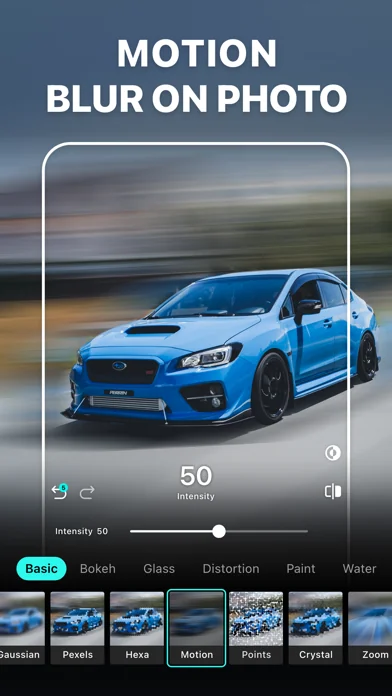
• Wide range of blur and mosaic effects, including motion blur, point blur, and bokeh, for professional results
• One-tap background blur with AI subject detection
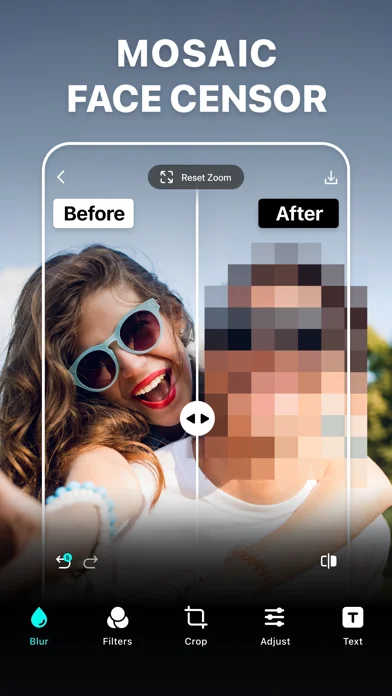
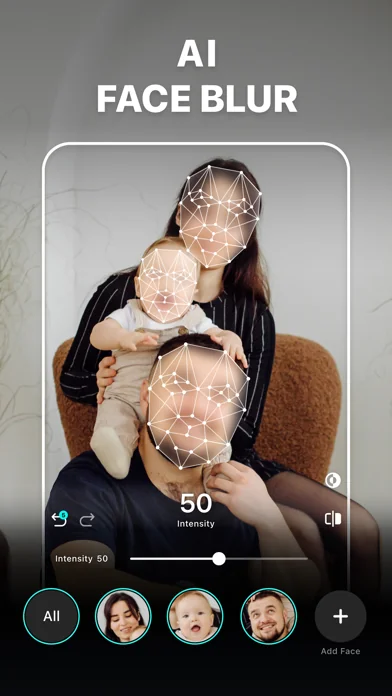
• AI-powered face blur and mosaic for face censoring
• Automatically detect text and redact sensitive information like documents, IDs, and credit card details
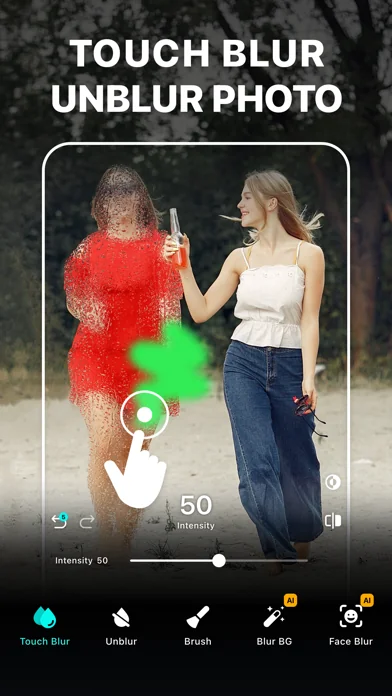
• Unblur part of the images that were accidentally edited
• Zoom in for precise editing
• Apply depth effects using lens blur with radial and linear blur
• Use shape blurs to creatively highlight or hide parts of a photo
• Large catalog of photo filters
• Edit with tools like crop, rotate, and fine-tune using brilliance, denoise, etc.
• Enhance photo to improve clarity, sharpness, and overall image quality
• Photo collage maker with multiple layouts
• Add custom text to photos with fonts, colors, and styles.
• Blend images with artistic double exposure effects.
• "My Project" to save work in progress
Amazing Blur & Mosaic Effects
Blur backgrounds or specific areas of your photos to censor unwanted details with precision. Apply Gaussian blur, motion blur, bokeh, and mosaic effects to create depth and visual impact. You can also create artistic blurry backgrounds using glass, water, distortion, and paint-style effects for a more creative look.
Powerful Photo Blur Tools
Make precise edits using advanced blur tools, including face blur and auto blur features. Create DSLR-style depth of field using radial and linear blur effects, or adjust focus to highlight your subject. Easily refine edits with zoom controls for pixel-perfect accuracy.
Unique Photo Filters
Explore a wide collection of filters, including B&W, sepia, classic, portrait, vintage, and more, to achieve your desired look. Apply filters on blurred or mosaic photos to create stylish and professional-looking results.
Enhance Photo Quality
Enhance low-quality or blurry photos by improving image quality, sharpening details, boosting colors, and reducing noise. Restore clarity and achieve a cleaner, high-quality photo with minimal effort.
How to mosaic + blur a photo on iPhone or iPad using Blur Photo Editor?
To blur a photo or hide parts of an image, follow these steps:
• Tap the (+) button and select a photo
• Tap on Blur. Then swipe or trace your finger across the photo
• Go to Effects and select the desired blur effect
• Adjust intensity as needed
• Tap tick and then tap Save to export the photo
Auto-Renewable Subscription Terms:
Subscribe to unlock full access to all features.
• Subscription Length: Weekly, Yearly
• Payment is charged to your Apple ID account at confirmation of purchase.
• Subscription with a free trial period automatically renews to a paid subscription unless canceled at least 24 hours before the end of the trial period.
• Your account will be charged for renewal within 24 hours before the end of the trial period.
• You can manage or cancel subscriptions from your App Store account settings.
• Any unused portion of a free trial will be forfeited when purchasing a subscription.
• By signing up for this subscription, you agree to our Terms of Use and Privacy Policy.
Terms of Use:
https://pixeltouch.net/legal/blurphoto/terms.html
Privacy Policy:
https://pixeltouch.net/legal/blurphoto/privacy.html
Disclaimer: This app is free to download but requires an auto-renewing subscription to access full functionality.
Key Features:
• Wide range of blur and mosaic effects, including motion blur, point blur, and bokeh, for professional results
• One-tap background blur with AI subject detection
• AI-powered face blur and mosaic for face censoring
• Automatically detect text and redact sensitive information like documents, IDs, and credit card details
• Unblur part of the images that were accidentally edited
• Zoom in for precise editing
• Apply depth effects using lens blur with radial and linear blur
• Use shape blurs to creatively highlight or hide parts of a photo
• Large catalog of photo filters
• Edit with tools like crop, rotate, and fine-tune using brilliance, denoise, etc.
• Enhance photo to improve clarity, sharpness, and overall image quality
• Photo collage maker with multiple layouts
• Add custom text to photos with fonts, colors, and styles.
• Blend images with artistic double exposure effects.
• "My Project" to save work in progress
Amazing Blur & Mosaic Effects
Blur backgrounds or specific areas of your photos to censor unwanted details with precision. Apply Gaussian blur, motion blur, bokeh, and mosaic effects to create depth and visual impact. You can also create artistic blurry backgrounds using glass, water, distortion, and paint-style effects for a more creative look.
Powerful Photo Blur Tools
Make precise edits using advanced blur tools, including face blur and auto blur features. Create DSLR-style depth of field using radial and linear blur effects, or adjust focus to highlight your subject. Easily refine edits with zoom controls for pixel-perfect accuracy.
Unique Photo Filters
Explore a wide collection of filters, including B&W, sepia, classic, portrait, vintage, and more, to achieve your desired look. Apply filters on blurred or mosaic photos to create stylish and professional-looking results.
Enhance Photo Quality
Enhance low-quality or blurry photos by improving image quality, sharpening details, boosting colors, and reducing noise. Restore clarity and achieve a cleaner, high-quality photo with minimal effort.
How to mosaic + blur a photo on iPhone or iPad using Blur Photo Editor?
To blur a photo or hide parts of an image, follow these steps:
• Tap the (+) button and select a photo
• Tap on Blur. Then swipe or trace your finger across the photo
• Go to Effects and select the desired blur effect
• Adjust intensity as needed
• Tap tick and then tap Save to export the photo
Auto-Renewable Subscription Terms:
Subscribe to unlock full access to all features.
• Subscription Length: Weekly, Yearly
• Payment is charged to your Apple ID account at confirmation of purchase.
• Subscription with a free trial period automatically renews to a paid subscription unless canceled at least 24 hours before the end of the trial period.
• Your account will be charged for renewal within 24 hours before the end of the trial period.
• You can manage or cancel subscriptions from your App Store account settings.
• Any unused portion of a free trial will be forfeited when purchasing a subscription.
• By signing up for this subscription, you agree to our Terms of Use and Privacy Policy.
Terms of Use:
https://pixeltouch.net/legal/blurphoto/terms.html
Privacy Policy:
https://pixeltouch.net/legal/blurphoto/privacy.html
Disclaimer: This app is free to download but requires an auto-renewing subscription to access full functionality.
🆕 What's New · v5.9.1
Thanks for using Blur Editor! We’ve listened to your feedback and made updates to improve your experience. This latest version includes:
• Now you can use basic blur features unlimited times for free, giving you more freedom to edit.
• You can now edit with fewer interruptions, with ads reduced across the app.
• Bug fixes and performance improvements.
More features are already in the works for the next update. Stay tuned, and if you’re enjoying the app, feel free to leave a rating.
Have questions or feedback? Tap Contact Support from the app’s Settings or email us at support@pixeltouch.net
• Now you can use basic blur features unlimited times for free, giving you more freedom to edit.
• You can now edit with fewer interruptions, with ads reduced across the app.
• Bug fixes and performance improvements.
More features are already in the works for the next update. Stay tuned, and if you’re enjoying the app, feel free to leave a rating.
Have questions or feedback? Tap Contact Support from the app’s Settings or email us at support@pixeltouch.net
Profile & Insights
Everything we know — and don't — about this app and its company.
Identification
- App name
- Blur: Hintergrund Verschwommen
- Developer
- Sohel Ibna Saad
- Bundle ID
- net.twinbit.photoblur
- App Store URL
- Open in App Store
- Category
- Photo & Video
- Content rating
- 4+
- Languages
- AR, CA, HR, CS, DA, NL, EN, FI, FR, DE, EL, HE, HI, HU, ID, IT, JA, KO, MS, NB, PL, PT, RO, RU, ZH, SK, ES, SV, TH, ZH, TR, UK, VI
Company
- Website
- Not found
- Tagline
- Today
- Description
- Find apps and games for iPhone, iPad, Mac, and more on the App Store.
- Founded
- Not found
- HQ / Address
- Not found
- Employees
- Not found
- Logo
- OG image
Revenue
- Verified revenue / mo
- Not found
- AI revenue estimate / mo
- Not found
- AI annual estimate
- Not found
- ML model estimate / mo
- $1.1K/mo
- Top-grossing rank
- Outside top 100 in US Photo & Video
- All-time revenue
- Not found
- Pricing
- Not found
Founder
- Name
- Not found
- X / Twitter
- Not found
- Not found
- GitHub
- Not found
- X followers
- Not found
- Public statements
- Not found
Funding
- Total raised
- Not found
- Last round
- Not found
- Investors
- Not found
- Crunchbase
- Not found
- AngelList
- Not found
Press & Links
- Articles found
- Not found
- Listed on
- Not found
- Blog
- https://apps.apple.com/us/app/letterloop-group-newsletters/id6468623700
- Press / News
- Not found
Contacts & Socials
- Socials
- Not found
- Not found
- Phone
- Not found
- Contact page
- Not found
- About page
- https://apps.apple.com/us/iphone/story/id1895870717
📈Ratings growth10,382 ratings+2249% lifetimeShow 3-year history estimate ▾
Tracked (56 weeks) Pre-tracking estimate (33 weeks) · model-based, ±5% noise · anchored to release date and current value
🌍Geographic ReachNot ranked
This app is currently outside the top 100 grossing in all 9 countries we monitor (US, UK, DE, FR, JP, CA, AU, BR, IN). Niche or new apps often launch this way — popularity rankings appear once daily revenue clears the regional threshold.
Profile is built from iTunes Lookup + developer site scrape + ML revenue model. Empty fields show "Not found" — additional sources (Crunchbase, X, IndieHackers, Acquire.com) coming.
More by Sohel Ibna Saad
View all →More Photo & Video
YouTube
★ 4.7 · 47,130,049 reviews
★ 4.7 · 29,023,044 reviews
Snapchat: Chatte mit Freunden
★ 4.5 · 5,772,278 reviews
Canva: KI-Foto- & Video-Editor
★ 4.9 · 3,343,015 reviews
Twitch: Live Streaming
★ 4.7 · 2,700,069 reviews
InShot - AI Video Editor
★ 4.8 · 2,426,316 reviews
PicCollage: KI Foto Collage
★ 4.8 · 1,808,632 reviews
FaceApp: Gesichtsbearbeitung
★ 4.7 · 1,750,154 reviews
Browse BU Analytics
📚 All 55,000+ Books
🜍 Alchemy & Hermeticism
🔮 Magic & Ritual
🌙 Witchcraft & Paganism
⭐ Astrology & Cosmology
🃏 Divination & Tarot
📜 Photo & Video
✡️ Kabbalah & Jewish Mysticism
🕉️ Mysticism & Contemplation
🕊️ Theosophy & Anthroposophy
🏛️ Freemasonry & Secret Societies
👻 Spiritualism & Afterlife
📖 Sacred Texts & Gnosticism
👁️ Supernatural & Occult Fiction
🧘 Spiritual Development
📚 Esoteric History & Biography
Info
About BU Analytics