63
BU Score
Solid
CalenGoo Kalender
✍️ BU Analytics Review
“
CalenGoo Kalender is an iOS app from Dominique Andr Gunia in the Productivity category, currently rated 4.6★ across 293 ratings. Initial signal reads as mixed reviews — supporters praise core features while critics cite stability/value gaps.
Our BU Score puts it at 63 — Solid (established niche player). For a Productivity app, that means established niche player.
Track changes month-over-month in the Performance section below — live snapshot history and revenue forecast included.
creator
📊 Performance Tracking LIVE
Loading…
Rating
—
Reviews
—
Forecast Revenue / mo
—
Snapshots tracked
0
since first record
Range:
💰 Forecast Revenue / mo
MODELRevenue forecast computed from BU's 234 trigger model on each snapshot. Calibrated against ground-truth from 58 verified-revenue apps.
🔬Forecast Breakdown — Why This Estimate?Top 14 of 14 triggers
Our ML model uses 200+ signals from public data. These are the most influential for this app:
| Paid app ($0.00)METRIC | +$2,800 | |
| Excellent rating (4.6★)METRIC | +$2,200 | |
| worth every pennyREVIEW | +$2,000 | |
| bugsREVIEW | −$1,800 | |
| 5 starREVIEW | +$1,800 | |
| cancelledREVIEW | −$1,500 | |
| excellent appREVIEW | +$1,500 | |
| Mature app (17y old)METRIC | +$1,500 | |
| highly recommendREVIEW | +$1,400 | |
| slowREVIEW | −$1,200 | |
| too expensiveREVIEW | −$1,000 | |
| priceyREVIEW | −$800 | |
| Localized (9 languages)METRIC | +$600 | |
| Early-stage install base (293 ratings)METRIC | +$400 |
METRIC = structural app data · REVIEW = mined from user reviews · ✓ VERIFIED = Stripe-verified anchor (TrustMRR)
📈 Reviews Growth
LIVECumulative review count from first BU snapshot. Each point = a tracked update.
💚Sentiment Over Time↑ green = positive · ↓ red = negative
Nov 24
Dec 24
Feb 25
Mar 25
Apr 25
May 25
Jun 25
Aug 25
Sep 25
Oct 25
Nov 25
Jan 26
⭐ Rating Trend
LIVEAverage rating evolution. Updates with each new review batch.
🗓️ Snapshot Timeline
HISTORYEach bar shows a tracked update and the metric delta from the previous snapshot.
App Specs
🔐 Own this app? Claim & verify MRR →💾 30 MB🔞 4+📱 iOS 13.0+🔖 v1.5.105🔄 updated 3w ago🌐 MY, CS, NL, EN, FR +4📂 Productivity💰 Paid🚀 Launched 2009 (17y old)
📝 About this app
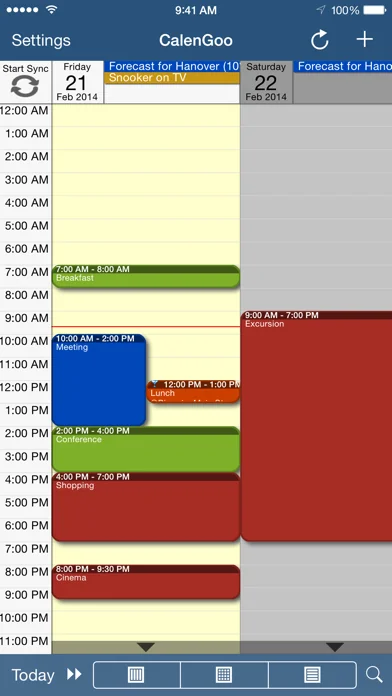
CalenGoo gives you a fast and easy way to access and modify your Google Calendar with your iPhone, iPod Touch or iPad. It can also be used when you have no Internet connection, using the cached data. Changes are saved and uploaded the next time you are connected.
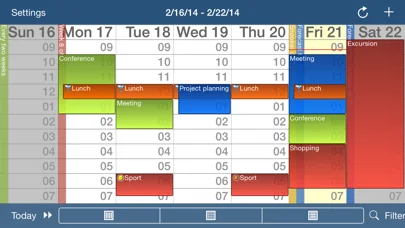
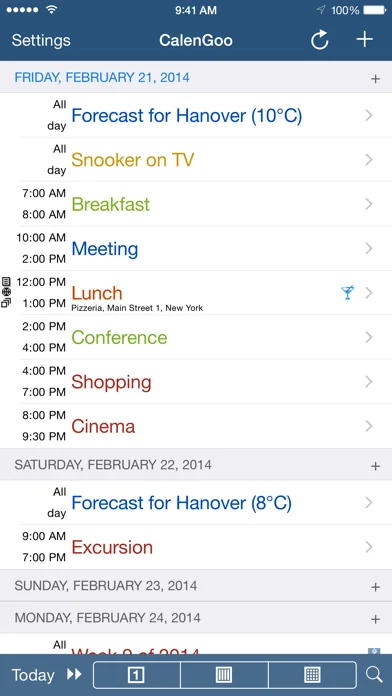
The calendar view is similar to the web view of Google Calendar. Events are displayed using the same calendar colors that you use in your Google Calendar, even Google's event colors are supported (please see http://www.calengoo.com/cc ). It also recognizes which calendars are visible and which are hidden. So the view should match the view of your Google Calendar as much as possible.
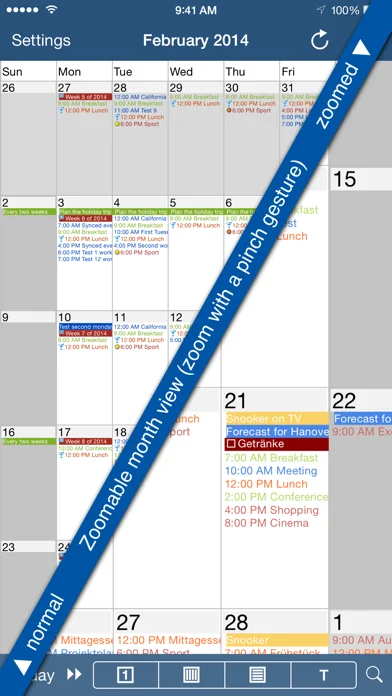
CalenGoo also has a month view similar to that of Google Calendar. It can be zoomed and panned to quickly get an overview over the events of a month. Zooming the month is done by using the two-finger-zoom gesture that you know from Safari and the photo application. A double tap opens the tapped day.
It also supports the same kinds of recurrence rules as Google Calendar and displays recurring events correctly even when you are offline or scroll far into the future.
You can also use Google Calendar's feature to invite people to events and see their status (accepted, declined, maybe, no answer). They will get an invitation email with links to e.g. accept or decline the invitation.
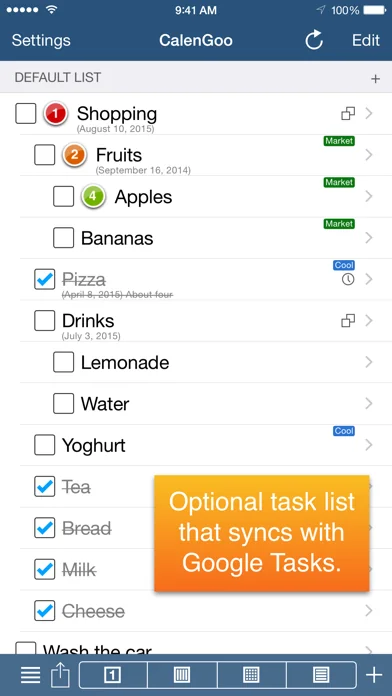
Google Calendar has an integrated task list, called Google Tasks. Tasks with a due date are displayed on the corresponding days of the calendar. CalenGoo can do the same, it can sync this list, display your tasks in the calendar views and in a list view and it even makes your tasks available offline. You can edit and add tasks and the changes will be synced with Google Tasks.
You either need a (free) Google Calendar account to use this app or you can use it with your iOS calendars. However using it with Google Calendar has a few advantages.
To get more information, screenshots and a tutorial, please go to http://www.calengoo.com
If you have any problems or suggestions, please send an email to calengoo@dgunia.de or take a look at CalenGoo's support website to get help.
If you think the font is too small and hard to read, you can increase the font size of all calendar views in the settings under "Settings", "Display and Use".
Features ( http://www.calengoo.com ):
- Drag&drop to quickly copy and move events
- Templates to quickly create similar events again. They can even be combined, e.g. one template for the location of an event and another for the attendees
- Print/PDF function to print the day, week, month or agenda view via AirPrint or to email it as a PDF file
- Supports the same recurrence rules as Google Calendar
- Supports Google Calendar's event colors when syncing via OAuth2
- Icons can be assigned to Google Calendar events
- Date/time can be entered using the iOS wheels or by using a keypad
- Fast search function
- Show/edit iOS calendars in addition to Google calendars (or instead of Google calendars)
- Sync with Google Tasks and iOS Reminders
- Reminders can be snoozed and they can be (optionally) repeated every minute
- Birthdays and anniversaries of your contacts can be displayed
- Zoomable month view, which can be configured to scroll horizontally (month by month) or vertically (week by week)
- Events can be linked to contacts
- Floating events and completable events
- Photos and PDF files can be created and attached to events (via Google Drive)
- Calendar selection bar to quickly show and hide single calendars
- The location of an event can be opened with Apple Maps, Google Maps, Navigon, TomTom, Skobbler, Sygic, iGo or Waze
- View/edit calendars that are shared with others via Google Calendar
- Many configuration options to change the way the app looks and works
The calendar view is similar to the web view of Google Calendar. Events are displayed using the same calendar colors that you use in your Google Calendar, even Google's event colors are supported (please see http://www.calengoo.com/cc ). It also recognizes which calendars are visible and which are hidden. So the view should match the view of your Google Calendar as much as possible.
CalenGoo also has a month view similar to that of Google Calendar. It can be zoomed and panned to quickly get an overview over the events of a month. Zooming the month is done by using the two-finger-zoom gesture that you know from Safari and the photo application. A double tap opens the tapped day.
It also supports the same kinds of recurrence rules as Google Calendar and displays recurring events correctly even when you are offline or scroll far into the future.
You can also use Google Calendar's feature to invite people to events and see their status (accepted, declined, maybe, no answer). They will get an invitation email with links to e.g. accept or decline the invitation.
Google Calendar has an integrated task list, called Google Tasks. Tasks with a due date are displayed on the corresponding days of the calendar. CalenGoo can do the same, it can sync this list, display your tasks in the calendar views and in a list view and it even makes your tasks available offline. You can edit and add tasks and the changes will be synced with Google Tasks.
You either need a (free) Google Calendar account to use this app or you can use it with your iOS calendars. However using it with Google Calendar has a few advantages.
To get more information, screenshots and a tutorial, please go to http://www.calengoo.com
If you have any problems or suggestions, please send an email to calengoo@dgunia.de or take a look at CalenGoo's support website to get help.
If you think the font is too small and hard to read, you can increase the font size of all calendar views in the settings under "Settings", "Display and Use".
Features ( http://www.calengoo.com ):
- Drag&drop to quickly copy and move events
- Templates to quickly create similar events again. They can even be combined, e.g. one template for the location of an event and another for the attendees
- Print/PDF function to print the day, week, month or agenda view via AirPrint or to email it as a PDF file
- Supports the same recurrence rules as Google Calendar
- Supports Google Calendar's event colors when syncing via OAuth2
- Icons can be assigned to Google Calendar events
- Date/time can be entered using the iOS wheels or by using a keypad
- Fast search function
- Show/edit iOS calendars in addition to Google calendars (or instead of Google calendars)
- Sync with Google Tasks and iOS Reminders
- Reminders can be snoozed and they can be (optionally) repeated every minute
- Birthdays and anniversaries of your contacts can be displayed
- Zoomable month view, which can be configured to scroll horizontally (month by month) or vertically (week by week)
- Events can be linked to contacts
- Floating events and completable events
- Photos and PDF files can be created and attached to events (via Google Drive)
- Calendar selection bar to quickly show and hide single calendars
- The location of an event can be opened with Apple Maps, Google Maps, Navigon, TomTom, Skobbler, Sygic, iGo or Waze
- View/edit calendars that are shared with others via Google Calendar
- Many configuration options to change the way the app looks and works
🆕 What's New · v1.5.105
- New Google Drive picker
- Added a switch to show all-day events in the small 1x1 widget
- Added an option to remove countdown events from the today widget
- Bug fixes
- Added a switch to show all-day events in the small 1x1 widget
- Added an option to remove countdown events from the today widget
- Bug fixes
Profile & Insights
Everything we know — and don't — about this app and its company.
Identification
- App name
- CalenGoo Kalender
- Developer
- Dominique Andr Gunia
- Bundle ID
- de.dgunia.calengoo
- App Store URL
- Open in App Store
- Category
- Productivity
- Content rating
- 4+
- Languages
- MY, CS, NL, EN, FR, DE, IT, PT, ES
Company
- Website
- www.calengoo.com
- Tagline
- 1.5.88
- Description
- Not found
- Founded
- Not found
- HQ / Address
- Not found
- Employees
- Not found
- Logo
- Not found
Revenue
- Verified revenue / mo
- Not found
- AI revenue estimate / mo
- Not found
- AI annual estimate
- Not found
- ML model estimate / mo
- $2.8K/mo
- Top-grossing rank
- Outside top 100 in US Productivity
- All-time revenue
- Not found
- Pricing
- Not found
Founder
- Name
- Not found
- X / Twitter
- Not found
- Not found
- GitHub
- Not found
- X followers
- Not found
- Public statements
- Not found
Funding
- Total raised
- Not found
- Last round
- Not found
- Investors
- Not found
- Crunchbase
- Not found
- AngelList
- Not found
Press & Links
- Articles found
- Not found
- Listed on
- Not found
- Blog
- http://www.calengoo.com/news/news.html
- Press / News
- Not found
Contacts & Socials
- Socials
- Not found
- Not found
- Phone
- Not found
- Contact page
- http://www.calengoo.com/pageedit/styled/pagecontacts.html
- About page
- Not found
📈Ratings growth293 ratings+-34% lifetimeShow 3-year history estimate ▾
Tracked (59 weeks) Pre-tracking estimate (36 weeks) · model-based, ±5% noise · anchored to release date and current value
🌍Geographic ReachNot ranked
This app is currently outside the top 100 grossing in all 9 countries we monitor (US, UK, DE, FR, JP, CA, AU, BR, IN). Niche or new apps often launch this way — popularity rankings appear once daily revenue clears the regional threshold.
Profile is built from iTunes Lookup + developer site scrape + ML revenue model. Empty fields show "Not found" — additional sources (Crunchbase, X, IndieHackers, Acquire.com) coming.
More by Dominique Andr Gunia
View all →More Productivity
Microsoft Outlook
★ 4.8 · 8,891,395 reviews
Google Drive – online backup
★ 4.8 · 7,526,498 reviews
ChatGPT
★ 4.8 · 7,136,919 reviews
Yahoo Mail – Alles im Blick
★ 4.7 · 4,623,459 reviews
HP
★ 4.6 · 4,011,497 reviews
Google Docs
★ 4.8 · 3,078,214 reviews
Microsoft Word
★ 4.7 · 2,843,856 reviews
Gmail – E-Mail von Google
★ 4.7 · 2,406,337 reviews
Browse BU Analytics
📚 All 55,000+ Books
🜍 Alchemy & Hermeticism
🔮 Magic & Ritual
🌙 Witchcraft & Paganism
⭐ Astrology & Cosmology
🃏 Divination & Tarot
📜 Productivity
✡️ Kabbalah & Jewish Mysticism
🕉️ Mysticism & Contemplation
🕊️ Theosophy & Anthroposophy
🏛️ Freemasonry & Secret Societies
👻 Spiritualism & Afterlife
📖 Sacred Texts & Gnosticism
👁️ Supernatural & Occult Fiction
🧘 Spiritual Development
📚 Esoteric History & Biography
Info
About BU Analytics