60
BU Score
Solid
Depth Of Field Calculator
✍️ bumetric analysis
“
Depth Of Field Calculator is an iOS app from Essence Computing in the Photo & Video category, currently rated 4.6★ across 44 ratings. Initial signal reads as largely positive sentiment, users highlighting consistency and feature depth.
Our BU Score puts it at 60: Solid (established niche player). For a Photo & Video app, that means established niche player.
Track changes month-over-month in the Performance section below: live snapshot history and revenue forecast included.
📊 Performance Tracking LIVE
Loading…
Rating
—
Reviews
—
Forecast Revenue / mo
—
Snapshots tracked
0
since first record
Range:
💰 Forecast Revenue / mo
MODELRevenue forecast computed from BU's 234 trigger model on each snapshot. Calibrated against ground-truth from 58 verified-revenue apps.
🔬Forecast Breakdown — Why This Estimate?Top 6 of 6 triggers
Our ML model uses 200+ signals from public data. These are the most influential for this app:
| Paid app ($0.00)METRIC | +$2,800 | |
| Excellent rating (4.6★)METRIC | +$2,200 | |
| Mature app (16y old)METRIC | +$1,500 | |
| highly recommendREVIEW | +$1,400 | |
| Single-language (English only)METRIC | −$400 | |
| Pre-traction phase (44 ratings)METRIC | −$300 |
METRIC = structural app data · REVIEW = mined from user reviews · ✓ VERIFIED = Stripe-verified anchor (TrustMRR)
📈 Reviews Growth
LIVECumulative review count from first BU snapshot. Each point = a tracked update.
⭐ Rating Trend
LIVEAverage rating evolution. Updates with each new review batch.
🗓️ Snapshot Timeline
HISTORYEach bar shows a tracked update and the metric delta from the previous snapshot.
App Specs
🔐 Own this app? Claim & verify MRR →💾 19 MB🔞 4+📱 iOS 15.6+🔖 v1.8.22🔄 updated 4mo ago🌐 EN📂 Photo & Video💰 Paid🚀 Launched 2010 (16y old)
📝 About this app
Camera list updated to beginning October 2024. If yours is not listed please email stating which one is missing and I will be happy to add it to the next release.
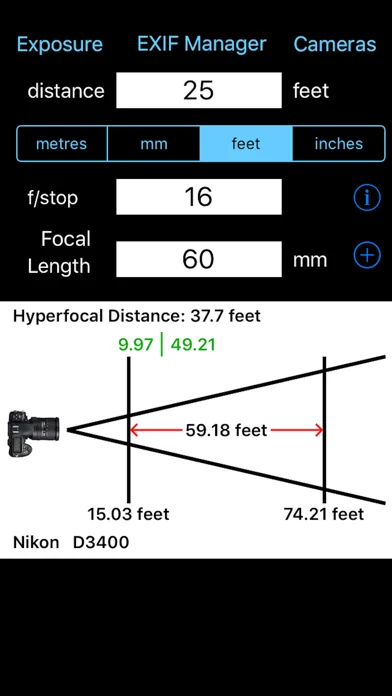
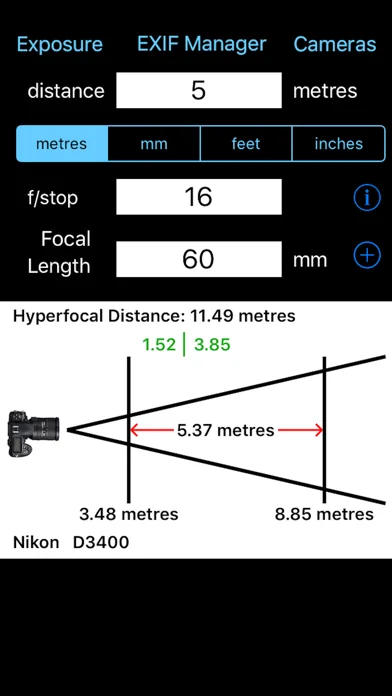
Ever taken a picture and wished that either more of it had been in focus or the exact reverse and that less had been in focus? Of course you have I certainly have. But what settings on your camera give which results and what if you change one of those settings what is the Depth of Field then. You can calculate it all yourself but it is not easy. This App takes all of those problems and makes it easy to find the answers. Just type in the distance to the subject, the focal length being used and the f-stop and the App calculates the near and far distances of acceptable focus and therefore the depth of field. This is all shown on an easy to understand diagram.
An example is: You are trying to take a photo of a bee on a flower and all but the bee is to be out of focus. Set the distance of the subject to be 200 mm (20 cm, approx 8 inches), set the f-stop to be f/5.6 and set the focal length at 50 mm. The App calculates that the depth of field is 3.41 mm (0.3 cm, a small fraction of an inch). The bee will be partially in focus but bees are more than 3.4 mm across so that depth of field is probably not what you were looking for. Set the camera to f/22 and now the depth of field is 13.39 mm (1.39 cm or just over half an inch) now this is much closer to what you wanted. Now maybe the whole of bee is in focus but still all of its surroundings are out of focus.
This App will help you take much better photographs by being able to understand the relationship between the settings on your camera and the depth of field that they produce. The diagram shown is better than a thousand words of text (as the saying goes). You can now easily see what effect a change in the settings will make.
The Depth of Field Calculator allows you to quickly calculate the near and far distances of acceptable focus. Just select the distance you are focused at, the f/stop and the len's focal length and the diagram shows you at what distance acceptable focus starts and at what distance it ends. You can select to express the focus distance in metres, millimetres, feet and inches. Unlike other Apps this App does not use picker wheels for the f/stop and focal length values so you can enter whatever values you want.
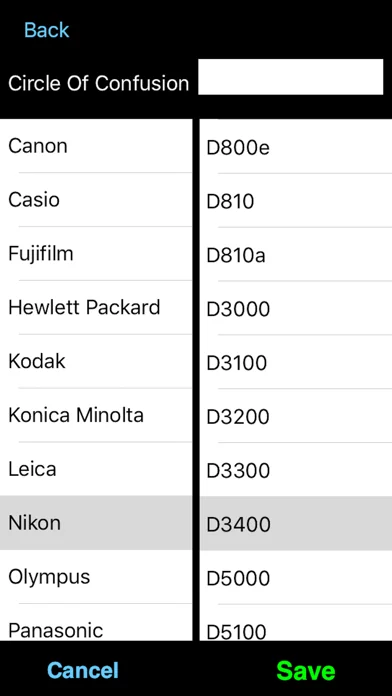
The only other thing you have to do is select the camera you are using. The Camera button takes you to a page with the makers of cameras listed to the left. Select the maker of your camera and then scroll down the list to the model. Select Save and you are now ready to calculate the correct values. The calculations work using a value called the Circle of Confusion. This changes depending on the camera make and model.
If you camera is not listed then email and it will be added. You can generally find your Circle of Confusion value on the web. Once you know this value just set it manually in field at the top and Save.
You can manually specify the Circle of Confusion to use. Just select the field at the top and type in the value required. Select OK and then select Save. The user-defined Circle of Confusion will be used.
Ever taken a picture and wished that either more of it had been in focus or the exact reverse and that less had been in focus? Of course you have I certainly have. But what settings on your camera give which results and what if you change one of those settings what is the Depth of Field then. You can calculate it all yourself but it is not easy. This App takes all of those problems and makes it easy to find the answers. Just type in the distance to the subject, the focal length being used and the f-stop and the App calculates the near and far distances of acceptable focus and therefore the depth of field. This is all shown on an easy to understand diagram.
An example is: You are trying to take a photo of a bee on a flower and all but the bee is to be out of focus. Set the distance of the subject to be 200 mm (20 cm, approx 8 inches), set the f-stop to be f/5.6 and set the focal length at 50 mm. The App calculates that the depth of field is 3.41 mm (0.3 cm, a small fraction of an inch). The bee will be partially in focus but bees are more than 3.4 mm across so that depth of field is probably not what you were looking for. Set the camera to f/22 and now the depth of field is 13.39 mm (1.39 cm or just over half an inch) now this is much closer to what you wanted. Now maybe the whole of bee is in focus but still all of its surroundings are out of focus.
This App will help you take much better photographs by being able to understand the relationship between the settings on your camera and the depth of field that they produce. The diagram shown is better than a thousand words of text (as the saying goes). You can now easily see what effect a change in the settings will make.
The Depth of Field Calculator allows you to quickly calculate the near and far distances of acceptable focus. Just select the distance you are focused at, the f/stop and the len's focal length and the diagram shows you at what distance acceptable focus starts and at what distance it ends. You can select to express the focus distance in metres, millimetres, feet and inches. Unlike other Apps this App does not use picker wheels for the f/stop and focal length values so you can enter whatever values you want.
The only other thing you have to do is select the camera you are using. The Camera button takes you to a page with the makers of cameras listed to the left. Select the maker of your camera and then scroll down the list to the model. Select Save and you are now ready to calculate the correct values. The calculations work using a value called the Circle of Confusion. This changes depending on the camera make and model.
If you camera is not listed then email and it will be added. You can generally find your Circle of Confusion value on the web. Once you know this value just set it manually in field at the top and Save.
You can manually specify the Circle of Confusion to use. Just select the field at the top and type in the value required. Select OK and then select Save. The user-defined Circle of Confusion will be used.
🆕 What's New · v1.8.22
Added many new cameras
Profile & Insights
Everything we know — and don't — about this app and its company.
Identification
- App name
- Depth Of Field Calculator
- Developer
- Essence Computing
- Bundle ID
- uk.co.esscomp.simplefocal
- App Store URL
- Open in App Store
- Category
- Photo & Video
- Content rating
- 4+
- Languages
- EN
Company
- Website
- www.essence-computing.co.uk
- Tagline
- Essence Computing Ltd
- Description
- Not found
- Founded
- Not found
- HQ / Address
- Not found
- Employees
- Not found
- Logo
- Not found
Revenue
- Verified revenue / mo
- Not found
- AI revenue estimate / mo
- Not found
- AI annual estimate
- Not found
- ML model estimate / mo
- $8.1K/mo
- Top-grossing rank
- Outside top 100 in US Photo & Video
- All-time revenue
- Not found
- Pricing
- Not found
Founder
- Name
- Not found
- X / Twitter
- Not found
- Not found
- GitHub
- Not found
- X followers
- Not found
- Public statements
- Not found
Funding
- Total raised
- Not found
- Last round
- Not found
- Investors
- Not found
- Crunchbase
- Not found
- AngelList
- Not found
Press & Links
- Articles found
- Not found
- Listed on
- Not found
- Blog
- Not found
- Press / News
- Not found
Contacts & Socials
- Socials
- Not found
- Not found
- Phone
- Not found
- Contact page
- Not found
- About page
- Not found
⭐Recent App Store Reviews42 latest · avg 4.14★ · 59.5% 5★ · 9.5% 1★
5★25 (60%)
4★7 (17%)
3★5 (12%)
2★1 (2%)
1★4 (10%)
+0 ratings/week
Praise: great ×13 recommend ×5 love ×3 favorite ×2 awesome ×2Complaints: expensive ×2 crash ×1
Top positive
★★★★★ Simple and Effective
Definitely purchase this... it performs the calculation for your camera flawlessly, supports US and Euro units. It has an addon app for calculating exposure which works great too.
If your a technical or landscape photographer you need this…
★★★★★ Love it!
Does what is advertised. More cameras and cheaper price than competiters. Icon could look better, but this is a miner quibble.…
Top negative
★☆☆☆☆ Disappointment
If you want to use the single feature of choosing your camera then pay for this. Every other option is an in app purchase. You could just make the app cost what you assume each feature is worth so it’s actually useful. Wasted my money.…
★☆☆☆☆ Crappy app
Very crappy app, poor design + spelling errors. you also have to pay more for additional features... 👎👎👎…
📈Ratings growth44 ratings+4300% lifetimeShow 3-year history estimate ▾
Tracked (43 weeks) Pre-tracking estimate (37 weeks) · model-based, ±5% noise · anchored to release date and current value
🌍Geographic ReachNot ranked
This app is currently outside the top 100 grossing in all 9 countries we monitor (US, UK, DE, FR, JP, CA, AU, BR, IN). Niche or new apps often launch this way — popularity rankings appear once daily revenue clears the regional threshold.
Profile is built from iTunes Lookup + developer site scrape + ML revenue model. Empty fields show "Not found" — additional sources (Crunchbase, X, IndieHackers, Acquire.com) coming.
More by Essence Computing
View all →Full revenue analysis
Read the article-style breakdown for Depth Of Field Calculator: category rank, percentile, growth signal, comparable apps, and how the forecast is calibrated against verified-MRR anchors in this niche.
