
51
BU Score
Solid
Exposure Calculator
✍️ bumetric analysis
“
Exposure Calculator is an iOS app from Essence Computing in the Photo & Video category, currently rated 3.8★ across 5 ratings. Initial signal reads as mixed reviews: supporters praise core features while critics cite stability and value gaps.
Our BU Score puts it at 51: Solid (established niche player). For a Photo & Video app, that means established niche player.
Track changes month-over-month in the Performance section below: live snapshot history and revenue forecast included.
📊 Performance Tracking LIVE
Loading…
Rating
—
Reviews
—
Forecast Revenue / mo
—
Snapshots tracked
0
since first record
Range:
💰 Forecast Revenue / mo
MODELRevenue forecast computed from BU's 234 trigger model on each snapshot. Calibrated against ground-truth from 58 verified-revenue apps.
🔬Forecast Breakdown — Why This Estimate?Top 6 of 6 triggers
Our ML model uses 200+ signals from public data. These are the most influential for this app:
| Paid app ($0.00)METRIC | +$2,800 | |
| excellent appREVIEW | +$1,500 | |
| Mature app (16y old)METRIC | +$1,500 | |
| highly recommendREVIEW | +$1,400 | |
| Single-language (English only)METRIC | −$400 | |
| Pre-traction phase (5 ratings)METRIC | −$300 |
METRIC = structural app data · REVIEW = mined from user reviews · ✓ VERIFIED = Stripe-verified anchor (TrustMRR)
📈 Reviews Growth
LIVECumulative review count from first BU snapshot. Each point = a tracked update.
⭐ Rating Trend
LIVEAverage rating evolution. Updates with each new review batch.
🗓️ Snapshot Timeline
HISTORYEach bar shows a tracked update and the metric delta from the previous snapshot.
App Specs
🔐 Own this app? Claim & verify MRR →💾 18 MB🔞 4+📱 iOS 15.6+🔖 v1.8.22🔄 updated 4mo ago🌐 EN📂 Photo & Video💰 Paid🚀 Launched 2010 (16y old)
📝 About this app
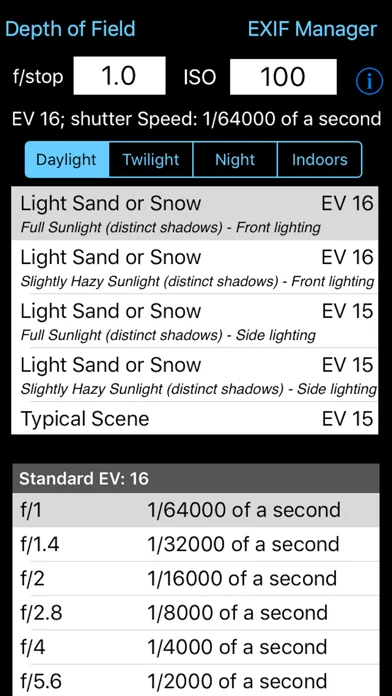
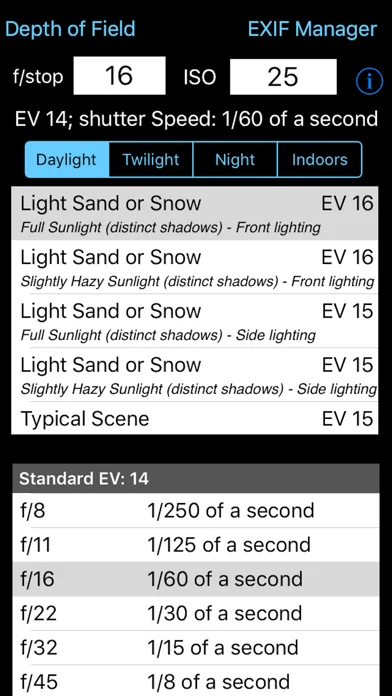
Takes the guesswork out of what shutter speed to use. Ever struggled with an exposure meter or the camera's auto exposure system and found that it just cannot seem to determine the correct shutter speed? I have and that is why this App was written. There are tables and formulae to help you to work out the shutter speed for yourself, but that's not easy. This App takes some simple information about the lighting conditions, the f-stop of the camera and the ISO rating being used and calculates what the correct shutter speed should be. It is that simple. If you have used the pre-calculated tables before you might be suprised by the answers this App gives you but, believe me, I have implemented the formulae and the pre-calculated tables are approximations (sometimes rather wild ones). The tables do not include all f-stops, the tables do not take account the different ISO values cameras can be set to. This App does.
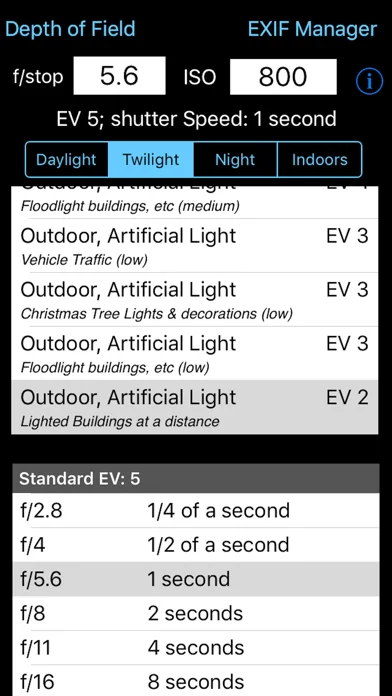
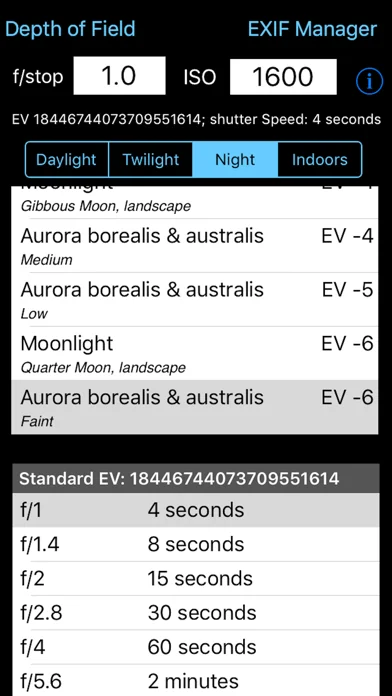
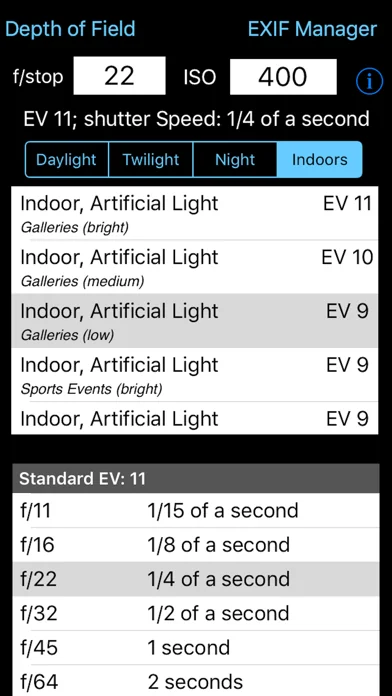
This App takes this information and presents it in an easy to use form. Just type in the f/stop value using the keypad, type in the ISO rating using the keypad and then select the applicable lighting conditions from the four lighting condition types: Daylight, Twilight, Night and Indoors. Each has a range of Exposure Values to select from.
The App then calculates what the effective EV value is (given the ISO rating) and so can calculate what the actual shutter speed should be. It also shows the applicable row from the standard tables for the EV.
Depending on the ISO rating being used the Exposure value selected from the list can be increased or decreased e.g. if the light is low and the EV is -3 but you are using ISO 800 then the effective Exposure value is zero (ISO 800 counts as +3 to EV) the shutter speed needs to match this value not that selected from the standard lighting condition values.
The tables only show some of f/stop values. For example the tables show f/2.0 and f/2.8 but you might have the camera set to f/2.4. Well it is possible to calculate the exact value so this is what the App does. Coupled with ISO values that do not generate exact EV numbers this value can show you the true value you should be attempting to use. An ISO of 250 adds +1.32 to the EV value. It is a log2 scale.
Now you may not be able to set you camera to the exact value given but it does give you a much better idea of the real shutter speed required rather than trying to guess from the tables (which are calculated on a logarithmic scale and are approximations).
By being able to set the ISO to 250 or 500, etc this App is can calculate the real EV value. If you set the ISO to 1000 then any EV value selected needs to have approximately 3.3 added to it to give the correct EV value. So if the selected EV is 6 then the effective EV with this ISO is actually 9.3. But there is no row for 9.3 in the standard tables and it does make a difference. If the camera is set to f/3.5 then the closest row in the table is for EV9 and f/2.8 (1/60th of a second) or f/4.0 (1/30th of a second).
So do you err towards 1/30th or 1/60th. Well this App actually calculates the exact value and this shows as 1/52nd of a second. Generally a camera cannot be set to this but it can be set to 1/50th so I would try that and then maybe 1/60th and maybe 1/40th. The calculation comes out as 1/50th because the EV is not 9 it is 9.3 and therefore with the ISO at 1000 everything must be treated as brighter and so less exposure is needed.
Being able to see the exact value to use is even more use when long exposures are needed. The standard tables get very vague for low light conditions i.e. EV -6 for f/22 is 64 minutes and for f/32 it is 128 minutes (over an hour more). So if you are using f/28 how many minutes at ISO 1250? Well the answer is 66.9 minutes which is much shorter than you might have guessed.
This App takes this information and presents it in an easy to use form. Just type in the f/stop value using the keypad, type in the ISO rating using the keypad and then select the applicable lighting conditions from the four lighting condition types: Daylight, Twilight, Night and Indoors. Each has a range of Exposure Values to select from.
The App then calculates what the effective EV value is (given the ISO rating) and so can calculate what the actual shutter speed should be. It also shows the applicable row from the standard tables for the EV.
Depending on the ISO rating being used the Exposure value selected from the list can be increased or decreased e.g. if the light is low and the EV is -3 but you are using ISO 800 then the effective Exposure value is zero (ISO 800 counts as +3 to EV) the shutter speed needs to match this value not that selected from the standard lighting condition values.
The tables only show some of f/stop values. For example the tables show f/2.0 and f/2.8 but you might have the camera set to f/2.4. Well it is possible to calculate the exact value so this is what the App does. Coupled with ISO values that do not generate exact EV numbers this value can show you the true value you should be attempting to use. An ISO of 250 adds +1.32 to the EV value. It is a log2 scale.
Now you may not be able to set you camera to the exact value given but it does give you a much better idea of the real shutter speed required rather than trying to guess from the tables (which are calculated on a logarithmic scale and are approximations).
By being able to set the ISO to 250 or 500, etc this App is can calculate the real EV value. If you set the ISO to 1000 then any EV value selected needs to have approximately 3.3 added to it to give the correct EV value. So if the selected EV is 6 then the effective EV with this ISO is actually 9.3. But there is no row for 9.3 in the standard tables and it does make a difference. If the camera is set to f/3.5 then the closest row in the table is for EV9 and f/2.8 (1/60th of a second) or f/4.0 (1/30th of a second).
So do you err towards 1/30th or 1/60th. Well this App actually calculates the exact value and this shows as 1/52nd of a second. Generally a camera cannot be set to this but it can be set to 1/50th so I would try that and then maybe 1/60th and maybe 1/40th. The calculation comes out as 1/50th because the EV is not 9 it is 9.3 and therefore with the ISO at 1000 everything must be treated as brighter and so less exposure is needed.
Being able to see the exact value to use is even more use when long exposures are needed. The standard tables get very vague for low light conditions i.e. EV -6 for f/22 is 64 minutes and for f/32 it is 128 minutes (over an hour more). So if you are using f/28 how many minutes at ISO 1250? Well the answer is 66.9 minutes which is much shorter than you might have guessed.
🆕 What's New · v1.8.22
Added more cameras to Depth of Field
Profile & Insights
Everything we know — and don't — about this app and its company.
Identification
- App name
- Exposure Calculator
- Developer
- Essence Computing
- Bundle ID
- uk.co.esscomp.exposure
- App Store URL
- Open in App Store
- Category
- Photo & Video
- Content rating
- 4+
- Languages
- EN
Company
- Website
- www.essence-computing.co.uk
- Tagline
- Essence Computing Ltd
- Description
- Not found
- Founded
- Not found
- HQ / Address
- Not found
- Employees
- Not found
- Logo
- Not found
Revenue
- Verified revenue / mo
- Not found
- AI revenue estimate / mo
- Not found
- AI annual estimate
- Not found
- ML model estimate / mo
- $17.1K/mo
- Top-grossing rank
- Outside top 100 in US Photo & Video
- All-time revenue
- Not found
- Pricing
- Not found
Founder
- Name
- Not found
- X / Twitter
- Not found
- Not found
- GitHub
- Not found
- X followers
- Not found
- Public statements
- Not found
Funding
- Total raised
- Not found
- Last round
- Not found
- Investors
- Not found
- Crunchbase
- Not found
- AngelList
- Not found
Press & Links
- Articles found
- Not found
- Listed on
- Not found
- Blog
- Not found
- Press / News
- Not found
Contacts & Socials
- Socials
- Not found
- Not found
- Phone
- Not found
- Contact page
- Not found
- About page
- Not found
⭐Recent App Store Reviews11 latest · avg 3.73★ · 36.4% 5★ · 18.2% 1★
5★4 (36%)
4★4 (36%)
3★1 (9%)
2★0 (0%)
1★2 (18%)
+0 ratings/week
Praise: great ×3 awesome ×1 excellent ×1
Top positive
★★★★★ Straight forward, easy to use and understand
My main use of this app is to determine approximate EV values and also look at the approximate dynamic ranges ( white and black clipping points) of raw files after the photos have been shot. For that it works very well.…
★★★★★ Works great, simple, useful!
Exposure Calculator is simple to use and does what it says. It has frequent updates that add more camera models.
Thanks for an awesome app!…
Top negative
★☆☆☆☆ Rip off
Beware. Hidden fees for each feature (fee for depth of field calculator, zoom, etc). Had I known that I would not have bought the base app.…
★☆☆☆☆ Has Possibilities, but
A good, well laid out app. However:
1. Bottom chart is off two stops (EV) from chosen scene.
2. Would like option on shutter constant OR aperture constant.…
📈Ratings growth5 ratings+400% lifetimeShow 3-year history estimate ▾
Tracked (13 weeks) Pre-tracking estimate (37 weeks) · model-based, ±5% noise · anchored to release date and current value
🌍Geographic ReachNot ranked
This app is currently outside the top 100 grossing in all 9 countries we monitor (US, UK, DE, FR, JP, CA, AU, BR, IN). Niche or new apps often launch this way — popularity rankings appear once daily revenue clears the regional threshold.
Profile is built from iTunes Lookup + developer site scrape + ML revenue model. Empty fields show "Not found" — additional sources (Crunchbase, X, IndieHackers, Acquire.com) coming.
More by Essence Computing
View all →Full revenue analysis
Read the article-style breakdown for Exposure Calculator: category rank, percentile, growth signal, comparable apps, and how the forecast is calibrated against verified-MRR anchors in this niche.
