69
BU Score
Solid
画像リサイズ・写真編集・モザイク - 「画像の編集屋さん」
✍️ BU Analytics Review
“
画像リサイズ・写真編集・モザイク - 「画像の編集屋さん」 is an Android app from jn in the Video Players & Editors category, currently rated 5.0★ across 6,632 ratings. Initial signal reads as largely positive sentiment, users highlighting consistency and feature depth.
Our BU Score puts it at 69 — Solid (established niche player). For a Video Players & Editors app, that means established niche player.
Track changes month-over-month in the Performance section below — live snapshot history and revenue forecast included.
creator
📊 Performance Tracking LIVE
Loading…
Rating
—
Reviews
—
Forecast Revenue / mo
—
Snapshots tracked
0
since first record
Range:
💰 Forecast Revenue / mo
MODELRevenue forecast computed from BU's 234 trigger model on each snapshot. Calibrated against ground-truth from 58 verified-revenue apps.
🔬Forecast Breakdown — Why This Estimate?Top 4 of 4 triggers
Our ML model uses 200+ signals from public data. These are the most influential for this app:
| Excellent rating (5.0★)METRIC | +$2,200 | |
| Low install base (6,632 ratings)METRIC | +$1,500 | |
| Mature app (13y old)METRIC | +$1,500 | |
| Ad-supported / freemiumMETRIC | +$600 |
METRIC = structural app data · REVIEW = mined from user reviews · ✓ VERIFIED = Stripe-verified anchor (TrustMRR)
📈 Reviews Growth
LIVECumulative review count from first BU snapshot. Each point = a tracked update.
⭐ Rating Trend
LIVEAverage rating evolution. Updates with each new review batch.
🗓️ Snapshot Timeline
HISTORYEach bar shows a tracked update and the metric delta from the previous snapshot.
App Specs
🔐 Own this app? Claim & verify MRR →🔖 v1.3.8🔄 updated 6mo ago📂 Video Players & Editors💰 Free📺 Ad-supported🚀 Launched 2013 (13y old)
📝 About this app
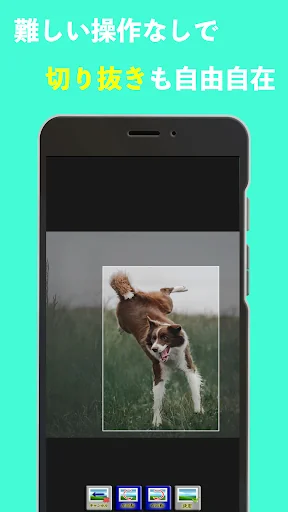
Image editor is a free image editing app that allows you to easily edit images such as resizing, cropping images, and mosaics. Functions such as resizing and cropping photos and images can be used with simple operations. It can be used in various situations such as SNS icon creation, image editing & image processing using resizing and image cropping. It is convenient because you can easily resize the image when sending it to the feature phone. It is recommended for those who want to edit images for free, but feel that other apps are complicated and difficult to operate. You can edit images without stress.
<font color="fuchsia"> <b>
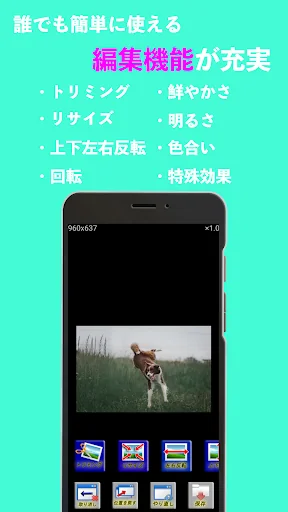
The following image processing functions are available.
-Jpg / png conversion: You can convert to JPEG or PNG file format.
-Crop: You can crop or crop the image.
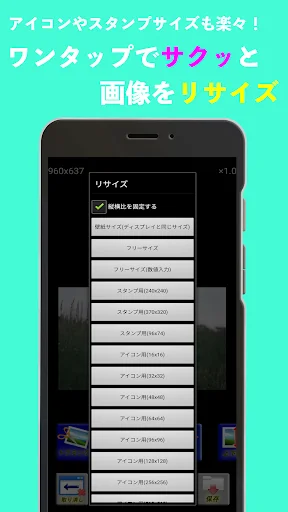
-Resize / Image reduction: You can reduce the image or change the image size such as enlargement. Please use it when sending to a feature phone that needs to be resized, or for creating icons and line stamps.
-Reverse / Rotate: Rotate / reverse is possible.
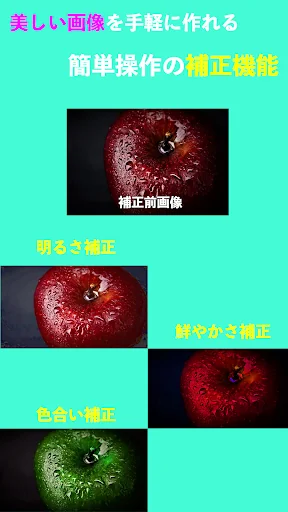
-Tint: You can adjust the shade.
・ Vividness: You can adjust the vividness.
-Brightness: You can adjust the brightness.
-Special effects: You can add special effects such as mosaic and blur.
-Partial effect: You can add special effects such as mosaic and blur to a part of the image.
<font color="fuchsia"> <b>
-Full image editing and photo editing functions !! Even beginners of smartphones can easily process images.
・ Simple and easy-to-use image editing / photo editing screen !!
・ You can also make a perfect wallpaper on the screen !!
・ Easy-to-use trimming function !!
-The resizing function allows you to reduce the size of the image and create stamps! !!
<font color="fuchsia"> <b>
* If the image quality deteriorates, uncheck "Settings-> Image display settings-> Resize and display." From the top screen.
The image quality will be better, but the size of the image will be larger, so it will take longer to forcibly terminate or edit the image due to memory. Please be careful for older models.
<font color="fuchsia"> <b>
* If you forcibly terminate, please stop other apps before using the image editor because there is a possibility of memory shortage. Also, uncheck "Settings-> Function settings-> Use cancel function" from the top screen. You will not be able to use the undo function, but the operation when editing an image will be more comfortable.
<font color="fuchsia"> <b>
Due to a change in Android specifications, images can only be saved in specific folders. If you cannot save the image, please try the following solutions.
1. Set the app version to 1.3.0 on Google Play. For the version of the app, start the app and check the version information in the settings.
2. Launch the app.
3. Select "Settings" on the top screen
4. Check "Specify the save location."
5. In "Select save location", set to "Download /", "DCIM /", "Pictures /", or "Documents /".
* You can also use "DCIM / Camera". If it is under the above folder, there is no problem.
If all else fails, please email us.</b></font></b></font></b></font></b></font></b></font>
<font color="fuchsia"> <b>
The following image processing functions are available.
-Jpg / png conversion: You can convert to JPEG or PNG file format.
-Crop: You can crop or crop the image.
-Resize / Image reduction: You can reduce the image or change the image size such as enlargement. Please use it when sending to a feature phone that needs to be resized, or for creating icons and line stamps.
-Reverse / Rotate: Rotate / reverse is possible.
-Tint: You can adjust the shade.
・ Vividness: You can adjust the vividness.
-Brightness: You can adjust the brightness.
-Special effects: You can add special effects such as mosaic and blur.
-Partial effect: You can add special effects such as mosaic and blur to a part of the image.
<font color="fuchsia"> <b>
-Full image editing and photo editing functions !! Even beginners of smartphones can easily process images.
・ Simple and easy-to-use image editing / photo editing screen !!
・ You can also make a perfect wallpaper on the screen !!
・ Easy-to-use trimming function !!
-The resizing function allows you to reduce the size of the image and create stamps! !!
<font color="fuchsia"> <b>
* If the image quality deteriorates, uncheck "Settings-> Image display settings-> Resize and display." From the top screen.
The image quality will be better, but the size of the image will be larger, so it will take longer to forcibly terminate or edit the image due to memory. Please be careful for older models.
<font color="fuchsia"> <b>
* If you forcibly terminate, please stop other apps before using the image editor because there is a possibility of memory shortage. Also, uncheck "Settings-> Function settings-> Use cancel function" from the top screen. You will not be able to use the undo function, but the operation when editing an image will be more comfortable.
<font color="fuchsia"> <b>
Due to a change in Android specifications, images can only be saved in specific folders. If you cannot save the image, please try the following solutions.
1. Set the app version to 1.3.0 on Google Play. For the version of the app, start the app and check the version information in the settings.
2. Launch the app.
3. Select "Settings" on the top screen
4. Check "Specify the save location."
5. In "Select save location", set to "Download /", "DCIM /", "Pictures /", or "Documents /".
* You can also use "DCIM / Camera". If it is under the above folder, there is no problem.
If all else fails, please email us.</b></font></b></font></b></font></b></font></b></font>
Profile & Insights
Everything we know — and don't — about this app and its company.
Identification
- App name
- 画像リサイズ・写真編集・モザイク - 「画像の編集屋さん」
- Developer
- jn
- Bundle ID
- com.jun.shop_image_editing
- App Store URL
- Open in App Store
- Category
- Video Players & Editors
- Content rating
- Not found
- Languages
- Not found
Company
- Website
- nrssjr.github.io
- Tagline
- Not found
- Description
- Not found
- Founded
- Not found
- HQ / Address
- Not found
- Employees
- Not found
- Logo
- Not found
Revenue
- Verified revenue / mo
- Not found
- AI revenue estimate / mo
- Not found
- AI annual estimate
- Not found
- ML model estimate / mo
- $926/mo
- Top-grossing rank
- Not found
- All-time revenue
- Not found
- Pricing
- Not found
Founder
- Name
- Not found
- X / Twitter
- Not found
- Not found
- GitHub
- Not found
- X followers
- Not found
- Public statements
- Not found
Funding
- Total raised
- Not found
- Last round
- Not found
- Investors
- Not found
- Crunchbase
- Not found
- AngelList
- Not found
Press & Links
- Articles found
- Not found
- Listed on
- Not found
- Blog
- Not found
- Press / News
- Not found
Contacts & Socials
- Socials
- Not found
- Not found
- Phone
- Not found
- Contact page
- Not found
- About page
- Not found
📈Ratings growth6,632 ratings+14% lifetimeShow 3-year history estimate ▾
Tracked (1 weeks) Pre-tracking estimate (37 weeks) · model-based, ±5% noise · anchored to release date and current value
Profile is built from iTunes Lookup + developer site scrape + ML revenue model. Empty fields show "Not found" — additional sources (Crunchbase, X, IndieHackers, Acquire.com) coming.
More by jn
View all →More Video Players & Editors
TikTok
★ 4.5 · 23,257,202 reviews
MX Player
★ 4.2 · 13,979,081 reviews
CapCut - Video Editor
★ 3.5 · 12,702,185 reviews
VivaVideo - Video Cut & Editor
★ 4.3 · 12,348,610 reviews
Likee - Short Video Community
★ 4.4 · 11,403,905 reviews
Kwai - Cool Video & Social Fun
★ 4.0 · 10,870,105 reviews
SnackVideo
★ 4.5 · 8,496,328 reviews
YouCut - Video Editor & Maker
★ 4.8 · 8,441,660 reviews
Browse BU Analytics
📚 All 55,000+ Books
🜍 Alchemy & Hermeticism
🔮 Magic & Ritual
🌙 Witchcraft & Paganism
⭐ Astrology & Cosmology
🃏 Divination & Tarot
📜 Video Players & Editors
✡️ Kabbalah & Jewish Mysticism
🕉️ Mysticism & Contemplation
🕊️ Theosophy & Anthroposophy
🏛️ Freemasonry & Secret Societies
👻 Spiritualism & Afterlife
📖 Sacred Texts & Gnosticism
👁️ Supernatural & Occult Fiction
🧘 Spiritual Development
📚 Esoteric History & Biography
Info
About BU Analytics