82
BU Score
Excellent
Microsoft OneNote: Save Notes
✍️ BU Analytics Review
“
Microsoft OneNote: Save Notes is an Android app from Microsoft Corporation in the Productivity category, currently rated 4.6★ across 1,474,045 ratings. Initial signal reads as mixed reviews — supporters praise core features while critics cite stability/value gaps.
Our BU Score puts it at 82 — Excellent (strong product-market fit). For a Productivity app, that means strong product-market fit.
Track changes month-over-month in the Performance section below — live snapshot history and revenue forecast included.
creator
📊 Performance Tracking LIVE
Loading…
Rating
—
Reviews
—
Forecast Revenue / mo
—
Snapshots tracked
0
since first record
Range:
💰 Forecast Revenue / mo
MODELRevenue forecast computed from BU's 234 trigger model on each snapshot. Calibrated against ground-truth from 58 verified-revenue apps.
🔬Forecast Breakdown — Why This Estimate?Top 3 of 3 triggers
Our ML model uses 200+ signals from public data. These are the most influential for this app:
| High install base (1,474,045 ratings)METRIC | +$12,000 | |
| Excellent rating (4.6★)METRIC | +$2,200 | |
| Ad-supported / freemiumMETRIC | +$600 |
METRIC = structural app data · REVIEW = mined from user reviews · ✓ VERIFIED = Stripe-verified anchor (TrustMRR)
📈 Reviews Growth
LIVECumulative review count from first BU snapshot. Each point = a tracked update.
⭐ Rating Trend
LIVEAverage rating evolution. Updates with each new review batch.
🗓️ Snapshot Timeline
HISTORYEach bar shows a tracked update and the metric delta from the previous snapshot.
App Specs
🔐 Own this app? Claim & verify MRR →🔖 v16.0.19822.20114🔄 updated 1w ago📂 Productivity💰 Free
📝 About this app
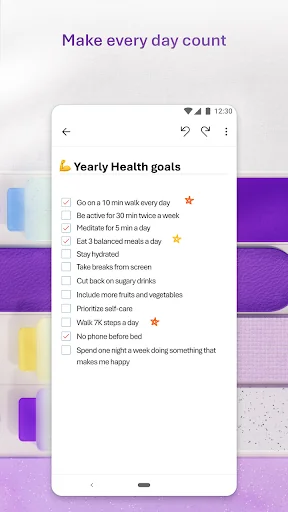
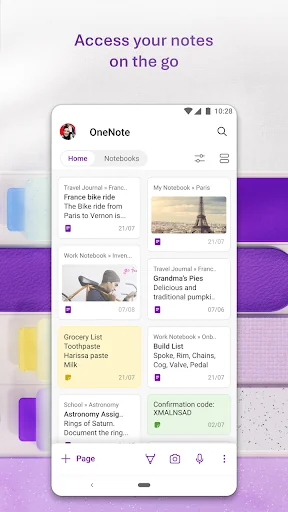
Organize your thoughts, discoveries, and ideas and simplify planning important moments in your life with your digital notepad. Take notes on your phone and sync them across all your devices with Microsoft OneNote.
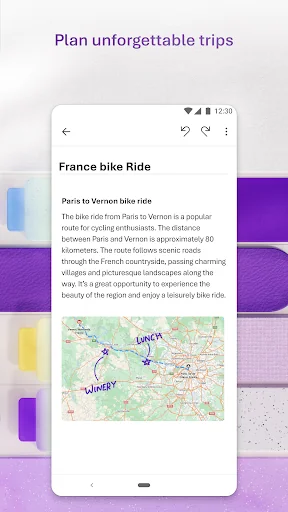
With OneNote, you can plan a big event, seize a moment of inspiration to create something new, and track your list of errands that are too important to forget. Take notes, write memos and make a digital sketchbook right on your phone. Capture pictures and add images to your notes.
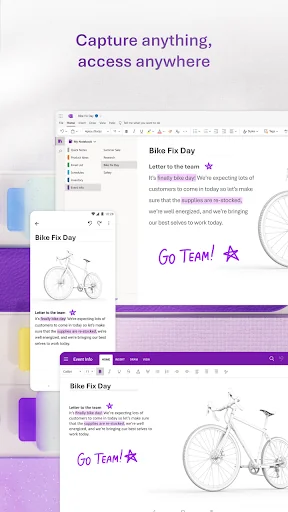
Sync notes across your devices to access them anytime, anywhere. Save ideas and check your list at home, in the office, or on the go across your devices. Search your notes quickly and effortlessly.
Take notes, share ideas, organize and collaborate with Microsoft OneNote today.
Homepage & Quick Capture Bar
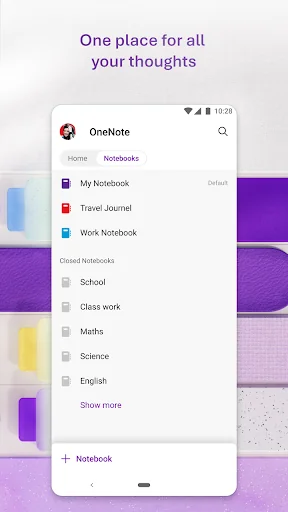
• Find all notes from your connected accounts in one place to easily create, find, & act on your notes
• Now with Samsung Notes integration
• Capture text, voice, ink or images to your notepad with Quick Capture
• Capture notes in ink. Click the pen button & write down your thoughts
Scan Pictures & Extract Text
• Notes Scanner: Scan documents, pictures, or files to extract notes
• Capture images to extract text from documents, files, & more
• Apply different filters to change colors, add ink, crop images & more
Audio Notes
• Take accurate voice notes with voice dictation
• Click the Mic button to begin recording, then click it again to end recording & save the file
• Dictate notes in 27 languages (note some languages are in preview) & use Auto-Punctutation to automatically format your notes
Capture Content & Get Organized
• Write notes, draw & clip things from the web to add to your notebook
• Use OneNote’s flexible canvas to place content anywhere you want
Take Notes & Achieve More
• Organize your notes using to-do lists, follow up items, marks for what’s important & custom labels
• Use OneNote as a notebook, journal or a notepad
Save Ideas At The Speed of Light
• OneNote syncs your notes across all devices & lets multiple people work on the content together, at the same time
• Notepad badge hovers on screen & lets you quickly write your thoughts down any time
• Sticky notes are helpful for quick memos
Collaborate & Share Notes
• Take meeting notes, brainstorm projects, & draw attention to important points
• Take notes & save ideas across your favorite devices, no matter what device your team likes to use
• Search your notes with a fast & powerful search function
Better Together With Microsoft Office
• OneNote is part of the Office family & works great with your favorite apps, such as Excel or Word, to help you do more
Write notes, save ideas & keep up with your to-do list with Microsoft OneNote.
You can find answers to frequently asked questions about OneNote for Android at http://aka.ms/OnenoteAndroidFAQ
Requirements:
• Requires Android OS 9.0 or later.
• A free Microsoft account is required to use OneNote.
• OneNote opens existing notebooks created in Microsoft OneNote 2010 format or later.
• To sync your notes to OneDrive for Business, sign in with your organization’s Office 365 or SharePoint account.
This app is provided either by Microsoft or a third-party app publisher and is subject to a separate privacy statement and terms and conditions. Data provided through the use of this store and this app may be accessible to Microsoft or the third-party app publisher, as applicable, and transferred to, stored and processed in the United States or any other country where Microsoft or the app publisher and their affiliates or service providers maintain facilities.
Please refer to Microsoft’s End User License Agreement (EULA) for Terms of Service for OneNote on Android. By installing the app, you agree to these terms and conditions: https://support.office.com/legal?llcc=en-us&aid=OneNoteForAndroidLicenseTerms.htm. Microsoft’s privacy statement is available at https://privacy.microsoft.com/en-us/privacystatement
With OneNote, you can plan a big event, seize a moment of inspiration to create something new, and track your list of errands that are too important to forget. Take notes, write memos and make a digital sketchbook right on your phone. Capture pictures and add images to your notes.
Sync notes across your devices to access them anytime, anywhere. Save ideas and check your list at home, in the office, or on the go across your devices. Search your notes quickly and effortlessly.
Take notes, share ideas, organize and collaborate with Microsoft OneNote today.
Homepage & Quick Capture Bar
• Find all notes from your connected accounts in one place to easily create, find, & act on your notes
• Now with Samsung Notes integration
• Capture text, voice, ink or images to your notepad with Quick Capture
• Capture notes in ink. Click the pen button & write down your thoughts
Scan Pictures & Extract Text
• Notes Scanner: Scan documents, pictures, or files to extract notes
• Capture images to extract text from documents, files, & more
• Apply different filters to change colors, add ink, crop images & more
Audio Notes
• Take accurate voice notes with voice dictation
• Click the Mic button to begin recording, then click it again to end recording & save the file
• Dictate notes in 27 languages (note some languages are in preview) & use Auto-Punctutation to automatically format your notes
Capture Content & Get Organized
• Write notes, draw & clip things from the web to add to your notebook
• Use OneNote’s flexible canvas to place content anywhere you want
Take Notes & Achieve More
• Organize your notes using to-do lists, follow up items, marks for what’s important & custom labels
• Use OneNote as a notebook, journal or a notepad
Save Ideas At The Speed of Light
• OneNote syncs your notes across all devices & lets multiple people work on the content together, at the same time
• Notepad badge hovers on screen & lets you quickly write your thoughts down any time
• Sticky notes are helpful for quick memos
Collaborate & Share Notes
• Take meeting notes, brainstorm projects, & draw attention to important points
• Take notes & save ideas across your favorite devices, no matter what device your team likes to use
• Search your notes with a fast & powerful search function
Better Together With Microsoft Office
• OneNote is part of the Office family & works great with your favorite apps, such as Excel or Word, to help you do more
Write notes, save ideas & keep up with your to-do list with Microsoft OneNote.
You can find answers to frequently asked questions about OneNote for Android at http://aka.ms/OnenoteAndroidFAQ
Requirements:
• Requires Android OS 9.0 or later.
• A free Microsoft account is required to use OneNote.
• OneNote opens existing notebooks created in Microsoft OneNote 2010 format or later.
• To sync your notes to OneDrive for Business, sign in with your organization’s Office 365 or SharePoint account.
This app is provided either by Microsoft or a third-party app publisher and is subject to a separate privacy statement and terms and conditions. Data provided through the use of this store and this app may be accessible to Microsoft or the third-party app publisher, as applicable, and transferred to, stored and processed in the United States or any other country where Microsoft or the app publisher and their affiliates or service providers maintain facilities.
Please refer to Microsoft’s End User License Agreement (EULA) for Terms of Service for OneNote on Android. By installing the app, you agree to these terms and conditions: https://support.office.com/legal?llcc=en-us&aid=OneNoteForAndroidLicenseTerms.htm. Microsoft’s privacy statement is available at https://privacy.microsoft.com/en-us/privacystatement
Profile & Insights
Everything we know — and don't — about this app and its company.
Identification
- App name
- Microsoft OneNote: Save Notes
- Developer
- Microsoft Corporation
- Bundle ID
- com.microsoft.office.onenote
- App Store URL
- Open in App Store
- Category
- Productivity
- Content rating
- Not found
- Languages
- Not found
Company
- Website
- Not found
- Tagline
- Not found
- Description
- Not found
- Founded
- Not found
- HQ / Address
- Not found
- Employees
- Not found
- Logo
- Not found
Revenue
- Verified revenue / mo
- Not found
- AI revenue estimate / mo
- $4.6K ($1.0K – $10.0K)AI low
- AI annual estimate
- $54.9K/yr
- ML model estimate / mo
- $5.0K/mo
- Top-grossing rank
- Not found
- All-time revenue
- Not found
- Pricing
- Not found
Founder
- Name
- Not found
- X / Twitter
- Not found
- Not found
- GitHub
- Not found
- X followers
- Not found
- Public statements
- Not found
Funding
- Total raised
- Not found
- Last round
- Not found
- Investors
- Not found
- Crunchbase
- Not found
- AngelList
- Not found
Press & Links
- Articles found
- Not found
- Listed on
- Not found
- Blog
- Not found
- Press / News
- Not found
Contacts & Socials
- Socials
- Not found
- Not found
- Phone
- Not found
- Contact page
- Not found
- About page
- Not found
✨AI Revenue EstimateCONFIDENCE: LOW
The Android app "Microsoft OneNote: Save Notes" is estimated to generate approximately $4,575 in direct monthly revenue, with an annual estimate of $54,900. This estimate is derived from a public source indicating a total monthly app revenue of $30,000 for "Microsoft OneNote" and applying a typical Android revenue share, as the app's primary monetization is largely tied to Microsoft 365 subscriptions and enterprise licensing.
Sources mentioned: Adapty, Reddit, Google Play, Microsoft 365 Blog
Profile is built from iTunes Lookup + developer site scrape + ML revenue model. Empty fields show "Not found" — additional sources (Crunchbase, X, IndieHackers, Acquire.com) coming.
More by Microsoft Corporation
View all →Microsoft Word: Edit Documents
★ 4.8 · 16,131,978 reviews
Microsoft Outlook
★ 4.4 · 10,522,219 reviews
Microsoft 365 Copilot
★ 4.5 · 8,906,266 reviews
Microsoft Outlook
★ 4.8 · 8,891,395 reviews
Microsoft Excel: Spreadsheets
★ 4.8 · 8,862,436 reviews
Microsoft Teams
★ 4.6 · 8,580,729 reviews
Microsoft OneDrive
★ 4.6 · 7,026,381 reviews
Microsoft PowerPoint
★ 4.8 · 4,011,287 reviews
More Productivity
Microsoft Outlook
★ 4.8 · 8,891,395 reviews
Google Drive – online backup
★ 4.8 · 7,526,498 reviews
ChatGPT
★ 4.8 · 7,136,919 reviews
Yahoo Mail – Alles im Blick
★ 4.7 · 4,623,459 reviews
HP
★ 4.6 · 4,011,497 reviews
Google Docs
★ 4.8 · 3,078,214 reviews
Microsoft Word
★ 4.7 · 2,843,856 reviews
Gmail – E-Mail von Google
★ 4.7 · 2,406,337 reviews
Browse BU Analytics
📚 All 55,000+ Books
🜍 Alchemy & Hermeticism
🔮 Magic & Ritual
🌙 Witchcraft & Paganism
⭐ Astrology & Cosmology
🃏 Divination & Tarot
📜 Productivity
✡️ Kabbalah & Jewish Mysticism
🕉️ Mysticism & Contemplation
🕊️ Theosophy & Anthroposophy
🏛️ Freemasonry & Secret Societies
👻 Spiritualism & Afterlife
📖 Sacred Texts & Gnosticism
👁️ Supernatural & Occult Fiction
🧘 Spiritual Development
📚 Esoteric History & Biography
Info
About BU Analytics