
62
BU Score
Solid
Nomedia
โ๏ธ BU Analytics Review
“
Nomedia is an Android app from g(x) labs in the Tools category, currently rated 3.6โ across 17,201 ratings. Initial signal reads as largely positive sentiment, users highlighting consistency and feature depth.
Our BU Score puts it at 62 โ Solid (established niche player). For a Tools app, that means established niche player.
Track changes month-over-month in the Performance section below โ live snapshot history and revenue forecast included.
creator
๐ Performance Tracking LIVE
Loadingโฆ
Rating
โ
Reviews
โ
Forecast Revenue / mo
โ
Snapshots tracked
0
since first record
Range:
๐ฐ Forecast Revenue / mo
MODELRevenue forecast computed from BU's 234 trigger model on each snapshot. Calibrated against ground-truth from 58 verified-revenue apps.
๐ฌForecast Breakdown โ Why This Estimate?Top 3 of 3 triggers
Our ML model uses 200+ signals from public data. These are the most influential for this app:
| Mid install base (17,201 ratings)METRIC | +$5,500 | |
| Mature app (12y old)METRIC | +$1,500 | |
| Ad-supported / freemiumMETRIC | +$600 |
METRIC = structural app data ยท REVIEW = mined from user reviews ยท โ VERIFIED = Stripe-verified anchor (TrustMRR)
๐ Reviews Growth
LIVECumulative review count from first BU snapshot. Each point = a tracked update.
โญ Rating Trend
LIVEAverage rating evolution. Updates with each new review batch.
๐๏ธ Snapshot Timeline
HISTORYEach bar shows a tracked update and the metric delta from the previous snapshot.
๐ v4.6.3๐ updated 4mo ago๐ Tools๐ฐ Free๐บ Ad-supported๐ Launched 2013 (12y old)
๐ About this app
โจ Core features of this App
1) ๐ Media Scanner: automatically scan all folders to find out all the media files, including those not in the media store.
โ On Android 11 and above, You need to manually add the folders to be scanned.
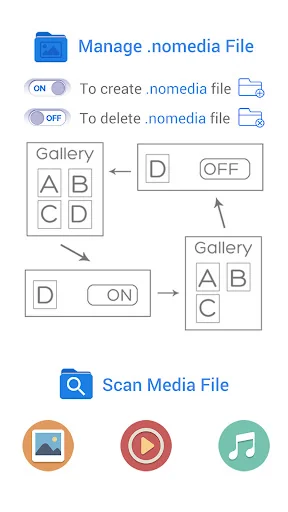
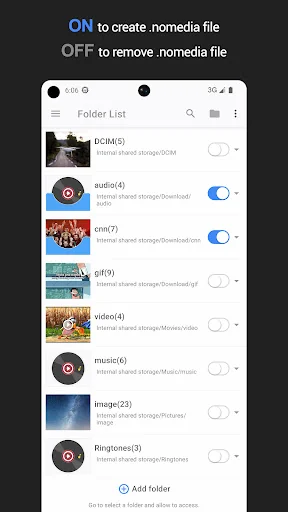
2) ๐ Create or delete the ".nomedia" file in any folders: "ON" means to create a .nomedia file in a folder, "OFF" means to delete the .nomedia file from a folder.
๐ซ There are two view modes to manage, viewing media files and .nomedia files
1) Folder list mode: more convenient, the default mode.
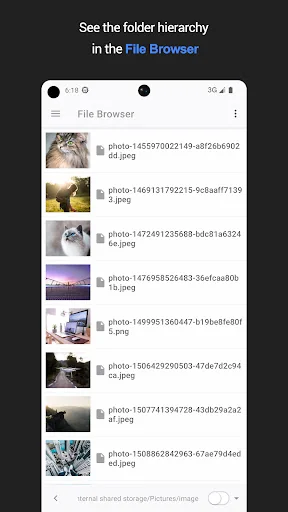
2) File browser mode: advanced mode, works like a file manger.
โน๏ธโป What can it do?
๐ 1. Create ".nomedia" file in the containing directory signaling the media scanner to ignore media, so as to hiding useless and redundant media file(image/photo, music, video) in Gallery, Music Player, Video Player and other APP base on media store.
๐ 2. Use as a media scanner, find out all the media file(image/photo, music, video) on your device, and update to the media store, so you can view the media file in Gallery, Music Player, Video Player and other APP base on media store.
โน๏ธโป What is this:
This APP can help you to create or remove a file called .nomedia in a
folder contains media files easily. And refresh MediaStore immediately!
โน๏ธโป What is a .nomedia file?
.nomedia file signaling the media scanner to ignore media in the containing directory and its subdirectories. This prevents media scanner from reading your media files(image, video, audio) and providing them to other apps(Gallery, Music Player, Video Player etc.) through the MediaStore content provider.
If you want to scan all the photo/image/music/video on your device;
If the Gallery, Media Player always load some pictures, videos or audios which you do think are useless, redundant.
Then this APP may be what you need.
๐Note:
The main purpose of this app is let the junk media files(which we do think) don't show in some APP(such as the Gallery, Play Music) based on MediaStore. It is not a tool to hide files and protect your privacy, as files may be show in file manager APPs.
โน๏ธโป How to use:
1. The application will scan picture, video, audio files from the MediaStore and file system, and then categorizes them by folder.
2. When a folder is set to "ON," means that media files in this folder will NOT be scanned by MediaStore, otherwise will be scanned.
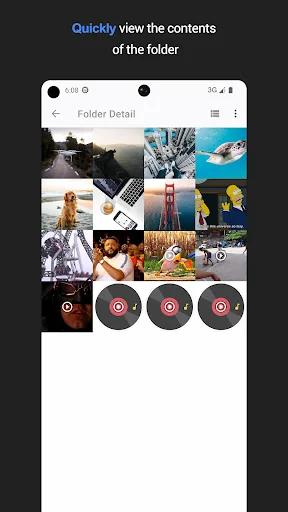
3. In the list view, click the folder preview to view folder detail.
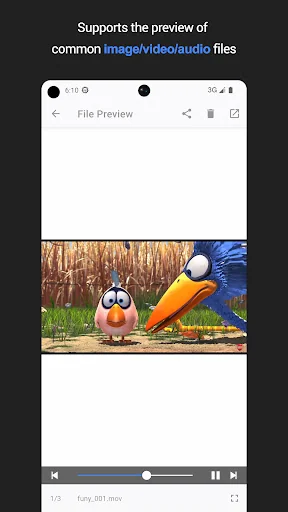
4. In the grid view, click the file preview can play the media file.
โ ๏ธ Warning: This APP may NOT work on SOME devices. It may cause files to be deleted automatically on SOME Samsung devices. Anyway you can try it out. It's a good idea to try it on unimportant folders/files firstly.
1) ๐ Media Scanner: automatically scan all folders to find out all the media files, including those not in the media store.
โ On Android 11 and above, You need to manually add the folders to be scanned.
2) ๐ Create or delete the ".nomedia" file in any folders: "ON" means to create a .nomedia file in a folder, "OFF" means to delete the .nomedia file from a folder.
๐ซ There are two view modes to manage, viewing media files and .nomedia files
1) Folder list mode: more convenient, the default mode.
2) File browser mode: advanced mode, works like a file manger.
โน๏ธโป What can it do?
๐ 1. Create ".nomedia" file in the containing directory signaling the media scanner to ignore media, so as to hiding useless and redundant media file(image/photo, music, video) in Gallery, Music Player, Video Player and other APP base on media store.
๐ 2. Use as a media scanner, find out all the media file(image/photo, music, video) on your device, and update to the media store, so you can view the media file in Gallery, Music Player, Video Player and other APP base on media store.
โน๏ธโป What is this:
This APP can help you to create or remove a file called .nomedia in a
folder contains media files easily. And refresh MediaStore immediately!
โน๏ธโป What is a .nomedia file?
.nomedia file signaling the media scanner to ignore media in the containing directory and its subdirectories. This prevents media scanner from reading your media files(image, video, audio) and providing them to other apps(Gallery, Music Player, Video Player etc.) through the MediaStore content provider.
If you want to scan all the photo/image/music/video on your device;
If the Gallery, Media Player always load some pictures, videos or audios which you do think are useless, redundant.
Then this APP may be what you need.
๐Note:
The main purpose of this app is let the junk media files(which we do think) don't show in some APP(such as the Gallery, Play Music) based on MediaStore. It is not a tool to hide files and protect your privacy, as files may be show in file manager APPs.
โน๏ธโป How to use:
1. The application will scan picture, video, audio files from the MediaStore and file system, and then categorizes them by folder.
2. When a folder is set to "ON," means that media files in this folder will NOT be scanned by MediaStore, otherwise will be scanned.
3. In the list view, click the folder preview to view folder detail.
4. In the grid view, click the file preview can play the media file.
โ ๏ธ Warning: This APP may NOT work on SOME devices. It may cause files to be deleted automatically on SOME Samsung devices. Anyway you can try it out. It's a good idea to try it on unimportant folders/files firstly.
Profile & Insights
Everything we know โ and don't โ about this app and its company.
Identification
- App name
- Nomedia
- Developer
- g(x) labs
- Bundle ID
- com.mrck.nomedia
- App Store URL
- Open in App Store
- Category
- Tools
- Content rating
- Not found
- Languages
- Not found
Company
- Website
- gxlabs-apps.web.app
- Tagline
- Not found
- Description
- Not found
- Founded
- Not found
- HQ / Address
- Not found
- Employees
- Not found
- Logo
- Not found
Revenue
- Verified revenue / mo
- Not found
- AI revenue estimate / mo
- Not found
- AI annual estimate
- Not found
- ML model estimate / mo
- $1.1K/mo
- Top-grossing rank
- Not found
- All-time revenue
- Not found
- Pricing
- Not found
Founder
- Name
- Not found
- X / Twitter
- Not found
- Not found
- GitHub
- Not found
- X followers
- Not found
- Public statements
- Not found
Funding
- Total raised
- Not found
- Last round
- Not found
- Investors
- Not found
- Crunchbase
- Not found
- AngelList
- Not found
Press & Links
- Articles found
- Not found
- Listed on
- Not found
- Blog
- Not found
- Press / News
- Not found
Contacts & Socials
- Socials
- Not found
- Not found
- Phone
- Not found
- Contact page
- Not found
- About page
- Not found
๐Ratings growth17,201 ratings+20% lifetimeShow 3-year history estimate โพ
Tracked (1 weeks) Pre-tracking estimate (37 weeks) ยท model-based, ยฑ5% noise ยท anchored to release date and current value
Profile is built from iTunes Lookup + developer site scrape + ML revenue model. Empty fields show "Not found" โ additional sources (Crunchbase, X, IndieHackers, Acquire.com) coming.
More Tools
Phone by Google
โ
4.5 ยท 47,248,471 reviews
Google Play services
โ
4.3 ยท 44,619,167 reviews
โ
4.1 ยท 29,135,018 reviews
Gboard - the Google Keyboard
โ
4.5 ยท 18,500,531 reviews
SHAREit: Transfer, Share Files
โ
4.3 ยท 18,247,718 reviews
gov.br
โ
4.5 ยท 12,551,225 reviews
MyTelkomsel โ Buy Internet
โ
3.7 ยท 11,917,556 reviews
myIM3: Data Plan & Buy Package
โ
4.4 ยท 10,992,500 reviews
Browse BU Analytics
๐ All 55,000+ Books
๐ Alchemy & Hermeticism
๐ฎ Magic & Ritual
๐ Witchcraft & Paganism
โญ Astrology & Cosmology
๐ Divination & Tarot
๐ Tools
โก๏ธ Kabbalah & Jewish Mysticism
๐๏ธ Mysticism & Contemplation
๐๏ธ Theosophy & Anthroposophy
๐๏ธ Freemasonry & Secret Societies
๐ป Spiritualism & Afterlife
๐ Sacred Texts & Gnosticism
๐๏ธ Supernatural & Occult Fiction
๐ง Spiritual Development
๐ Esoteric History & Biography
Info
About BU Analytics