70
BU Score
Strong
MDScan
✍️ bumetric analysis
“
MDScan is an Android app from MIXAImaging in the Business category, currently rated 4.2★ across 48,183 ratings. Initial signal reads as largely positive sentiment, users highlighting consistency and feature depth.
Our BU Score puts it at 70: Strong (healthy traction). For a Business app, that means healthy traction.
Track changes month-over-month in the Performance section below: live snapshot history and revenue forecast included.
📊 Performance Tracking LIVE
Loading…
Rating
—
Reviews
—
Forecast Revenue / mo
—
Snapshots tracked
0
since first record
Range:
💰 Forecast Revenue / mo
MODELRevenue forecast computed from BU's 234 trigger model on each snapshot. Calibrated against ground-truth from 58 verified-revenue apps.
🔬Forecast Breakdown — Why This Estimate?Top 3 of 3 triggers
Our ML model uses 200+ signals from public data. These are the most influential for this app:
| Mid install base (48,183 ratings)METRIC | +$5,500 | |
| Good rating (4.2★)METRIC | +$800 | |
| Ad-supported / freemiumMETRIC | +$600 |
METRIC = structural app data · REVIEW = mined from user reviews · ✓ VERIFIED = Stripe-verified anchor (TrustMRR)
📈 Reviews Growth
LIVECumulative review count from first BU snapshot. Each point = a tracked update.
⭐ Rating Trend
LIVEAverage rating evolution. Updates with each new review batch.
🗓️ Snapshot Timeline
HISTORYEach bar shows a tracked update and the metric delta from the previous snapshot.
App Specs
🔐 Own this app? Claim & verify MRR →🔖 v3.9.97🔄 updated 2mo ago📂 Business💰 Free
📝 About this app
"MDScan, or Mobile Doc Scanner for Android, is one of the best I have found."
TJ McCue, Senior Contributor, Forbes (https://www.forbes.com/sites/tjmccue/2020/04/24/no-desktop-scanner-use-this-android-mobile-document-scanner-for-personal-and-work)
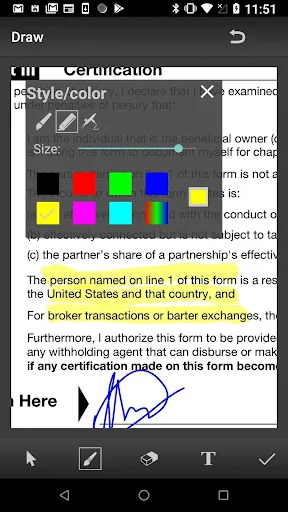
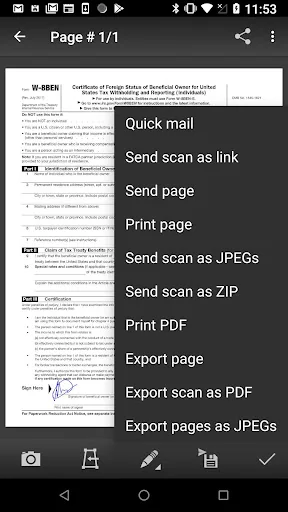
Take a picture with your camera, edit it using the many enhancing features, save into a preferred format and share on social media, email, cloud services.
Not satisfied? We’ll refund you!
MDScan is a mobile doc scanner that allows you to scan any type of document using your phone camera. This could be receipts, text pages, coupons, posters, magazine articles, invoices, pictures, and any printed documents.
How does it work?
1. Take a picture with your camera
2. Choose an editing option (you can select “unenhanced”)
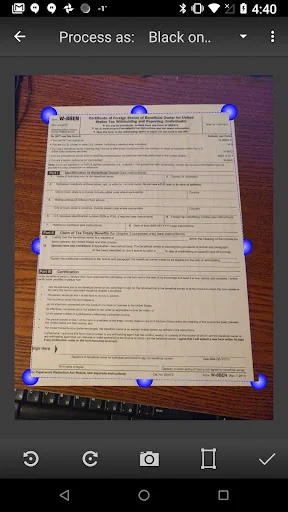
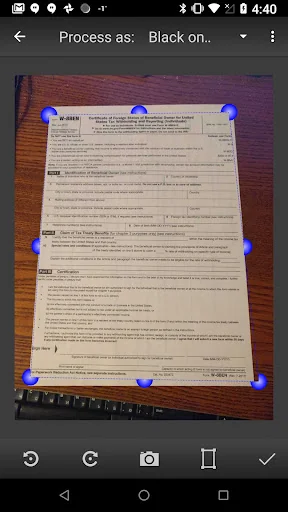
3. Easily adjust the scan area using the 4 borders on the page
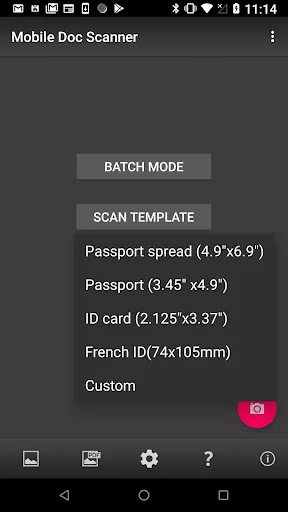
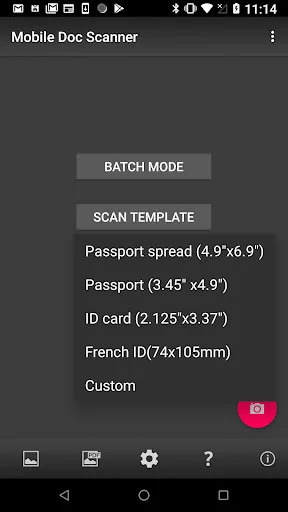
4. Confirm the scan to the set dimensions (ready presets available)
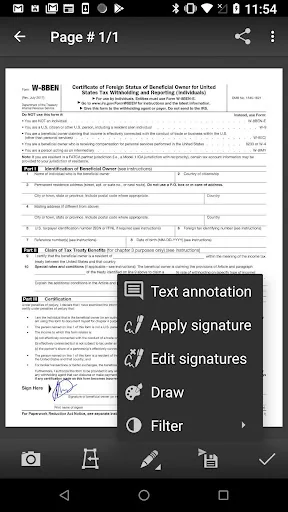
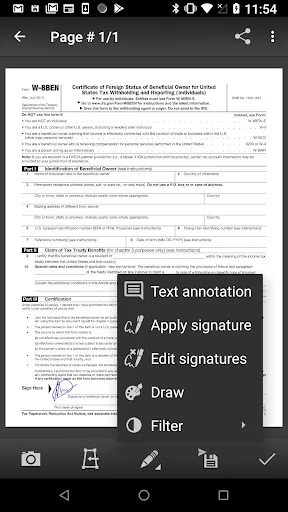
5. Choose filters to enhance the quality (optional)
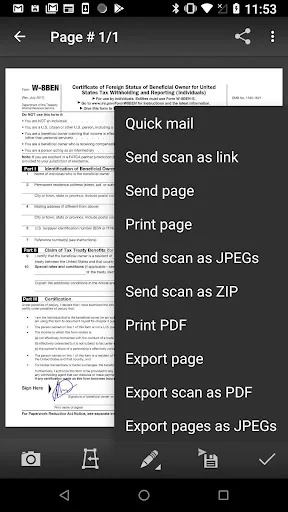
6. Save and Export into a PDF or JPG
7. Share on Social Media, Email, Cloud Servers
More detailed information:
This mobile scanner is perfect to use on the go - anywhere and anytime. With a variety of presets, MDScan guarantees great experience and its automatized functions are suitable for the busiest users looking to scan PDF documents with their mobile device’s camera. If you are looking for a mobile scanning application that automatically detects borders, corrects distortion, and equalizes brightness to create clear, legible documents, you are definitely on the right page.
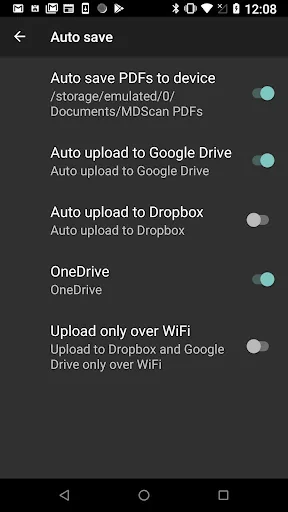
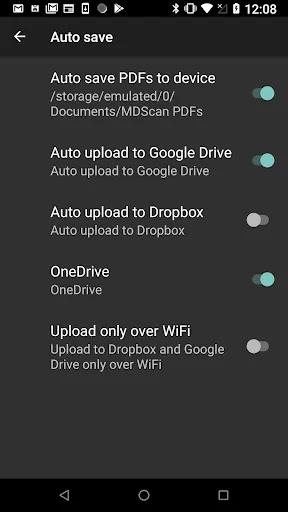
Speaking of great user experience and automatic functions, the MDScan integrates seamlessly with cloud storage services such as Google Drive and Dropbox. In addition, you can send your scanned documents with email services, Facebook (Messenger), Twitter, and other apps if installed on your device.
This scanner app shines in terms of uploading but has no second when it comes to converting pictures taken from your phone's camera into legitimate documents you can use for business purposes.
With the Mobile Doc Scanner (MDScan), you can now add multiple pages easier than ever. Whenever you want to scan a new page, you just need to press the caption button and you’re all set! All of the scanned documents and pages are stored and available under the “My Scans” field.
You can also try the Batch mode, which allows you to scan multiple pages within seconds! There is a feature called “Process page laters (spy mode)” that allows you to scan as many documents as you want to without facing any processing delays.
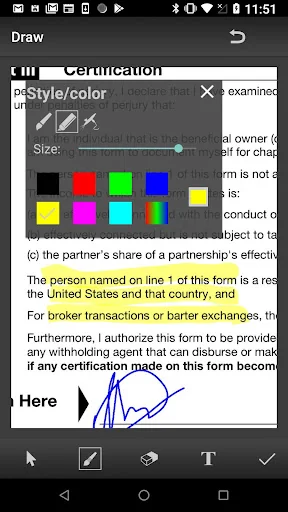
Of course, you can work with a photo or document that is already saved in your file system. Whether a PDF file or a regular picture, you can use the same editing options as if you just scanned a picture with your camera.
Let’s sum up what you get downloading the MDScan:
● Convert any image into a PDF format.
● Document edge detection and perspective correction.
● Improved image quality
● Quick scan and multi-page documents
● Share easily and upload instantly
● Money-back guarantee
User satisfaction is our main goal and if you have any questions or suggestions on how we can improve the Mobile Doc Scanner (MDScan), contact us at our support email. We do our best to respond as soon as possible!
TJ McCue, Senior Contributor, Forbes (https://www.forbes.com/sites/tjmccue/2020/04/24/no-desktop-scanner-use-this-android-mobile-document-scanner-for-personal-and-work)
Take a picture with your camera, edit it using the many enhancing features, save into a preferred format and share on social media, email, cloud services.
Not satisfied? We’ll refund you!
MDScan is a mobile doc scanner that allows you to scan any type of document using your phone camera. This could be receipts, text pages, coupons, posters, magazine articles, invoices, pictures, and any printed documents.
How does it work?
1. Take a picture with your camera
2. Choose an editing option (you can select “unenhanced”)
3. Easily adjust the scan area using the 4 borders on the page
4. Confirm the scan to the set dimensions (ready presets available)
5. Choose filters to enhance the quality (optional)
6. Save and Export into a PDF or JPG
7. Share on Social Media, Email, Cloud Servers
More detailed information:
This mobile scanner is perfect to use on the go - anywhere and anytime. With a variety of presets, MDScan guarantees great experience and its automatized functions are suitable for the busiest users looking to scan PDF documents with their mobile device’s camera. If you are looking for a mobile scanning application that automatically detects borders, corrects distortion, and equalizes brightness to create clear, legible documents, you are definitely on the right page.
Speaking of great user experience and automatic functions, the MDScan integrates seamlessly with cloud storage services such as Google Drive and Dropbox. In addition, you can send your scanned documents with email services, Facebook (Messenger), Twitter, and other apps if installed on your device.
This scanner app shines in terms of uploading but has no second when it comes to converting pictures taken from your phone's camera into legitimate documents you can use for business purposes.
With the Mobile Doc Scanner (MDScan), you can now add multiple pages easier than ever. Whenever you want to scan a new page, you just need to press the caption button and you’re all set! All of the scanned documents and pages are stored and available under the “My Scans” field.
You can also try the Batch mode, which allows you to scan multiple pages within seconds! There is a feature called “Process page laters (spy mode)” that allows you to scan as many documents as you want to without facing any processing delays.
Of course, you can work with a photo or document that is already saved in your file system. Whether a PDF file or a regular picture, you can use the same editing options as if you just scanned a picture with your camera.
Let’s sum up what you get downloading the MDScan:
● Convert any image into a PDF format.
● Document edge detection and perspective correction.
● Improved image quality
● Quick scan and multi-page documents
● Share easily and upload instantly
● Money-back guarantee
User satisfaction is our main goal and if you have any questions or suggestions on how we can improve the Mobile Doc Scanner (MDScan), contact us at our support email. We do our best to respond as soon as possible!
Profile & Insights
Everything we know — and don't — about this app and its company.
Identification
- App name
- MDScan
- Developer
- MIXAImaging
- Bundle ID
- com.stoik.mdscanlite
- App Store URL
- Open in App Store
- Category
- Business
- Content rating
- Not found
- Languages
- Not found
Company
- Website
- Not found
- Tagline
- Not found
- Description
- Not found
- Founded
- Not found
- HQ / Address
- Not found
- Employees
- Not found
- Logo
- Not found
Revenue
- Verified revenue / mo
- Not found
- AI revenue estimate / mo
- Not found
- AI annual estimate
- Not found
- ML model estimate / mo
- $1.6K/mo
- Top-grossing rank
- Not found
- All-time revenue
- Not found
- Pricing
- Not found
Founder
- Name
- Not found
- X / Twitter
- Not found
- Not found
- GitHub
- Not found
- X followers
- Not found
- Public statements
- Not found
Funding
- Total raised
- Not found
- Last round
- Not found
- Investors
- Not found
- Crunchbase
- Not found
- AngelList
- Not found
Press & Links
- Articles found
- Not found
- Listed on
- Not found
- Blog
- Not found
- Press / News
- Not found
Contacts & Socials
- Socials
- Not found
- Not found
- Phone
- Not found
- Contact page
- Not found
- About page
- Not found
Profile is built from iTunes Lookup + developer site scrape + ML revenue model. Empty fields show "Not found" — additional sources (Crunchbase, X, IndieHackers, Acquire.com) coming.
Full revenue analysis
Read the article-style breakdown for MDScan: category rank, percentile, growth signal, comparable apps, and how the forecast is calibrated against verified-MRR anchors in this niche.