55
BU Score
Solid
Event Countdown Widget
✍️ bumetric analysis
“
Event Countdown Widget is an Android app from JimSoft in the Lifestyle category, currently rated 3.0★ across 10,197 ratings. Initial signal reads as largely positive sentiment, users highlighting consistency and feature depth.
Our BU Score puts it at 55: Solid (established niche player). For a Lifestyle app, that means established niche player.
Track changes month-over-month in the Performance section below: live snapshot history and revenue forecast included.
📊 Performance Tracking LIVE
Loading…
Rating
—
Reviews
—
Forecast Revenue / mo
—
Snapshots tracked
0
since first record
Range:
💰 Forecast Revenue / mo
MODELRevenue forecast computed from BU's 234 trigger model on each snapshot. Calibrated against ground-truth from 58 verified-revenue apps.
🔬Forecast Breakdown — Why This Estimate?Top 4 of 4 triggers
Our ML model uses 200+ signals from public data. These are the most influential for this app:
| Mid install base (10,197 ratings)METRIC | +$5,500 | |
| Below-average rating (3.0★)METRIC | −$1,500 | |
| Mature app (13y old)METRIC | +$1,500 | |
| Ad-supported / freemiumMETRIC | +$600 |
METRIC = structural app data · REVIEW = mined from user reviews · ✓ VERIFIED = Stripe-verified anchor (TrustMRR)
📈 Reviews Growth
LIVECumulative review count from first BU snapshot. Each point = a tracked update.
⭐ Rating Trend
LIVEAverage rating evolution. Updates with each new review batch.
🗓️ Snapshot Timeline
HISTORYEach bar shows a tracked update and the metric delta from the previous snapshot.
App Specs
🔐 Own this app? Claim & verify MRR →🔖 v2.1.0🔄 updated 2y ago📂 Lifestyle💰 Free📺 Ad-supported🚀 Launched 2012 (13y old)
📝 About this app
<b>Don't forget the important dates of your life!</b>
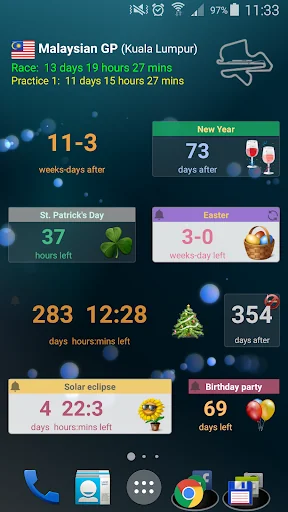
Organize your days till Christmas, your Mom's birthday, Thanksgiving, Easter, St. Patrick's day, vacation, your anniversary or any events that you don't want to forget. Never miss an important day again!
<b>This is a countdown widget for your home screen to remind you of the meaningful dates in your life.</b>
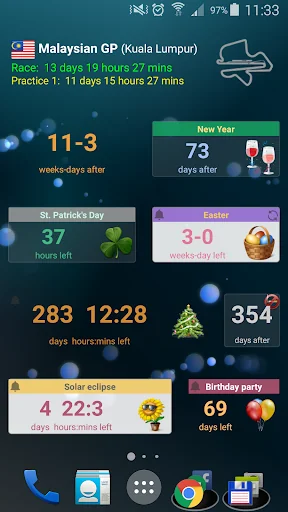
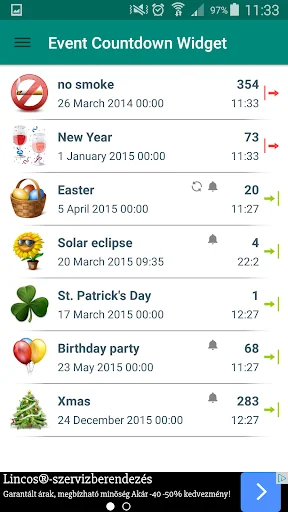
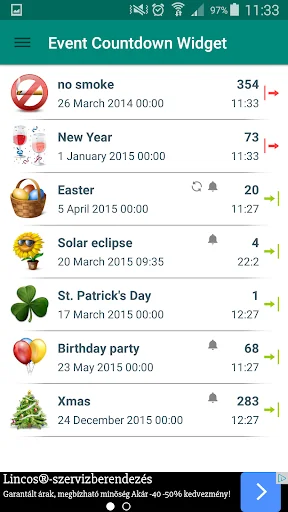
It shows the number of weeks/days/hours/mins left to (or after from) a specified date. You can add several countdown widgets to your home screen and you can easily customize them at the creation or later by tapping on them. You can export and import widget datas too.
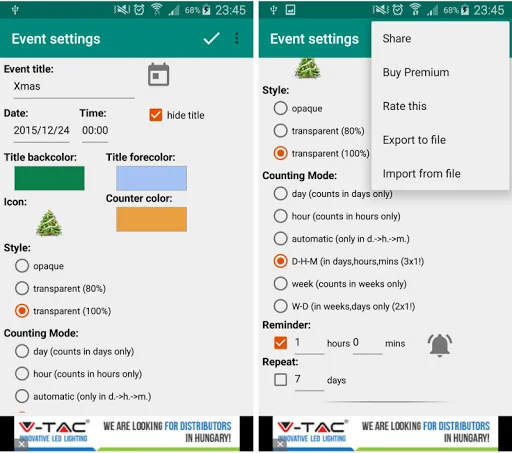
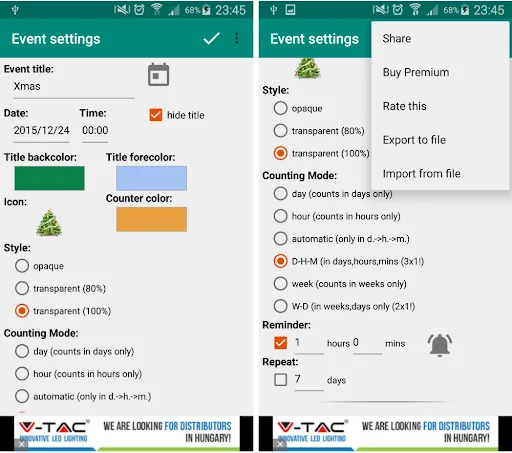
You must set <b>a title and a date</b>. You can choose event from Google Calendar (fills title and date). After these you can set optionally:
- set <b>time</b>
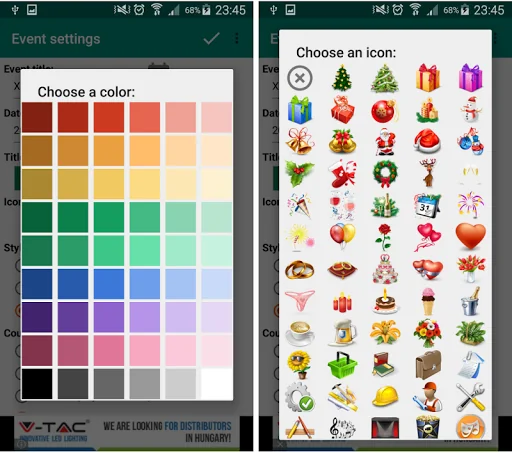
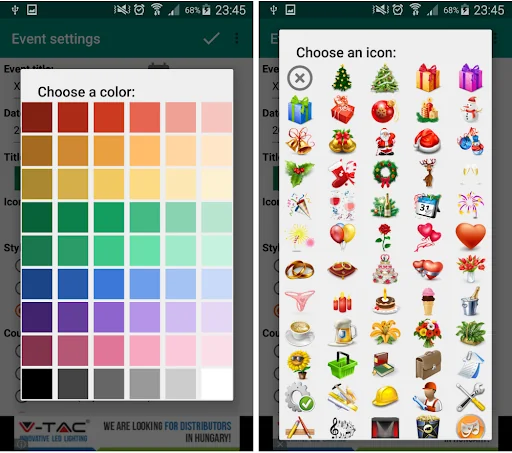
- set counter and title <b>backcolor and forecolor</b>
- choose an <b>icon</b> (from the available ~140 nice pictures)
- background <b>transparency</b> (0,80,100%)
- choose from <b>six counting modes</b>:
-- day (counts in days only, use event date only the time doesn't matter, default is 00:00)
-- hour (counts in hours only, use event date + event hour only)
-- automatic (defult in days only mode -> switch to hours only mode in the last day -> finally shows minutes only in the last hour, use event date + time too.)
-- D-H-M (counts in days, hours and mins all at once, but it only works with 3x1 widget size!)
-- week
-- W-D (counts in week and days)
- set a <b>reminder</b> and an invidual sound
- set <b>repeating</b> (in days only)
<b>There are three widget size:</b>
- 1x1 size shows ONLY the days, hours or mins by right of choosed counting mode.
- 2x1 and 3x1 size shows the same like 1x1 but has bigger fonts and picture.
- With 3x1 size you can choose D-H-M counting mode and it will shows days, hours and mins all at once.
You can resize the widgets if you have Android 4.1 version or above. When you resize its layout has change.
(watch the instruction video to see how to!)
<b>Available languages:</b> Hungarian, English / German (Inkey Uno), Italian (Nicola Ventricelli), Czech / Slovak (Marek Bednář), Romanian (Claudiu Condurache), Russian (Ekaterina Kuritcina), French (Jean-Marie Bauwens), Portuguese (Tati Lima), Turkish (Tuğba Özer), Dutch (Naomi Kruijsbergen), Arabic (Samer Al Kaabi), Chinese CN/TW/HK (Spitta Aspeaciare), Spanish (Nicholas Gelio), Polish (Arkadiusz Pietrzak), Norwegian (Ingeborg Kjellberg), Croatian/Bosnian/Serbian (Eduard Vrhovec)
<b>◄ HOW TO USE ►</b>
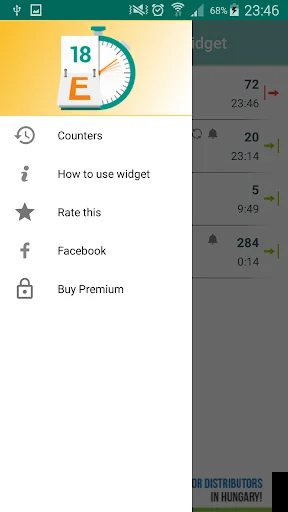
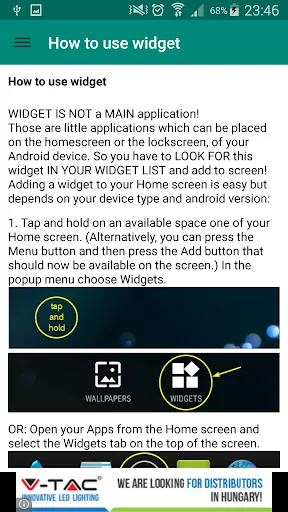
This is ONLY A WIDGET not a main application! Widgets are little applications which can be placed on the homescreen or the lockscreen, of your Android device. Adding widget to your Home screen is easy:
1a. On your Home screen press the menu key and select Add or alternatively tap any blank/empty area and hold down your finger. In the popup menu choose Widgets.
1b. or Go to your All Apps and select the Widgets tab.
2. Find and select the Event Countdown Widget to add your screen.
<b>◄ IMPORTANT! WHY DO NOT DOWNRATE! ►</b>
- If you can't find it in the widget list you can try to reinstall and restart your phone too! Or: Some phones install apps to the Phone Storage (or SD card) instead of the Internal Storage. You have to move it to Internal Storage in the apps manager and the widget list will show it!
- If you use any task killer or mem cleaner app, it kills the counter!
- If the layout doesn't change when you resize OR YOU CAN'T RESIZE with android version 4.0 or below it's an Android fault. Only 4.1 or above version support widget resize!
- If you don't know what is widget and can't add it to your homescreen!! It's not a fault! Please see the examp video and read the How to Use description!
- If you have any other problems or ideas please send an E-mail instead of downrating!
Organize your days till Christmas, your Mom's birthday, Thanksgiving, Easter, St. Patrick's day, vacation, your anniversary or any events that you don't want to forget. Never miss an important day again!
<b>This is a countdown widget for your home screen to remind you of the meaningful dates in your life.</b>
It shows the number of weeks/days/hours/mins left to (or after from) a specified date. You can add several countdown widgets to your home screen and you can easily customize them at the creation or later by tapping on them. You can export and import widget datas too.
You must set <b>a title and a date</b>. You can choose event from Google Calendar (fills title and date). After these you can set optionally:
- set <b>time</b>
- set counter and title <b>backcolor and forecolor</b>
- choose an <b>icon</b> (from the available ~140 nice pictures)
- background <b>transparency</b> (0,80,100%)
- choose from <b>six counting modes</b>:
-- day (counts in days only, use event date only the time doesn't matter, default is 00:00)
-- hour (counts in hours only, use event date + event hour only)
-- automatic (defult in days only mode -> switch to hours only mode in the last day -> finally shows minutes only in the last hour, use event date + time too.)
-- D-H-M (counts in days, hours and mins all at once, but it only works with 3x1 widget size!)
-- week
-- W-D (counts in week and days)
- set a <b>reminder</b> and an invidual sound
- set <b>repeating</b> (in days only)
<b>There are three widget size:</b>
- 1x1 size shows ONLY the days, hours or mins by right of choosed counting mode.
- 2x1 and 3x1 size shows the same like 1x1 but has bigger fonts and picture.
- With 3x1 size you can choose D-H-M counting mode and it will shows days, hours and mins all at once.
You can resize the widgets if you have Android 4.1 version or above. When you resize its layout has change.
(watch the instruction video to see how to!)
<b>Available languages:</b> Hungarian, English / German (Inkey Uno), Italian (Nicola Ventricelli), Czech / Slovak (Marek Bednář), Romanian (Claudiu Condurache), Russian (Ekaterina Kuritcina), French (Jean-Marie Bauwens), Portuguese (Tati Lima), Turkish (Tuğba Özer), Dutch (Naomi Kruijsbergen), Arabic (Samer Al Kaabi), Chinese CN/TW/HK (Spitta Aspeaciare), Spanish (Nicholas Gelio), Polish (Arkadiusz Pietrzak), Norwegian (Ingeborg Kjellberg), Croatian/Bosnian/Serbian (Eduard Vrhovec)
<b>◄ HOW TO USE ►</b>
This is ONLY A WIDGET not a main application! Widgets are little applications which can be placed on the homescreen or the lockscreen, of your Android device. Adding widget to your Home screen is easy:
1a. On your Home screen press the menu key and select Add or alternatively tap any blank/empty area and hold down your finger. In the popup menu choose Widgets.
1b. or Go to your All Apps and select the Widgets tab.
2. Find and select the Event Countdown Widget to add your screen.
<b>◄ IMPORTANT! WHY DO NOT DOWNRATE! ►</b>
- If you can't find it in the widget list you can try to reinstall and restart your phone too! Or: Some phones install apps to the Phone Storage (or SD card) instead of the Internal Storage. You have to move it to Internal Storage in the apps manager and the widget list will show it!
- If you use any task killer or mem cleaner app, it kills the counter!
- If the layout doesn't change when you resize OR YOU CAN'T RESIZE with android version 4.0 or below it's an Android fault. Only 4.1 or above version support widget resize!
- If you don't know what is widget and can't add it to your homescreen!! It's not a fault! Please see the examp video and read the How to Use description!
- If you have any other problems or ideas please send an E-mail instead of downrating!
Profile & Insights
Everything we know — and don't — about this app and its company.
Identification
- App name
- Event Countdown Widget
- Developer
- JimSoft
- Bundle ID
- hu.jimsoft.eventcountdownwidget
- App Store URL
- Open in App Store
- Category
- Lifestyle
- Content rating
- Not found
- Languages
- Not found
Company
- Website
- Not found
- Tagline
- Not found
- Description
- Not found
- Founded
- Not found
- HQ / Address
- Not found
- Employees
- Not found
- Logo
- Not found
Revenue
- Verified revenue / mo
- Not found
- AI revenue estimate / mo
- Not found
- AI annual estimate
- Not found
- ML model estimate / mo
- $1.0K/mo
- Top-grossing rank
- Not found
- All-time revenue
- Not found
- Pricing
- Not found
Founder
- Name
- Not found
- X / Twitter
- Not found
- Not found
- GitHub
- Not found
- X followers
- Not found
- Public statements
- Not found
Funding
- Total raised
- Not found
- Last round
- Not found
- Investors
- Not found
- Crunchbase
- Not found
- AngelList
- Not found
Press & Links
- Articles found
- Not found
- Listed on
- Not found
- Blog
- Not found
- Press / News
- Not found
Contacts & Socials
- Socials
- Not found
- Not found
- Phone
- Not found
- Contact page
- Not found
- About page
- Not found
📈Ratings growth10,197 ratings+7% lifetimeShow 3-year history estimate ▾
Tracked (1 weeks) Pre-tracking estimate (37 weeks) · model-based, ±5% noise · anchored to release date and current value
Profile is built from iTunes Lookup + developer site scrape + ML revenue model. Empty fields show "Not found" — additional sources (Crunchbase, X, IndieHackers, Acquire.com) coming.
Full revenue analysis
Read the article-style breakdown for Event Countdown Widget: category rank, percentile, growth signal, comparable apps, and how the forecast is calibrated against verified-MRR anchors in this niche.