What Geofency - Time Tracking actually does (from App Store listing)
GEOFENCY enables fully automatic location-based time recording on iPhone, iPad, Mac & Apple Watch, where manual clock-in and clock-out becomes an absurdity of the past. Arrival and departure times are automatically recorded as soon as you enter or leave an interesting place – it works like magic! Of course all very energy efficient, thanks to the latest Geofencing & iBeacon technologies! With the integrated Webhook and Apple HomeKit automation features, you can trigger your smart home as you arr…
GEOFENCY enables fully automatic location-based time recording on iPhone, iPad, Mac & Apple Watch, where manual clock-in and clock-out becomes an absurdity of the past. Arrival and departure times are automatically recorded as soon as you enter or leave an interesting place – it works like magic! Of course all very energy efficient, thanks to the latest Geofencing & iBeacon technologies! With the integrated Webhook and Apple HomeKit automation features, you can trigger your smart home as you arrive or leave a place (e.g. switch on the lights when coming home)!
Ideal for automatic monitoring of working hours, client visits, lunch breaks or the stays on your favorite places! GEOFENCY offers the easiest and most effective way to MONITOR your DURATION OF STAYS on interesting places. Unpleasant manual time recording was yesterday!
• Are you tired of having to write down working hours again and again? • Fed up leaving the office absently, missed to check the clock? • Can't you remember when you came or left your favorite places?
Let the iPhone take over this nerve-racking time monitoring for you!
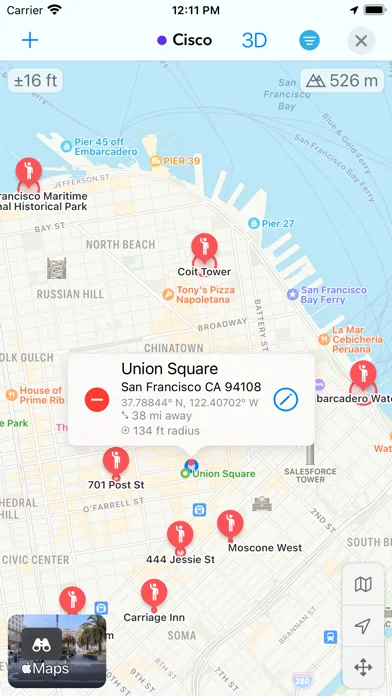
With GEOFENCY this is now possible in a smart and clever new way! Simply mark your points of interest on a map and leave the rest to Geofency!
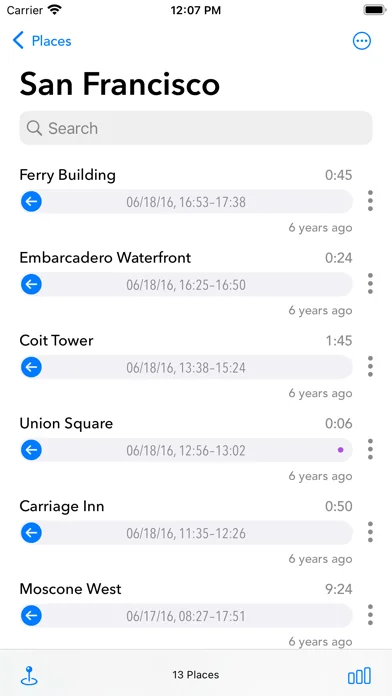
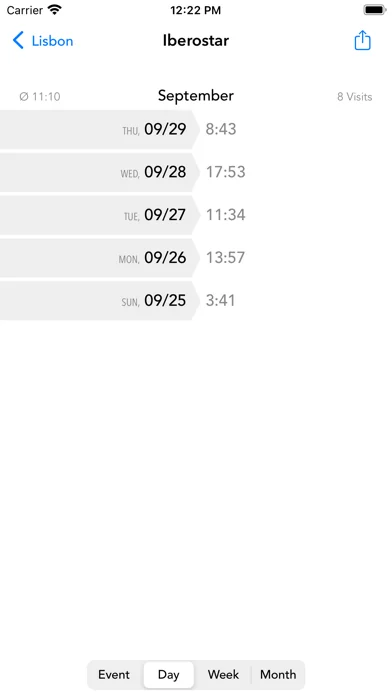
GEOFENCY automatically tracks the times when you enter or leave your points of interest. Simply carry your iPhone in your pocket or bag with you. You will automatically receive extensive statistics and graphics over time!
Automatic Location-based Time Tracking – The (GEO)FANCY way!
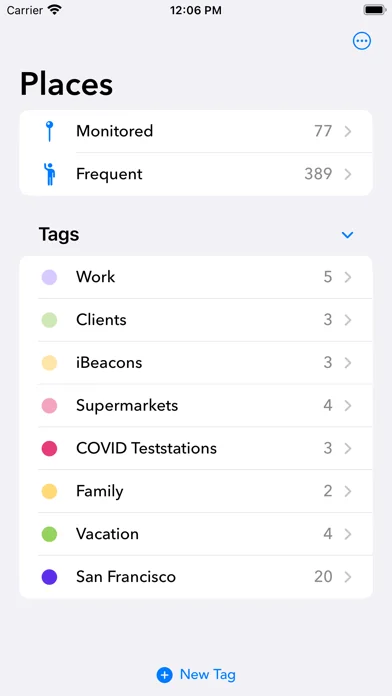
FEATURES • Automatic location-based time tracking - 24/7 time recording for your points of interest! • Graphical visualization of your dwell times - with zoom! • Rich statistics: Single-, Day-, Week- & Month-Summaries. • Map-View: Manage your points of interest directly on a beautiful fullscreen map view. • Add new locations in seconds – With just one tap! • Runs completely in the background while trying to maintain good battery life! • Automatic recognition when you enter or leave a place or region. • Tags: To group places into tags. • Home Automation: Integrates with Webhooks and Apple HomeKit to trigger automations when arriving at or leaving a place – from turning on lights to running complex smart home scenes! • Journaling feature: Automatic recognition of frequent visited places – to know exactly when you've been where and how long! • Calendar-Export: Export events automatically into your calendar (iCloud, CalDAV & Exchange) – view your data comfortable even from Mac or PC! • Widgets: Time Clock widgets to quickly clock in or out from the Home- or Lockscreen. • Apple Watch App! • Export feature: Send time recordings via e.g. email in an Excel-friendly format! • Export time data and use it directly in Excel or Numbers!
BENEFITS Simple to use daily timesaver! You don't have to fiddle around with time recordings on yourself. Free your mind and just don't bother about manual time tracking anymore!
PRIVACY 100% Private: Only YOU can see your data. We will never collect or share any information about you. We respect and care about the privacy of our users!
REQUIREMENTS For the best and most accurate monitoring results, Wi-Fi, carrier and location services should always be enabled for Geofency. iBeacon monitoring requires at least Bluetooth 4.
BATTERY USE Continued use of GPS in the background can significantly reduce battery life. Geofency was designed to use GPS very sparingly and never in the background. The app relies mostly on cell tower + Wi-Fi locations. This has been carefully chosen to get the best battery life.
WHAT PEOPLE SAY • "I had no idea that my iPhone could do such things!" • "Beautiful, polished and elegant designed. Extremely simple to use." • "Perhaps the most overall effective app available."
Find out more on our landing page: www.geofency.com Sample-Scripts for easy webhook integration: www.geofency.com/geo.zip
🆕 What's new · v10.6
What’s New in Geofency 10.6
• New: Introducing Manual Places — flexible locations for manual check-ins without geo-monitoring, perfect for Home Office and Shortcuts automations triggered by NFC tags or Wi-Fi
• New: Apple Intelligence support to more accurately find the best Wikipedia article for a place
• New: Configure Webhooks for multiple places at once using multi-selection
• New: Set up separate arrival and departure notifications directly in Place Settings
• New: Restore a place’s configuration anytime with the new Restore Defaults option
• New: Filter the map by multiple tags simultaneously for more powerful map exploration
• New: Start route planning directly from the main places list
• New: Access HomeKit automations and Webhooks directly from Place Settings
• New: View travel distance and estimated travel time directly on the map
• Improved: Route planning on iOS 26 now features a more compact options layout, leaving more room for the map
• Improved: Nearby Search category filters now feature a modern Liquid Glass design
• Improved: Enhanced stability and reliability of Time Sheet exports
• Improved: Better VoiceOver accessibility throughout the app
Enjoying Geofency? Your App Store rating helps support ongoing development and is greatly appreciated.
Comparable iOS apps
The five apps in Utilities with the closest revenue to Geofency - Time Tracking. Click any to see its detail page.
Each forecast combines App Store rating, ratings count, monetisation model, pricing tier, IAP signals and ad-supported flag.
The base estimate is then multiplied by a per-category scaling factor learned from apps with founder-verified MRR.
Every number on this page comes from public APIs and bumetric's own snapshot history.
Full methodology covers input variables, accuracy bands per category and how we treat apps without comparable anchors.
See also the live data on Geofency - Time Tracking's tracker page for current rating, reviews and snapshot timeline.
Building something similar? Get a free AI audit with $-revenue forecasts for every recommendation.


 Snap Markup: Annotationswerkz.
 NFC.cool Tools Tag Reader
 Carista OBD2
 Safe + Password Manager
 Führerschein 2026 GOLD