What JigglyPaint: Draw/Shake/Share! actually does (from App Store listing)
Disclaimer: JigglyPaint is a fork of WigglyPaint, the open-source (MIT) drawing tool made by Internet Janitor. We are not Internet Janitor. The original lives here: internet-janitor.itch.io/wigglypaint
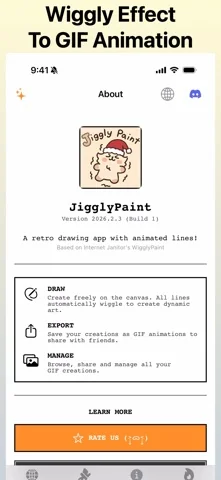
▣ Doodle Something. Watch It Wiggle. Export the GIF. ▣
JigglyPaint is a drawing app where the lines refuse to sit still. Every stroke you put down starts squirming on its own, forever, whether you asked for it or not. It's like your drawings are vibing to invisible music.
It's fine. It's just l…
Disclaimer: JigglyPaint is a fork of WigglyPaint, the open-source (MIT) drawing tool made by Internet Janitor. We are not Internet Janitor. The original lives here: internet-janitor.itch.io/wigglypaint
▣ Doodle Something. Watch It Wiggle. Export the GIF. ▣
JigglyPaint is a drawing app where the lines refuse to sit still. Every stroke you put down starts squirming on its own, forever, whether you asked for it or not. It's like your drawings are vibing to invisible music.
It's fine. It's just like that. That's on purpose.
You draw. It wiggles. You export an animated GIF. That is the entire app. There is no tutorial, because there is nothing to learn. If you ever lost an afternoon to WigglyPaint in a browser tab, you already know how this ends. \(°Д°)/
▣ WHAT'S IN IT ▣
• THE WIGGLE ENGINE Every line animates itself the moment you draw it. No timeline, no keyframes, no rigging, no weekend course. A dead doodle becomes a living, breathing, jiggly mess in exactly zero clicks. The line has made up its mind and it isn't really listening.
• THE INFINITE REGRET MACHINE Otherwise known as undo and redo. Made a mistake? Go back in time. Regret going back in time? Go forward again. Nobody has ever reached the end of it. (っ-_-ς)
• UNLIMITED COLOURS WigglyPaint ran on one small fixed palette. JigglyPaint hands over the whole spectrum, plus named palettes you can save and reuse. Pick any shade you can imagine, then deliberately pick a worse one.
• ANIMATED GIF EXPORT Export your wiggly drawing as a clean, looping animated GIF. Straight into Photos, into Discord, into a group chat where nobody asked for it.
• 10,000+ DOODLERS IN ONE FEED Browse wiggly art from people all over the world without leaving the app. Some of it is genuinely beautiful. Some of it is a cursed frog. Both count.
• A PILE OF BRUSHES Dynamic brushes and tools that each wiggle in their own way. Half the fun is working out which one does the thing you had in mind.
• SHARE IN ONE TAP Save the GIF, send the GIF, post the GIF. Nothing leaves your device unless you decide to send it.
▣ WHY PEOPLE KEEP JIGGLYPAINT INSTALLED ▣
+ NO ACCOUNT — Open it and draw. No email, no password, no "confirm you are a human" + NO ADS — Not one. Not even a tasteful one + WORKS OFFLINE — Planes, tunnels and long car rides are prime wiggling conditions + EASY ON PURPOSE — Nothing to learn, which is the entire point + FREE UPDATES — New tools land regularly and cost nothing
Chunky pixel styling, big buttons, and a canvas that behaves like a toy instead of a workstation. Serious art software exists elsewhere and we wish it well. (⊙_⊙)
▣ ABOUT THE ORIGINAL ▣
JigglyPaint is a fork of WigglyPaint, the open-source (MIT) drawing tool made by Internet Janitor. It was renamed with the author's consent and has been developed independently since, adding unlimited colours, undo and redo, animated GIF export and the in-app community.
WigglyPaint came first and it is still out there: internet-janitor.itch.io/wigglypaint. Go play that too. Everything good about the wiggle came from there. The bugs we added are ours.
▣ GO MAKE SOMETHING THAT MOVES ▣
Your canvas is empty and quietly judging you. Draw one bad line and it will start dancing anyway.
If JigglyPaint made you laugh even once, leave a review. It genuinely decides whether anybody else ever finds this thing. (;ω;)
Questions, bugs, or a drawing you are weirdly proud of? https://wigglypaint.io
▣ Make art wiggle. Make art move. Make art yours. ▣
🆕 What's new · v2026.8.27
Bug fixes and stability improvements.
Comparable iOS apps
The five apps in Utilities with the closest revenue to JigglyPaint: Draw/Shake/Share!. Click any to see its detail page.
Each forecast combines App Store rating, ratings count, monetisation model, pricing tier, IAP signals and ad-supported flag.
The base estimate is then multiplied by a per-category scaling factor learned from apps with founder-verified MRR.
Every number on this page comes from public APIs and Bumetric's own snapshot history.
Full methodology covers input variables, accuracy bands per category and how we treat apps without comparable anchors.
See also the live data on JigglyPaint: Draw/Shake/Share!'s tracker page for current rating, reviews and snapshot timeline.
Building something similar? Get a free AI audit with $-revenue forecasts for every recommendation.




 GIF Keyboard
 Polar Scope Align Pro
 Rafter Help
 My Classic-Retro Console
 Octopus Energy Agile Watcher