ML revenue forecast.
Calibrated against 2218 apps in this category.
Confidence band
±15%
High — many comparable apps with verified data
At a glance
Tracks close to the iOS app category median (1.0K/mo).
Ranks #1,076 of 2,218 in Productivity (top 48.5% by revenue).
Ratings volume grew 2488.0% over the last 30 days, suggesting active user acquisition.
Launched May 18, 2017 · last updated Apr 03, 2026.
24 months of snapshot history tracked.
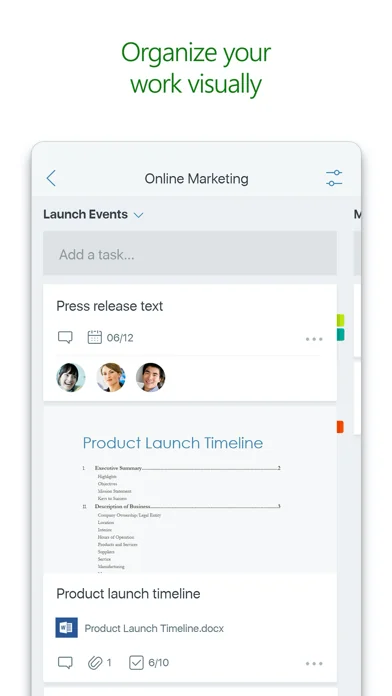
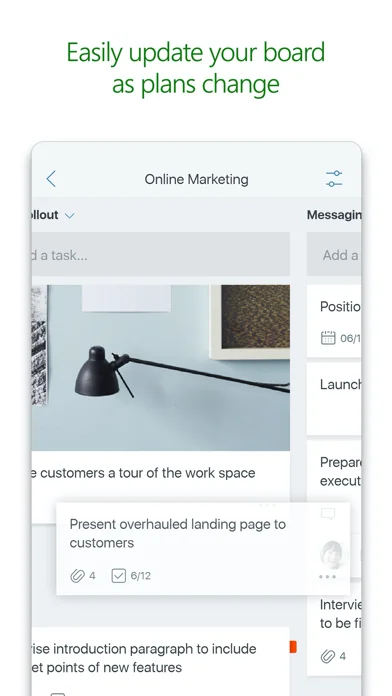
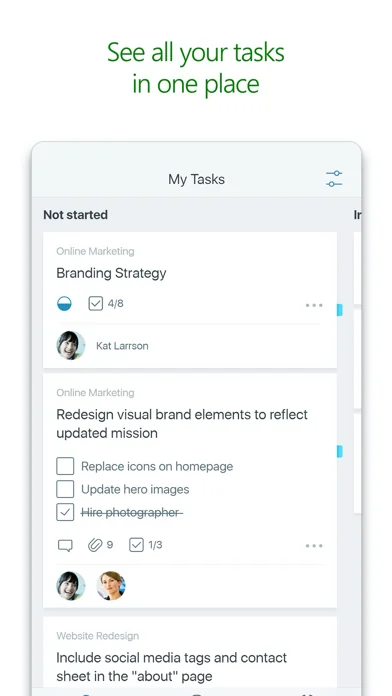
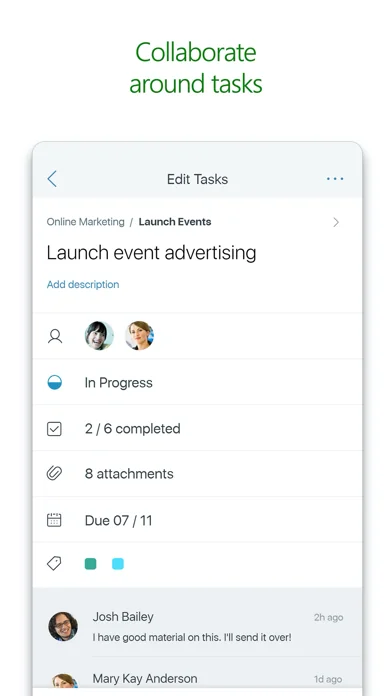
What the app looks like
Live screenshots from the App Store, captured by our snapshot worker. Tap any image to enlarge.
Microsoft Planner's revenue trajectory
Forecast revenue from snapshot history. Last 24 months.
Where Microsoft Planner sits in Productivity
Revenue distribution of 2218 comparable apps. Microsoft Planner highlighted.
Microsoft Planner vs comparable apps
Revenue trajectory side-by-side. Bold = Microsoft Planner, ghosted = peers.
App spec
Version
1.17.15
Last update
Apr 03, 2026
Launched
May 18, 2017
Min OS
17.0
Rating
4+
Price
Free
Monetization
Freemium
Languages
CA, HR, CS, DA +25
What Microsoft Planner actually does (from App Store listing)
Microsoft Planner requires an eligible Office 365 work or school subscription. This app does not support Office 365 personal accounts (for example: name@outlook.com or name@hotmail.com). If you are not sure about your company’s subscription or the services you have access to, please contact your IT department.
Planner provides a simple, visual way to organize teamwork. Planner makes it easy for your team to create new plans, organize and assign tasks, share files, chat about what you’re worki…
Microsoft Planner requires an eligible Office 365 work or school subscription. This app does not support Office 365 personal accounts (for example: name@outlook.com or name@hotmail.com). If you are not sure about your company’s subscription or the services you have access to, please contact your IT department.
Planner provides a simple, visual way to organize teamwork. Planner makes it easy for your team to create new plans, organize and assign tasks, share files, chat about what you’re working on, and get updates on progress.
-- Organize work visually -- Each plan has its own board, where you can organize tasks into buckets. You can categorize tasks based on their status or on whom they’re assigned to. To update the status or change assignments, just drag and drop tasks between columns.
-- Visibility -- The My Tasks view provides a comprehensive list of all your tasks and their status across all your plans. When working together on a plan, team members always know who is working on what.
-- Collaborate -- Built for Office 365, Planner lets you work together on the same tasks, attach captured photos directly to them, and even have conversations around tasks without switching between apps. With Planner, all your team’s discussions and deliverables stay with the plan and don’t get locked away across disparate applications.
-- Works across devices -- Planner works across all your devices. And with Planner, everyone is always on the same page. Continue conversations and updates tasks while on-the-go or at your desk.
Terms of service: https://go.microsoft.com/fwlink/?linkid=846830 Privacy policy: https://go.microsoft.com/fwlink/?LinkId=521839
To learn more, please visit https://go.microsoft.com/fwlink/?linkid=849067
The Microsoft Planner app will request permission to access your photos and your camera: When you try to attach a photo to a Planner task, the app requests permission to access your Photos app in order to select images. If you choose to take a photo to attach to a Planner task, the app will request permission to access your Camera app.
🆕 What's new · v1.17.15
Bug fixes and performance improvements.
Comparable iOS apps
The five apps in Productivity with the closest revenue to Microsoft Planner. Click any to see its detail page.
Each forecast combines App Store rating, ratings count, monetisation model, pricing tier, IAP signals and ad-supported flag.
The base estimate is then multiplied by a per-category scaling factor learned from apps with founder-verified MRR.
Every number on this page comes from public APIs and bumetric's own snapshot history.
Full methodology covers input variables, accuracy bands per category and how we treat apps without comparable anchors.
See also the live data on Microsoft Planner's tracker page for current rating, reviews and snapshot timeline.
Building something similar? Get a free AI audit with $-revenue forecasts for every recommendation.


 R6Stats
 My Inventory Tracker
 Dr Wiederherstellen: Foto&Fone
 TOR Browser: Phantom
 CloudNotes & CloudNews – ownCloud Clients