What Salesforce Authenticator actually does (from App Store listing)
Salesforce Authenticator adds an extra layer of security for your online accounts with multi-factor authentication (also known as two-factor authentication). With Salesforce Authenticator, you use your mobile device to verify your identity when logging in to your account or performing critical actions. The app sends you a push notification, and you approve or deny the activity with just a tap. For even more convenience, Salesforce Authenticator can use your mobile device’s location services to a…
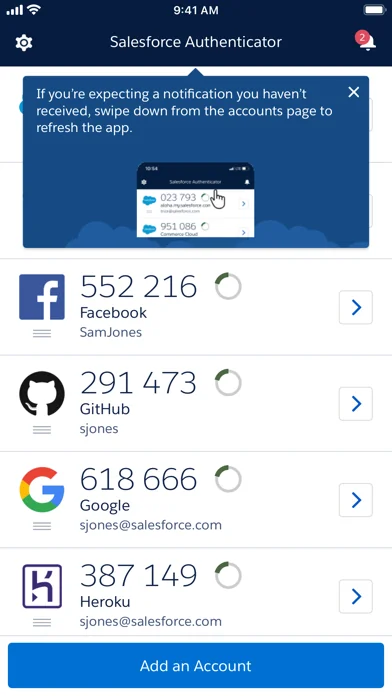
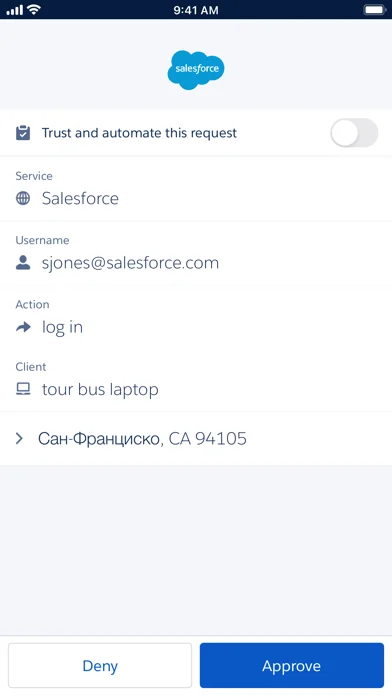
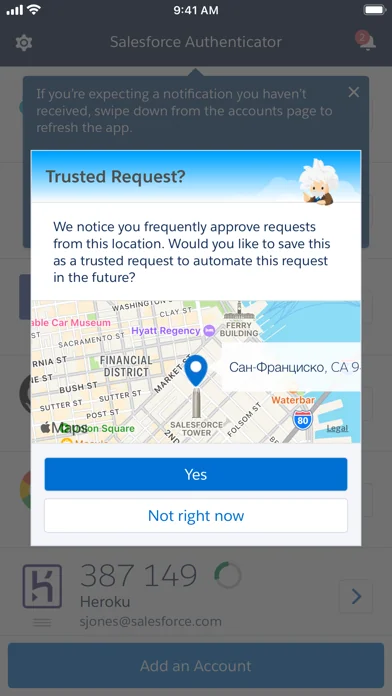
Salesforce Authenticator adds an extra layer of security for your online accounts with multi-factor authentication (also known as two-factor authentication). With Salesforce Authenticator, you use your mobile device to verify your identity when logging in to your account or performing critical actions. The app sends you a push notification, and you approve or deny the activity with just a tap. For even more convenience, Salesforce Authenticator can use your mobile device’s location services to automatically approve account activity that you trust. The app also provides one-time verification codes for use while you’re offline or have low connectivity.
Use Salesforce Authenticator to secure all your online accounts that support time-based one-time passwords (TOTP). Any service that allows multi-factor authentication using an “Authenticator app” is compatible with Salesforce Authenticator.
Location Data & Privacy If you enable location-based automation in Salesforce Authenticator, rest assured that Salesforce never tracks your location or shares it with anyone. Location data is stored securely on your mobile device, never in the cloud. You can delete all location data from your device or turn off location services at any time. Learn more about how the app uses location data in Salesforce Help.
Battery Usage Rather than getting precise location updates, Salesforce Authenticator only receives updates when you enter or leave the approximate area, or “geofence,” of a location that you trust. By minimizing the frequency of location updates, Salesforce Authenticator conserves your mobile device’s battery life. To reduce battery usage even more, you can turn off location services and stop automating your activity.
🆕 What's new · v4.7.0
We made automation easier than ever.
- Automation is now enabled by default to approve requests that you trust when certain conditions are met.
- We added Einstein icons for automation to Salesforce ecosystem accounts the home screen. The automation toggle includes an Einstein icon that is blue when automation is on and gray when automation is off. Accounts include a blue Einstein icon with a check mark if automation is enabled, a gray icon with an X if it’s disabled, and if automation isn’t an option, the Einstein icon doesn’t show up.
- We fixed some bugs.
Comparable iOS apps
The five apps in Business with the closest revenue to Salesforce Authenticator. Click any to see its detail page.
Each forecast combines App Store rating, ratings count, monetisation model, pricing tier, IAP signals and ad-supported flag.
The base estimate is then multiplied by a per-category scaling factor learned from apps with founder-verified MRR.
Every number on this page comes from public APIs and bumetric's own snapshot history.
Full methodology covers input variables, accuracy bands per category and how we treat apps without comparable anchors.
See also the live data on Salesforce Authenticator's tracker page for current rating, reviews and snapshot timeline.
Building something similar? Get a free AI audit with $-revenue forecasts for every recommendation.


 eProjector
 Xero Me
 Fresha for business
 Google Ads
 Dialpad