What Samsung Flow actually does (from store listing)
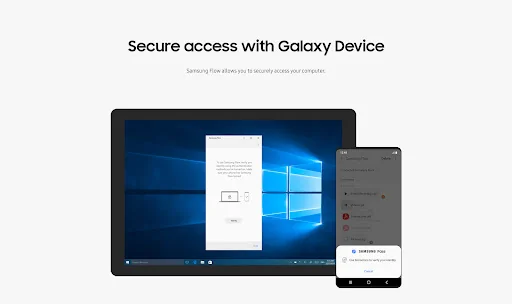
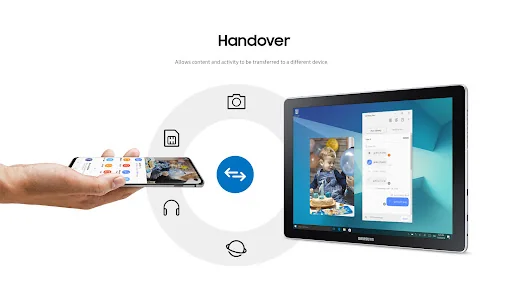
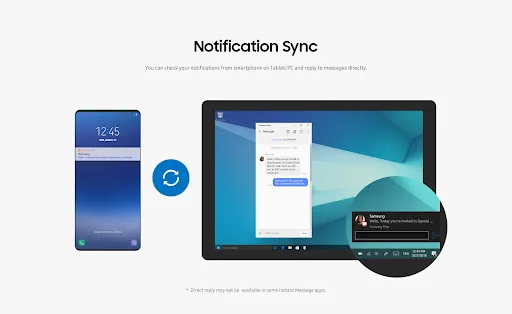
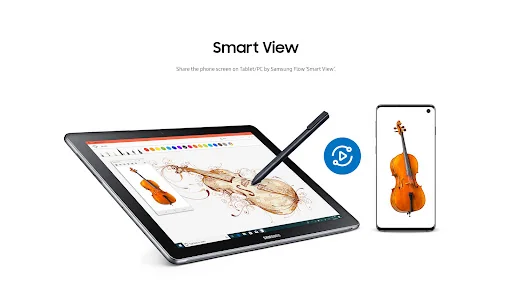
Samsung Flow is a software product that enables a seamless, secure, connected experience across your devices. You can authenticate your Tablet/PC with your smartphone, share content between devices, and sync notifications or view contents from your smartphone on your Tablet/PC. You can turn on the smartphone's Mobile Hotspot to keep your Tablet/PC connected.
You can also log in to your Tablet/PC with your biometric data (Iris, Fingerprints) if you register with Samsung Pass.
The following de…
Samsung Flow is a software product that enables a seamless, secure, connected experience across your devices. You can authenticate your Tablet/PC with your smartphone, share content between devices, and sync notifications or view contents from your smartphone on your Tablet/PC. You can turn on the smartphone's Mobile Hotspot to keep your Tablet/PC connected.
You can also log in to your Tablet/PC with your biometric data (Iris, Fingerprints) if you register with Samsung Pass.
The following devices support Samsung Flow:
1. Windows Tablet/PC : Windows 10 OS Creators update (V1703) and June patch build (15063.413)
(Galaxy TabPro S, Galaxy Book, Galaxy Book2. Galaxy Book S, PC)
2. Android Tablet: Android N OS or newer
3. Android Phone : Android N OS or Newer
It may not be supported by some models, depending on the smartphone specifications.
* Samsung Flow will operate only on official software released by Samsung Electronics.
* Windows: Bluetooth (Bluetooth LE optional) or Wi-Fi/LAN, Wi-Fi direct
Windows 10 users can find the Samsung Flow app on the Windows App Store.
Go to the Samsung Flow webpage where you can find the setup guide:
www.samsung.com/samsungflow
If you have not updated the Samsung Flow app to the latest version, please go to Windows Store > Menu > Downloads and Updates to update the app.
* The PC unlock function is no longer provided because the Windows policy has changed.
The following permissions are required for the app service. For optional permissions, the default functionality of the service is turned on, but not allowed.
Required permissions
• Nearby devices: Used to find nearby devices and track registered devices
• Notifications: Used to show the connection status between your devices
• Storage: Used to store content shared among registered devices on an external storage device and view the stored content (~Android 10)
Optional permissions
• Phone: Used to answer and decline calls to your phone on your tablet or computer
• Call logs: Used to read the contact information included in the event of the incoming call when receiving a call
• Contacts: Used to obtain information about callers or senders when you receive calls or text messages on your phone
• SMS: Used to receive and reply to text messages to your phone on your tablet or computer
• Microphone: Used to record and send the audio from your phone to your computer or tablet while using Smart View
• Location: Used to search for your phone using your tablet or computer connected through Bluetooth (~Android 12)
Comparable Android apps
The five apps in Productivity with the closest revenue to Samsung Flow. Click any to see its detail page.
Each forecast combines App Store rating, ratings count, monetisation model, pricing tier, IAP signals and ad-supported flag.
The base estimate is then multiplied by a per-category scaling factor learned from apps with founder-verified MRR.
Every number on this page comes from public APIs and bumetric's own snapshot history.
Full methodology covers input variables, accuracy bands per category and how we treat apps without comparable anchors.
See also the live data on Samsung Flow's tracker page for current rating, reviews and snapshot timeline.
Building something similar? Get a free AI audit with $-revenue forecasts for every recommendation.


 Cl@ve
Cl@ve
 Roubit: Daily Habit Tracker
 Simple Sticky Note Widget
 App Manager: Uninstaller & APK
 My Effectiveness Habits