What SIS Password Manager Bio-Auth. actually does (from store listing)
<b>SIS Password Manager</b> is a highly-rated, secure, and reliable password management app developed in Japan.
We address common user frustrations—like non-existent support and data loss during migration—to offer a solution that is <b>safer</b>, <b>more convenient</b>, and <b>completely reliable</b>.
<b>🔶Why Choose SIS Password Manager?</b>
- <b>Japanese Quality & Reliability:</b> Benefit from the meticulous detail and robust design synonymous with Japanese engineering.
- <b>Top-Tier Se…
SIS Password Manager is a highly-rated, secure, and reliable password management app developed in Japan.
We address common user frustrations—like non-existent support and data loss during migration—to offer a solution that is safer, more convenient, and completely reliable.
🔶Why Choose SIS Password Manager? - Japanese Quality & Reliability: Benefit from the meticulous detail and robust design synonymous with Japanese engineering.
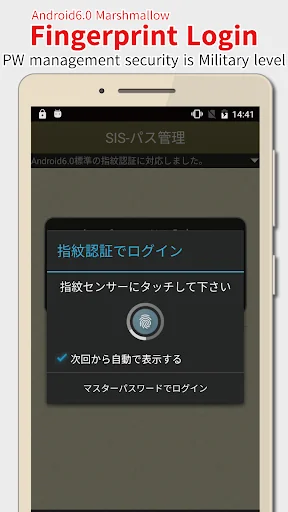
- Top-Tier Security: Your data is protected with AES256-bit encryption and Biometric Authentication (Fingerprint, Face, Iris).
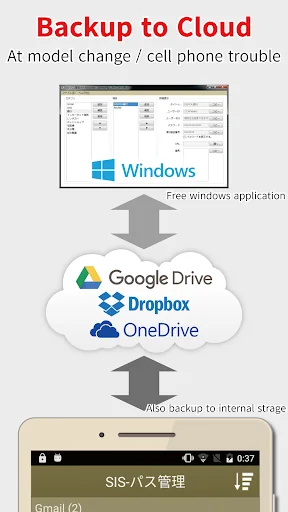
- Easy Data Migration:Cloud Backup (Google Drive, Dropbox, OneDrive) allows you to instantly restore data when you switch devices or if your phone is lost.
- Seamless Login: Use the Auto-Fill feature for quick sign-ins to apps and websites with in-app web browser.
🔶Are You Facing These Problems? If you've had any of these issues, SIS Password Manager is the solution:
- Worrying about managing passwords in a simple notes app.
- Security concerns from reusing the same passwords.
- Struggling with data loss or transfer during a device change.
- Finding other app translations awkward or difficult to use.
Our interface is designed to be intuitive for all users looking for a reliable, long-term password management solution.
🔶Key Features for Ultimate Security and Convenience SIS Password Manager is designed to be a simple, intuitive, and feature-rich manager that balances simplicity with deep customization.
🔹Management & Customization: - Create, Edit, and Delete Items.
- Sorting Options: Manual or by name.
- Category Tags for organization.
- Quick Search.
- Quick Access: Register items to the Notification Area.
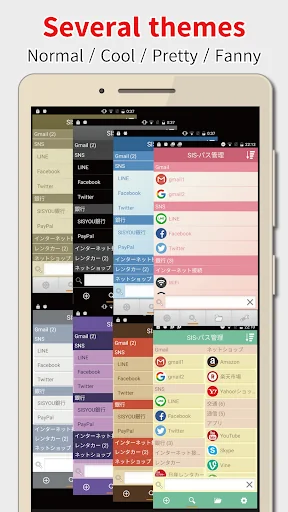
- Theming/Customization.
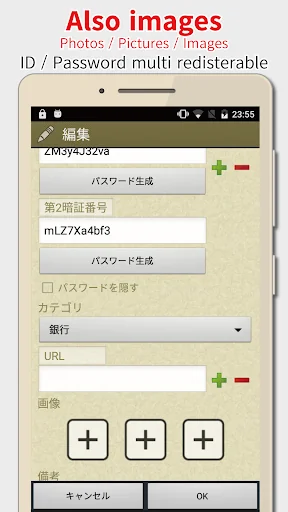
- Multiple Fields per Item: Up to 5 sets of ID/Password/URL for one entry.
- Encrypt & Record Photos/Images securely within the app.
🔹Advanced Backup & Data Options - Cloud Backup: Securely store data on Google Drive, Dropbox, and OneDrive for hassle-free device changes and Windows synchronization.
- Local Backup/Restore to device storage.
- Multiple Backup Lists: Save and manage named backup files.
- Windows App Linkage.
🔶Important Notes & Disclaimers 🔹Data Security & Backup - Independent Operation: Data is not automatically transferred; use Cloud Backup for migration.
- Data Deletion: Data is stored only on your device. Uninstalling or factory resetting will permanently delete all data. Back up regularly.
- UPDATE WARNING: Please back up your data before updating.
- Master Password: If forgotten, clearing cache deletes entries, but you can restore from a backup.
🔹Biometric Authentication - We only support Biometric Authentication officially supported by the Android OS (Android 8.0 or later).
🔹Permissions & Purchases - Network Access: Required for Cloud Backup and ads (removable via in-app purchase).
- Storage Access: Required for local data backup/restore.
- Account Search: Required for Google Drive linkage.
- In-App Purchases: Available for ad-free (one-time) and automatic backup (subscription).
🔶Disclaimer SISYOU.KUM is not responsible for any loss or damage caused by the use of this application. We urge users to regularly take backups as a countermeasure against device failure and the inherent risk of data loss.
Thank you for considering SIS Password Manager. We are committed to continuous updates and support.
Comparable Android apps
The five apps in Tools with the closest revenue to SIS Password Manager Bio-Auth.. Click any to see its detail page.
Each forecast combines App Store rating, ratings count, monetisation model, pricing tier, IAP signals and ad-supported flag.
The base estimate is then multiplied by a per-category scaling factor learned from apps with founder-verified MRR.
Every number on this page comes from public APIs and bumetric's own snapshot history.
Full methodology covers input variables, accuracy bands per category and how we treat apps without comparable anchors.
See also the live data on SIS Password Manager Bio-Auth.'s tracker page for current rating, reviews and snapshot timeline.
Building something similar? Get a free AI audit with $-revenue forecasts for every recommendation.


 Bil Info nummerplade
 Real Compass
 Full Battery Charge Alarm
 Mornify - Wake up to music
 Grapher - Equation Plotter