45
BU Score
Emerging
Auto Stitch Pic-Merge Panorama
✍️ BU Analytics Review
“
Auto Stitch Pic-Merge Panorama is an iOS app from 松滔 袁 in the Photo & Video category, currently rated 2.8★ across 313 ratings. Initial signal reads as mixed reviews — supporters praise core features while critics cite stability/value gaps.
Our BU Score puts it at 45 — Emerging (early traction worth watching). For a Photo & Video app, that means early traction worth watching.
Track changes month-over-month in the Performance section below — live snapshot history and revenue forecast included.
creator
📊 Performance Tracking LIVE
Loading…
Rating
—
Reviews
—
Forecast Revenue / mo
—
Snapshots tracked
0
since first record
Range:
💰 Forecast Revenue / mo
MODELRevenue forecast computed from BU's 234 trigger model on each snapshot. Calibrated against ground-truth from 58 verified-revenue apps.
🔬Forecast Breakdown — Why This Estimate?Top 9 of 9 triggers
Our ML model uses 200+ signals from public data. These are the most influential for this app:
| Paid app ($0.00)METRIC | +$2,800 | |
| bugsREVIEW | −$1,800 | |
| 5 starREVIEW | +$1,800 | |
| Below-average rating (2.8★)METRIC | −$1,500 | |
| Mature app (13y old)METRIC | +$1,500 | |
| highly recommendREVIEW | +$1,400 | |
| slowREVIEW | −$1,200 | |
| Early-stage install base (313 ratings)METRIC | +$400 | |
| Single-language (English only)METRIC | −$400 |
METRIC = structural app data · REVIEW = mined from user reviews · ✓ VERIFIED = Stripe-verified anchor (TrustMRR)
📈 Reviews Growth
LIVECumulative review count from first BU snapshot. Each point = a tracked update.
💚Sentiment Over Time↑ green = positive · ↓ red = negative
Nov 24
Nov 25
Feb 26
⭐ Rating Trend
LIVEAverage rating evolution. Updates with each new review batch.
🗓️ Snapshot Timeline
HISTORYEach bar shows a tracked update and the metric delta from the previous snapshot.
App Specs
🔐 Own this app? Claim & verify MRR →💾 11 MB🔞 4+📱 iOS 11.0+🔖 v1.61🔄 updated 7y ago🌐 EN📂 Photo & Video💰 Paid🚀 Launched 2013 (13y old)
📝 About this app
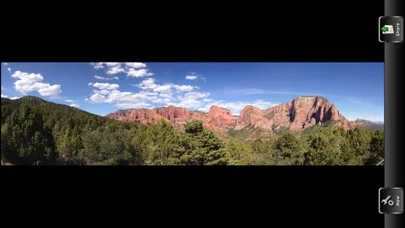
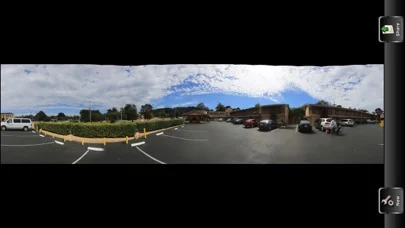
The AutoStitchPic app combines several photographs into one continuous image. For example, you can take 3-30 overlapping photographs of a city skyline, and then merge them into a panorama. This app can assemble photos that are tiled horizontally as well as vertically, and multi rows photos supported.
Learn how to make a good panorama photo:
Setting up for your shoot, a stable position to take your panoramas from is important. Once you find your potential spot and set your iPhone camera up, rotate it to the extreme right and left edges that you want to include in your photo and make sure that there isn’t anything that is too big of a visual or physical obstruction. Something else to keep in mind is to try to set up so that the full range of your shot does not show shadows from you or your iPhone.
When you have the settings you want and have taken your extreme left pictures it is time to grab a reference point in the viewfinder about 20%-30% away from the right side of your viewfinder. You do this because you are going to swivel the camera so that this reference point is at the far left but still in the viewfinder so that there is some overlap between your photos.
As far as overlap is concerned, you are shooting digitally so snap away, overlap 30-50% if you want, but err on the side of overlapping too much. If you don’t overlap enough, as AutoStitchPic app attempts to blend the shots it will not have enough of a fingerprint to blend well.
Now simply repeat this process until you come to the extreme right end of your desired panoramic shot:
1. Choose a reference point about 20-30% away from the right edge of the viewfinder
2. Swivel the camera to the right until your reference point is at the left edge of the viewfinder
3. Take the picture
4. Repeat until you have taken photos that cover the entire area you wish to capture in your panorama
Make your panorama:
Now you are ready to ‘stitch’ your photos together. Please open each photo that you wish to add to the panorama in AutoStitchPic app. Click OK button. Now AutoStitchPic app goes into action. It analyzes and blends the photos. This could take several minutes.
Go ahead and save your picture and you have a panorama!
Features:
Blend Images Together: to have AutoStitchPic attempt to seamlessly blend exposure and color.
Vignette Removal: to correct for any natural lens vignetting (darkening) at the edges.
Geometric Distortion Correction: to repair any lens distortion (often caused when shooting at a wider angle).
Note:
Overlap the images – the images should overlap by at least 40%, but no more than 70%. Outside of this range, Photomerge may not be able to align the files correctly.
Shoot vertical – this is a little counter-intuitive since we’re making panoramas. It’s usually best to shoot vertical (portrait orientation). Since you’ll merge multiple frames together later to get as wide as you need, shooting vertical will give you a taller overall panorama. Also, you’ll need some of this vertical space for cropping. More on cropping later.
Upload to Social Network
With iOS, you can connect directly to your social network accounts, allowing you to post and share content from nearly anywhere. iOS provides integrated support for:
▪Twitter
▪Facebook
▪Flickr
▪Vimeo
▪Sina Weibo
▪Tencent Weibo
▪Blush and Mascara
You can add your account in Settings, after adding your account, you can configure additional settings or download the official iOS app for that service.
Learn how to make a good panorama photo:
Setting up for your shoot, a stable position to take your panoramas from is important. Once you find your potential spot and set your iPhone camera up, rotate it to the extreme right and left edges that you want to include in your photo and make sure that there isn’t anything that is too big of a visual or physical obstruction. Something else to keep in mind is to try to set up so that the full range of your shot does not show shadows from you or your iPhone.
When you have the settings you want and have taken your extreme left pictures it is time to grab a reference point in the viewfinder about 20%-30% away from the right side of your viewfinder. You do this because you are going to swivel the camera so that this reference point is at the far left but still in the viewfinder so that there is some overlap between your photos.
As far as overlap is concerned, you are shooting digitally so snap away, overlap 30-50% if you want, but err on the side of overlapping too much. If you don’t overlap enough, as AutoStitchPic app attempts to blend the shots it will not have enough of a fingerprint to blend well.
Now simply repeat this process until you come to the extreme right end of your desired panoramic shot:
1. Choose a reference point about 20-30% away from the right edge of the viewfinder
2. Swivel the camera to the right until your reference point is at the left edge of the viewfinder
3. Take the picture
4. Repeat until you have taken photos that cover the entire area you wish to capture in your panorama
Make your panorama:
Now you are ready to ‘stitch’ your photos together. Please open each photo that you wish to add to the panorama in AutoStitchPic app. Click OK button. Now AutoStitchPic app goes into action. It analyzes and blends the photos. This could take several minutes.
Go ahead and save your picture and you have a panorama!
Features:
Blend Images Together: to have AutoStitchPic attempt to seamlessly blend exposure and color.
Vignette Removal: to correct for any natural lens vignetting (darkening) at the edges.
Geometric Distortion Correction: to repair any lens distortion (often caused when shooting at a wider angle).
Note:
Overlap the images – the images should overlap by at least 40%, but no more than 70%. Outside of this range, Photomerge may not be able to align the files correctly.
Shoot vertical – this is a little counter-intuitive since we’re making panoramas. It’s usually best to shoot vertical (portrait orientation). Since you’ll merge multiple frames together later to get as wide as you need, shooting vertical will give you a taller overall panorama. Also, you’ll need some of this vertical space for cropping. More on cropping later.
Upload to Social Network
With iOS, you can connect directly to your social network accounts, allowing you to post and share content from nearly anywhere. iOS provides integrated support for:
▪Flickr
▪Vimeo
▪Sina Weibo
▪Tencent Weibo
▪Blush and Mascara
You can add your account in Settings, after adding your account, you can configure additional settings or download the official iOS app for that service.
🆕 What's New · v1.61
Fixed some bugs for IOS12
Profile & Insights
Everything we know — and don't — about this app and its company.
Identification
- App name
- Auto Stitch Pic-Merge Panorama
- Developer
- 松滔 袁
- Bundle ID
- net.go2share.autostitchpic
- App Store URL
- Open in App Store
- Category
- Photo & Video
- Content rating
- 4+
- Languages
- EN
Company
- Website
- Not found
- Tagline
- Today
- Description
- Find apps and games for iPhone, iPad, Mac, and more on the App Store.
- Founded
- Not found
- HQ / Address
- Not found
- Employees
- Not found
- Logo
- OG image
Revenue
- Verified revenue / mo
- Not found
- AI revenue estimate / mo
- Not found
- AI annual estimate
- Not found
- ML model estimate / mo
- $1.2K/mo
- Top-grossing rank
- Outside top 100 in US Photo & Video
- All-time revenue
- Not found
- Pricing
- Not found
Founder
- Name
- Not found
- X / Twitter
- Not found
- Not found
- GitHub
- Not found
- X followers
- Not found
- Public statements
- Not found
Funding
- Total raised
- Not found
- Last round
- Not found
- Investors
- Not found
- Crunchbase
- Not found
- AngelList
- Not found
Press & Links
- Articles found
- Not found
- Listed on
- Not found
- Blog
- https://apps.apple.com/us/app/letterloop-group-newsletters/id6468623700
- Press / News
- Not found
Contacts & Socials
- Socials
- Not found
- Not found
- Phone
- Not found
- Contact page
- Not found
- About page
- https://apps.apple.com/us/iphone/story/id1750986966
📈Ratings growth313 ratings+148% lifetimeShow 3-year history estimate ▾
Tracked (59 weeks) Pre-tracking estimate (37 weeks) · model-based, ±5% noise · anchored to release date and current value
🌍Geographic ReachNot ranked
This app is currently outside the top 100 grossing in all 9 countries we monitor (US, UK, DE, FR, JP, CA, AU, BR, IN). Niche or new apps often launch this way — popularity rankings appear once daily revenue clears the regional threshold.
Profile is built from iTunes Lookup + developer site scrape + ML revenue model. Empty fields show "Not found" — additional sources (Crunchbase, X, IndieHackers, Acquire.com) coming.
More Photo & Video
YouTube
★ 4.7 · 47,130,049 reviews
★ 4.7 · 29,023,044 reviews
Snapchat: Chatte mit Freunden
★ 4.5 · 5,772,278 reviews
Canva: KI-Foto- & Video-Editor
★ 4.9 · 3,343,015 reviews
Twitch: Live Streaming
★ 4.7 · 2,700,069 reviews
InShot - AI Video Editor
★ 4.8 · 2,426,316 reviews
PicCollage: KI Foto Collage
★ 4.8 · 1,808,632 reviews
FaceApp: Gesichtsbearbeitung
★ 4.7 · 1,750,154 reviews
Browse BU Analytics
📚 All 55,000+ Books
🜍 Alchemy & Hermeticism
🔮 Magic & Ritual
🌙 Witchcraft & Paganism
⭐ Astrology & Cosmology
🃏 Divination & Tarot
📜 Photo & Video
✡️ Kabbalah & Jewish Mysticism
🕉️ Mysticism & Contemplation
🕊️ Theosophy & Anthroposophy
🏛️ Freemasonry & Secret Societies
👻 Spiritualism & Afterlife
📖 Sacred Texts & Gnosticism
👁️ Supernatural & Occult Fiction
🧘 Spiritual Development
📚 Esoteric History & Biography
Info
About BU Analytics