59
BU Score
Solid
Remove & Add Watermark
✍️ bumetric analysis
“
Remove & Add Watermark is an Android app from WATER INC in the Video Players & Editors category, currently rated 3.1★ across 30,198 ratings. Initial signal reads as mostly critical sentiment so far: users flag rough edges and unmet expectations.
Our BU Score puts it at 59: Solid (established niche player). For a Video Players & Editors app, that means established niche player.
Track changes month-over-month in the Performance section below: live snapshot history and revenue forecast included.
📊 Performance Tracking LIVE
Loading…
Rating
—
Reviews
—
Forecast Revenue / mo
—
Snapshots tracked
0
since first record
Range:
💰 Forecast Revenue / mo
MODELRevenue forecast computed from BU's 234 trigger model on each snapshot. Calibrated against ground-truth from 58 verified-revenue apps.
🔬Forecast Breakdown — Why This Estimate?Top 3 of 3 triggers
Our ML model uses 200+ signals from public data. These are the most influential for this app:
| Mid install base (30,198 ratings)METRIC | +$5,500 | |
| Below-average rating (3.1★)METRIC | −$1,500 | |
| Ad-supported / freemiumMETRIC | +$600 |
METRIC = structural app data · REVIEW = mined from user reviews · ✓ VERIFIED = Stripe-verified anchor (TrustMRR)
📈 Reviews Growth
LIVECumulative review count from first BU snapshot. Each point = a tracked update.
⭐ Rating Trend
LIVEAverage rating evolution. Updates with each new review batch.
🗓️ Snapshot Timeline
HISTORYEach bar shows a tracked update and the metric delta from the previous snapshot.
App Specs
🔐 Own this app? Claim & verify MRR →🔖 v4.5-Lite-LiteEN🔄 updated 1mo ago📂 Video Players & Editors💰 Free
📝 About this app
This app can be used to remove or add watermark to images and videos.
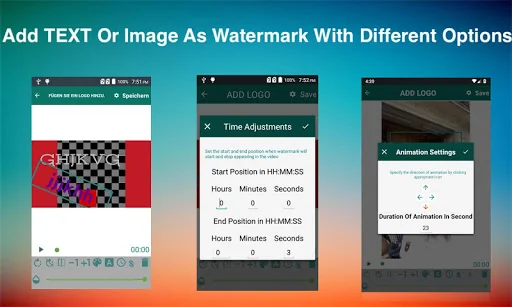
You can add watermark to images/videos using text and images with different options including animating the watermark.
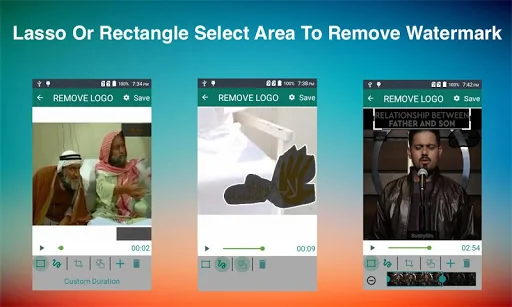
You can also suppress a watermark by selecting its area(lasso or rectangle select) and app can remove it by interpolation of the surrounding pixels.This technique works almost perfectly on alpha-blend watermarks, or you can crop the region outside of watermark area, this works perfectly for media that has logo at edges.
<h1>HOW TO USE</h1>
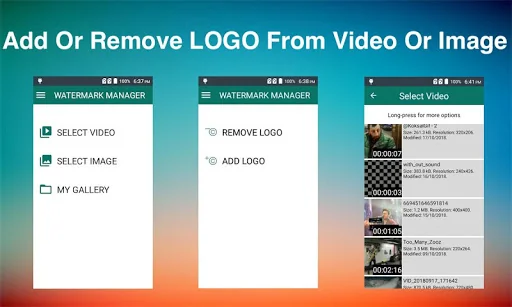
✔As soon as you start the app it show you option to select image or video
✔After selection you are asked if you want to remove or add the watermark
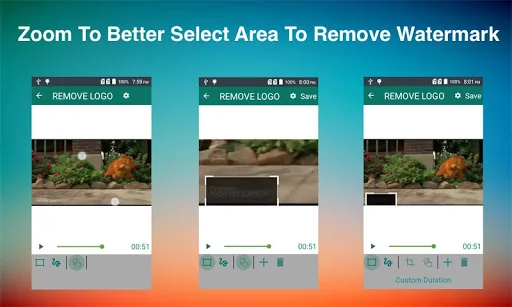
✔If you select REMOVE LOGO option then you are taken to screen with preview and adjustable rectangle with actions(specify more than 1 areas) to specify the area of logo, in this screen can also click on Custom Duration button to specify duration for which to apply filter.You can also choose zoom option and pinch with fingers to better select small watermark area.
✔If you select ADD LOGO option then you are taken to screen with options to add text or images, here you can also customise each option, like change font, text,
colour, size or rotation.
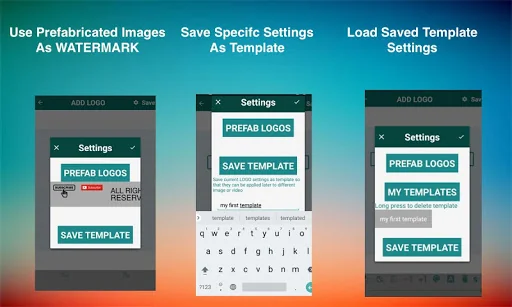
✔ You can also use prefabricated images as watermarks or can save your specific settings as template, these templates can be applied to a different image or video later using 'saved template' option.
✔Press Save button and wait for process to complete and view or share the results.
All exports are saved in <b>WATERMARK MANAGER</b> folder in SD card root directory.You can also view the processed files using 'My Gallery' screen
<h2>FAQS</h2>
<h3>How to add more fonts</h3>
Copy font files(.ttf) into WATERMARK MANAGER->.fonts directory and app will pick those fonts from there.
<h3>How to animate watermark</h3>
Select the watermark you want to animate & click the <b>A</b> button in bottom bar & define settings e.g., duration & direction of watermark.
<h3>How to improve processed video quality</h3>
In edit screen(where you specify watermark area and other components) there is a gear icon on top right corner, please use slowest speed you have patience for and video quality will improve.
<h3>How to save my logo settings as template</h3>
After defining all logo settings(images, texts) click on top-right gear icon to open settings screen and then click "Save Template"->Give template name and you are done.
<h3>What are prefabricated LOGO</h3>
These are images that comes with app and can be added as watermarks, these can be loaded from settings screen.
<h3>What to do if there are more than 1 watermarks to remove</h3>
Use add (+) action button at the bottom bar to specify another watermark area.
<h3>Which videos formats are supported</h3>
Mainly Mp4 but your video is any other format then it is trans-coded to mp4.
You can add watermark to images/videos using text and images with different options including animating the watermark.
You can also suppress a watermark by selecting its area(lasso or rectangle select) and app can remove it by interpolation of the surrounding pixels.This technique works almost perfectly on alpha-blend watermarks, or you can crop the region outside of watermark area, this works perfectly for media that has logo at edges.
<h1>HOW TO USE</h1>
✔As soon as you start the app it show you option to select image or video
✔After selection you are asked if you want to remove or add the watermark
✔If you select REMOVE LOGO option then you are taken to screen with preview and adjustable rectangle with actions(specify more than 1 areas) to specify the area of logo, in this screen can also click on Custom Duration button to specify duration for which to apply filter.You can also choose zoom option and pinch with fingers to better select small watermark area.
✔If you select ADD LOGO option then you are taken to screen with options to add text or images, here you can also customise each option, like change font, text,
colour, size or rotation.
✔ You can also use prefabricated images as watermarks or can save your specific settings as template, these templates can be applied to a different image or video later using 'saved template' option.
✔Press Save button and wait for process to complete and view or share the results.
All exports are saved in <b>WATERMARK MANAGER</b> folder in SD card root directory.You can also view the processed files using 'My Gallery' screen
<h2>FAQS</h2>
<h3>How to add more fonts</h3>
Copy font files(.ttf) into WATERMARK MANAGER->.fonts directory and app will pick those fonts from there.
<h3>How to animate watermark</h3>
Select the watermark you want to animate & click the <b>A</b> button in bottom bar & define settings e.g., duration & direction of watermark.
<h3>How to improve processed video quality</h3>
In edit screen(where you specify watermark area and other components) there is a gear icon on top right corner, please use slowest speed you have patience for and video quality will improve.
<h3>How to save my logo settings as template</h3>
After defining all logo settings(images, texts) click on top-right gear icon to open settings screen and then click "Save Template"->Give template name and you are done.
<h3>What are prefabricated LOGO</h3>
These are images that comes with app and can be added as watermarks, these can be loaded from settings screen.
<h3>What to do if there are more than 1 watermarks to remove</h3>
Use add (+) action button at the bottom bar to specify another watermark area.
<h3>Which videos formats are supported</h3>
Mainly Mp4 but your video is any other format then it is trans-coded to mp4.
Profile & Insights
Everything we know — and don't — about this app and its company.
Identification
- App name
- Remove & Add Watermark
- Developer
- WATER INC
- Bundle ID
- com.bongasoft.addremovewatermark
- App Store URL
- Open in App Store
- Category
- Video Players & Editors
- Content rating
- Not found
- Languages
- Not found
Company
- Website
- Not found
- Tagline
- Not found
- Description
- Not found
- Founded
- Not found
- HQ / Address
- Not found
- Employees
- Not found
- Logo
- Not found
Revenue
- Verified revenue / mo
- Not found
- AI revenue estimate / mo
- Not found
- AI annual estimate
- Not found
- ML model estimate / mo
- $1.4K/mo
- Top-grossing rank
- Not found
- All-time revenue
- Not found
- Pricing
- Not found
Founder
- Name
- Not found
- X / Twitter
- Not found
- Not found
- GitHub
- Not found
- X followers
- Not found
- Public statements
- Not found
Funding
- Total raised
- Not found
- Last round
- Not found
- Investors
- Not found
- Crunchbase
- Not found
- AngelList
- Not found
Press & Links
- Articles found
- Not found
- Listed on
- Not found
- Blog
- Not found
- Press / News
- Not found
Contacts & Socials
- Socials
- Not found
- Not found
- Phone
- Not found
- Contact page
- Not found
- About page
- Not found
Profile is built from iTunes Lookup + developer site scrape + ML revenue model. Empty fields show "Not found" — additional sources (Crunchbase, X, IndieHackers, Acquire.com) coming.
Full revenue analysis
Read the article-style breakdown for Remove & Add Watermark: category rank, percentile, growth signal, comparable apps, and how the forecast is calibrated against verified-MRR anchors in this niche.