69
BU Score
Solid
Hide Photos in Photo Locker
✍️ bumetric analysis
“
Hide Photos in Photo Locker is an Android app from Handy Apps in the Video Players & Editors category, currently rated 3.8★ across 175,512 ratings. Initial signal reads as mixed reviews: supporters praise core features while critics cite stability and value gaps.
Our BU Score puts it at 69: Solid (established niche player). For a Video Players & Editors app, that means established niche player.
Track changes month-over-month in the Performance section below: live snapshot history and revenue forecast included.
📊 Performance Tracking LIVE
Loading…
Rating
—
Reviews
—
Forecast Revenue / mo
—
Snapshots tracked
0
since first record
Range:
💰 Forecast Revenue / mo
MODELRevenue forecast computed from BU's 234 trigger model on each snapshot. Calibrated against ground-truth from 58 verified-revenue apps.
📈 Reviews Growth
LIVECumulative review count from first BU snapshot. Each point = a tracked update.
⭐ Rating Trend
LIVEAverage rating evolution. Updates with each new review batch.
🗓️ Snapshot Timeline
HISTORYEach bar shows a tracked update and the metric delta from the previous snapshot.
App Specs
🔐 Own this app? Claim & verify MRR →🔖 v2.2.6🔄 updated 1y ago📂 Video Players & Editors💰 Free
📝 About this app
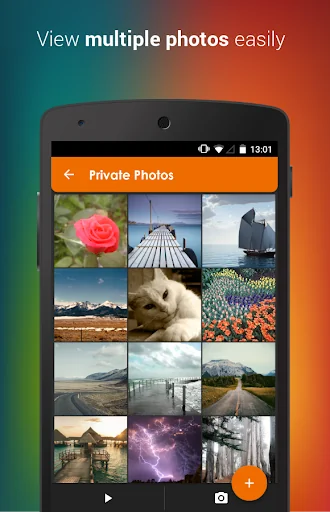
Hide pictures & photos securely and conveniently in Photo Locker! - The ultimate hidden gallery app for hiding photos on Android.
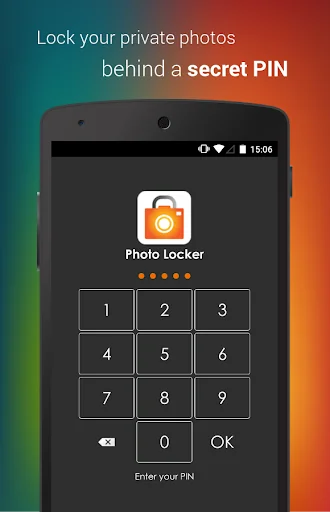
Sensitive photos from your Android photo gallery can be kept safely locked away in a secure Photo Locker accessible only via a secret PIN code.
Key features include:
1)Encryption - hidden pictures are not only moved to a secret location on your phone but are also encrypted using advanced 128 bit AES encryption. This means that even if someone manage to steal your SD card and copy the hidden picture files, they will still be unable to view the locked photos.
2)User friendly operation - Easily hide photos via default gallery or from within Photo Locker itself.
3)Fast bulk hide - Keep safe hundreds of photos quickly
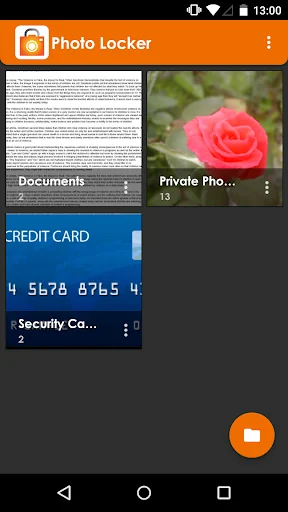
4)Folder level locking - lock individual hidden photo albums. This allows you to show only 1 hidden photo album without exposing the others.
5)Zoom in and out of hidden photos with multi-touch. Hidden photos maintain their original resolution and are not scaled down as in some other photo hiding apps.
6)Rotate hidden pictures left and right
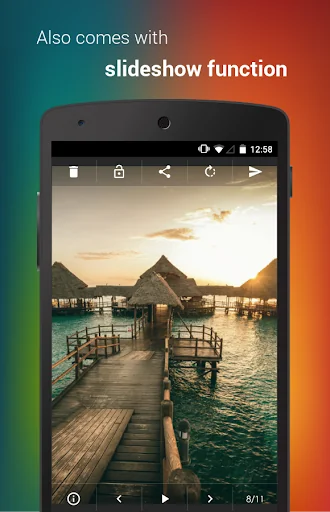
7)Slideshow - Slideshow viewing mode available with customizable delay setting
8)Removed from recent app list - Photo Locker App will not appear in 'recent apps' list
9)Lock on sleep - If you forgot to exit the Photo Locker, the app will lockout as soon as your phone goes to sleep mode.
10)Tablet optimized - Photo Locker's UI has been designed with tablets in mind as well so as to provide the ultimate viewing pleasure on both Android smart phones and tablets
11)PIN recovery - With the optional PIN recovery feature, you won't lose your precious files even if you forgot your PIN code. The app will email the PIN to you in the event you forgot Photo Locker's PIN code.
12)Un-hide pictures easily - Un-hide photos just as easily as hiding them and you can decide where the un-hidden photos go.
Premium features:
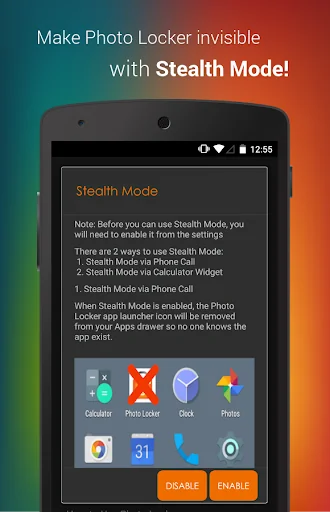
1)Stealth Mode - Hide the app itself! Photo Locker App will disappear from the app drawer as if it never exist on your phone. Access to your private photo vault can only be achieved via an innocent looking calculator widget.
2) Fingerprint log in
3) Get 2 apps for the price of 1! Upgrade either Photo Locker or Video Locker to get premium for both apps. Both apps must remain installed in the device to enjoy this promotion.
4)Ad-free viewing experience
Download Photo Locker now!
Photo Locker is brought to you by Handy Apps.
Connect with us on Facebook at: https://www.facebook.com/HandyAppsInc
-------------------------
Notes to users:
- All photos are safely hidden in the device and not saved to any cloud program for user's privacy.
- App must not be moved to SD card.
- Do not delete .PL folder.
- Not recommended for devices on custom ROM
- Devices running on Android 4.4 and above have restricted application access to SD card.
*Stealth Mode Dial Function has been disabled to comply with Google Play's policy changes: https://support.google.com/googleplay/android-developer/answer/9047303*
*Android 10 Stealth Mode users: Due to Google policy changes, icons can no longer hide in stealth mode for Android 10+. The Calculator(PL) widget will still work, and tapping on the icon only opens app settings, not the app itself.*
Having issues with Photo Locker? Check out the FAQ below for assistance!
https://www.handyappsforlife.com/photo-locker-video-locker-faqs
Sensitive photos from your Android photo gallery can be kept safely locked away in a secure Photo Locker accessible only via a secret PIN code.
Key features include:
1)Encryption - hidden pictures are not only moved to a secret location on your phone but are also encrypted using advanced 128 bit AES encryption. This means that even if someone manage to steal your SD card and copy the hidden picture files, they will still be unable to view the locked photos.
2)User friendly operation - Easily hide photos via default gallery or from within Photo Locker itself.
3)Fast bulk hide - Keep safe hundreds of photos quickly
4)Folder level locking - lock individual hidden photo albums. This allows you to show only 1 hidden photo album without exposing the others.
5)Zoom in and out of hidden photos with multi-touch. Hidden photos maintain their original resolution and are not scaled down as in some other photo hiding apps.
6)Rotate hidden pictures left and right
7)Slideshow - Slideshow viewing mode available with customizable delay setting
8)Removed from recent app list - Photo Locker App will not appear in 'recent apps' list
9)Lock on sleep - If you forgot to exit the Photo Locker, the app will lockout as soon as your phone goes to sleep mode.
10)Tablet optimized - Photo Locker's UI has been designed with tablets in mind as well so as to provide the ultimate viewing pleasure on both Android smart phones and tablets
11)PIN recovery - With the optional PIN recovery feature, you won't lose your precious files even if you forgot your PIN code. The app will email the PIN to you in the event you forgot Photo Locker's PIN code.
12)Un-hide pictures easily - Un-hide photos just as easily as hiding them and you can decide where the un-hidden photos go.
Premium features:
1)Stealth Mode - Hide the app itself! Photo Locker App will disappear from the app drawer as if it never exist on your phone. Access to your private photo vault can only be achieved via an innocent looking calculator widget.
2) Fingerprint log in
3) Get 2 apps for the price of 1! Upgrade either Photo Locker or Video Locker to get premium for both apps. Both apps must remain installed in the device to enjoy this promotion.
4)Ad-free viewing experience
Download Photo Locker now!
Photo Locker is brought to you by Handy Apps.
Connect with us on Facebook at: https://www.facebook.com/HandyAppsInc
-------------------------
Notes to users:
- All photos are safely hidden in the device and not saved to any cloud program for user's privacy.
- App must not be moved to SD card.
- Do not delete .PL folder.
- Not recommended for devices on custom ROM
- Devices running on Android 4.4 and above have restricted application access to SD card.
*Stealth Mode Dial Function has been disabled to comply with Google Play's policy changes: https://support.google.com/googleplay/android-developer/answer/9047303*
*Android 10 Stealth Mode users: Due to Google policy changes, icons can no longer hide in stealth mode for Android 10+. The Calculator(PL) widget will still work, and tapping on the icon only opens app settings, not the app itself.*
Having issues with Photo Locker? Check out the FAQ below for assistance!
https://www.handyappsforlife.com/photo-locker-video-locker-faqs
Profile & Insights
Everything we know — and don't — about this app and its company.
Identification
- App name
- Hide Photos in Photo Locker
- Developer
- Handy Apps
- Bundle ID
- com.handyapps.photoLocker
- App Store URL
- Open in App Store
- Category
- Video Players & Editors
- Content rating
- Not found
- Languages
- Not found
Company
- Website
- Not found
- Tagline
- Not found
- Description
- Not found
- Founded
- Not found
- HQ / Address
- Not found
- Employees
- Not found
- Logo
- Not found
Revenue
- Verified revenue / mo
- Not found
- AI revenue estimate / mo
- Not found
- AI annual estimate
- Not found
- ML model estimate / mo
- $2.5K/mo
- Top-grossing rank
- Not found
- All-time revenue
- Not found
- Pricing
- Not found
Founder
- Name
- Not found
- X / Twitter
- Not found
- Not found
- GitHub
- Not found
- X followers
- Not found
- Public statements
- Not found
Funding
- Total raised
- Not found
- Last round
- Not found
- Investors
- Not found
- Crunchbase
- Not found
- AngelList
- Not found
Press & Links
- Articles found
- Not found
- Listed on
- Not found
- Blog
- Not found
- Press / News
- Not found
Contacts & Socials
- Socials
- Not found
- Not found
- Phone
- Not found
- Contact page
- Not found
- About page
- Not found
Profile is built from iTunes Lookup + developer site scrape + ML revenue model. Empty fields show "Not found" — additional sources (Crunchbase, X, IndieHackers, Acquire.com) coming.
Full revenue analysis
Read the article-style breakdown for Hide Photos in Photo Locker: category rank, percentile, growth signal, comparable apps, and how the forecast is calibrated against verified-MRR anchors in this niche.