57
BU Score
Solid
Vault clock : Photo Video Lock
✍️ BU Analytics Review
“
Vault clock : Photo Video Lock is an Android app from Gallery Vault - Video Hide Pictures And Videos in the Video Players & Editors category, currently rated 3.8★ across 6,651 ratings. Initial signal reads as mixed reviews — supporters praise core features while critics cite stability/value gaps.
Our BU Score puts it at 57 — Solid (established niche player). For a Video Players & Editors app, that means established niche player.
Track changes month-over-month in the Performance section below — live snapshot history and revenue forecast included.
📊 Performance Tracking LIVE
Loading…
Rating
—
Reviews
—
Forecast Revenue / mo
—
Snapshots tracked
0
since first record
Range:
💰 Forecast Revenue / mo
MODELRevenue forecast computed from BU's 234 trigger model on each snapshot. Calibrated against ground-truth from 58 verified-revenue apps.
🔬Forecast Breakdown — Why This Estimate?Top 3 of 3 triggers
Our ML model uses 200+ signals from public data. These are the most influential for this app:
| Low install base (6,651 ratings)METRIC | +$1,500 | |
| Mature app (8y old)METRIC | +$1,500 | |
| Ad-supported / freemiumMETRIC | +$600 |
METRIC = structural app data · REVIEW = mined from user reviews · ✓ VERIFIED = Stripe-verified anchor (TrustMRR)
📈 Reviews Growth
LIVECumulative review count from first BU snapshot. Each point = a tracked update.
⭐ Rating Trend
LIVEAverage rating evolution. Updates with each new review batch.
🗓️ Snapshot Timeline
HISTORYEach bar shows a tracked update and the metric delta from the previous snapshot.
App Specs
🔐 Own this app? Claim & verify MRR →🔖 vVaries with device📂 Video Players & Editors💰 Free📺 Ad-supported💎 IAP $0.99 - $3.49 per item🚀 Launched 2018 (8y old)
📝 About this app
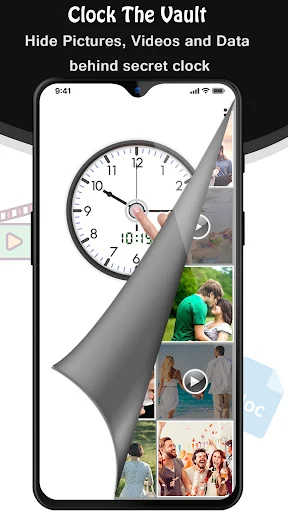
Clock Vault aka Secret Photo Video Locker Watch is a best privacy protection vault easily hide & to keep safe your private photos, videos & any other files that you do not want others to see on your phone.
Clock Vault for protecting your privacy as hiding each of the media files using time in form of passcode!
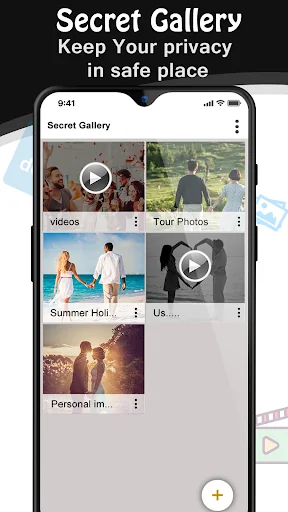
You can easily manage the folders or albums of gallery & view, move & export pictures.
<b><font color="blue">Important Features</font></b>:
•<b> Hide Pictures</b>: Handily hide pictures to our vault from your gallery with private photo locker.
• <b>Hide videos</b>: Smoothly hide your private media to our vault from your gallery with private video locker.
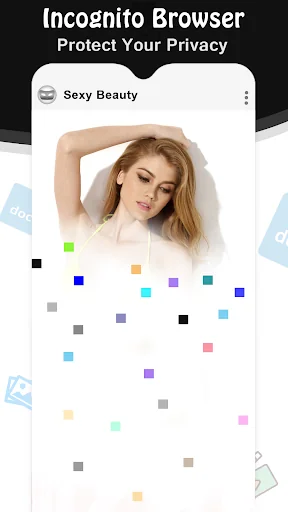
• <b>Private Browser(Incognito Browser)</b>: Private web browser to download and Lock photos, videos and audios from Internet & leaves no tracks in your system.
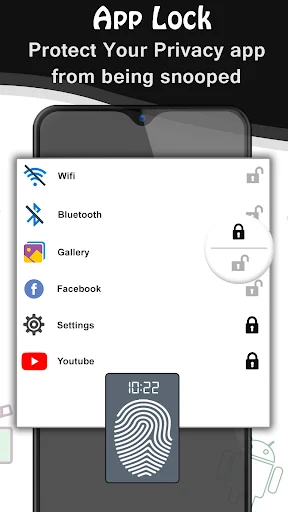
• <b>Strong app latch </b>: latch your Messenger, Gallery, Browser, Contacts, Email or any other apps you choose. You can also latch Wifi, Bluetooth & recent tasks.
• <b>Clock Vault Icon Replace</b>: Replace your Clock Icon with other icons like Whether, Music, Calculator Lock, Calculator Vault etc for better disguise Vault.
• <b>Decoy Locker (Fake Passcode)</b>: Support Fake Locker system and show fake content when you input fake passcode to protect real gallery lock.
• <b>Fingerprint Protection </b>: You can use your fingerprint to Unlock your secret Clock vault and App latch Fingerprint.
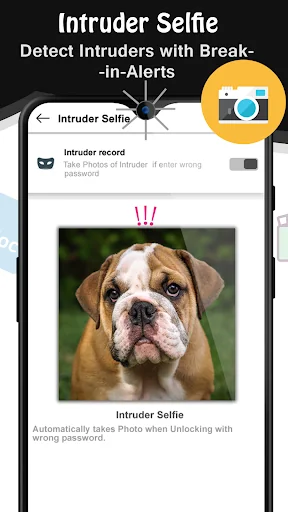
• <b>Break-in Alert</b>: Capture a snapshot and mails to you the selfie of anyone who tries to unlock apps behind you. You can also See & save the snooper photo from inside Gallery Vault.
• <b>Video Player</b>: Super Inbuilt Video player to watch videos inside video Vault.
• <b>Elegant Design</b>: Smooth and beautiful user experience.
• <b>Easy Navigation</b>: You can easily navigate to back screen from anywhere inside clock vault by swipe right from left edge.
<b><font color="blue">Extra Features</font></b>:
- App Disappears from recent apps list.
- Protects clock vault from being uninstalled by kids or strangers.
- Easy file management system. (Edit, Move, Rename, Create Folders etc)
- Direct Hide files from gallery by share option. Share to Vault from your gallery to Instant hide multiple photos videos.
How to Use Watch Lock?
1: Launch our Vault Clock and press the middle button of clock.
2: Set a desired time passcode by moving hour and minute hands and press middle button of clock.
3: Now repeat the passcode to confirm.
<font color="red">IMPORTANT: Do not uninstall this app before restoring your personal files otherwise it will be lost forever.</font>
Watch vault app uses Device Administrator Permission.
Clock Vault needs Device Administrator Permission to prevent it from being uninstalled by snoopers & this app never use this permission except for uninstall prevention.
Watch vault app uses Accessibility services.
Timer Vault need Accessibility services Permission for power saver & help users with disabilities to unlock apps.
Call Info feature will let you know who is calling and manually search for numbers outside your contact book.
FAQs:
Can I take back my photos/videos from Clock Vault?
Yes, just long press on video or photo which you want to back in your phone gallery & it will selected and then tap on topbar eye icon and it will come back to your phone gallery. this way you can also video download from cloud too.
What are the way to hide photo video?
local and cloud.
Which one is most secure way to hide photo videos?
cloud, because it is save photo video on server and accessible by you only.
How to uninstall app?
tap on top bar setting icon and set off Prevent accidentally uninstall app option. please refer above question answer before delete.
How to recover passcode?
set time 10:10 in watch.
Our main goal is Full Privacy Protection and provide the most advanced Hide Picture and Hide Video app to keep safe your privacy!
Clock Vault for protecting your privacy as hiding each of the media files using time in form of passcode!
You can easily manage the folders or albums of gallery & view, move & export pictures.
<b><font color="blue">Important Features</font></b>:
•<b> Hide Pictures</b>: Handily hide pictures to our vault from your gallery with private photo locker.
• <b>Hide videos</b>: Smoothly hide your private media to our vault from your gallery with private video locker.
• <b>Private Browser(Incognito Browser)</b>: Private web browser to download and Lock photos, videos and audios from Internet & leaves no tracks in your system.
• <b>Strong app latch </b>: latch your Messenger, Gallery, Browser, Contacts, Email or any other apps you choose. You can also latch Wifi, Bluetooth & recent tasks.
• <b>Clock Vault Icon Replace</b>: Replace your Clock Icon with other icons like Whether, Music, Calculator Lock, Calculator Vault etc for better disguise Vault.
• <b>Decoy Locker (Fake Passcode)</b>: Support Fake Locker system and show fake content when you input fake passcode to protect real gallery lock.
• <b>Fingerprint Protection </b>: You can use your fingerprint to Unlock your secret Clock vault and App latch Fingerprint.
• <b>Break-in Alert</b>: Capture a snapshot and mails to you the selfie of anyone who tries to unlock apps behind you. You can also See & save the snooper photo from inside Gallery Vault.
• <b>Video Player</b>: Super Inbuilt Video player to watch videos inside video Vault.
• <b>Elegant Design</b>: Smooth and beautiful user experience.
• <b>Easy Navigation</b>: You can easily navigate to back screen from anywhere inside clock vault by swipe right from left edge.
<b><font color="blue">Extra Features</font></b>:
- App Disappears from recent apps list.
- Protects clock vault from being uninstalled by kids or strangers.
- Easy file management system. (Edit, Move, Rename, Create Folders etc)
- Direct Hide files from gallery by share option. Share to Vault from your gallery to Instant hide multiple photos videos.
How to Use Watch Lock?
1: Launch our Vault Clock and press the middle button of clock.
2: Set a desired time passcode by moving hour and minute hands and press middle button of clock.
3: Now repeat the passcode to confirm.
<font color="red">IMPORTANT: Do not uninstall this app before restoring your personal files otherwise it will be lost forever.</font>
Watch vault app uses Device Administrator Permission.
Clock Vault needs Device Administrator Permission to prevent it from being uninstalled by snoopers & this app never use this permission except for uninstall prevention.
Watch vault app uses Accessibility services.
Timer Vault need Accessibility services Permission for power saver & help users with disabilities to unlock apps.
Call Info feature will let you know who is calling and manually search for numbers outside your contact book.
FAQs:
Can I take back my photos/videos from Clock Vault?
Yes, just long press on video or photo which you want to back in your phone gallery & it will selected and then tap on topbar eye icon and it will come back to your phone gallery. this way you can also video download from cloud too.
What are the way to hide photo video?
local and cloud.
Which one is most secure way to hide photo videos?
cloud, because it is save photo video on server and accessible by you only.
How to uninstall app?
tap on top bar setting icon and set off Prevent accidentally uninstall app option. please refer above question answer before delete.
How to recover passcode?
set time 10:10 in watch.
Our main goal is Full Privacy Protection and provide the most advanced Hide Picture and Hide Video app to keep safe your privacy!
Profile & Insights
Everything we know — and don't — about this app and its company.
Identification
- App name
- Vault clock : Photo Video Lock
- Developer
- Gallery Vault - Video Hide Pictures And Videos
- Bundle ID
- com.lembark.watch.applock
- App Store URL
- Open in App Store
- Category
- Video Players & Editors
- Content rating
- Not found
- Languages
- Not found
Company
- Website
- gallery-vault-for-photos.blogspot.com
- Tagline
- Not found
- Description
- Not found
- Founded
- Not found
- HQ / Address
- Not found
- Employees
- Not found
- Logo
- Not found
Revenue
- Verified revenue / mo
- Not found
- AI revenue estimate / mo
- Not found
- AI annual estimate
- Not found
- ML model estimate / mo
- $198/mo
- Top-grossing rank
- Not found
- All-time revenue
- Not found
- Pricing
- $0.99 - $3.49 per item
Founder
- Name
- Not found
- X / Twitter
- Not found
- Not found
- GitHub
- Not found
- X followers
- Not found
- Public statements
- Not found
Funding
- Total raised
- Not found
- Last round
- Not found
- Investors
- Not found
- Crunchbase
- Not found
- AngelList
- Not found
Press & Links
- Articles found
- Not found
- Listed on
- Not found
- Blog
- Not found
- Press / News
- Not found
Contacts & Socials
- Socials
- Not found
- Not found
- Phone
- Not found
- Contact page
- Not found
- About page
- Not found
📈Ratings growth6,651 ratings+32% lifetimeShow 3-year history estimate ▾
Tracked (1 weeks) Pre-tracking estimate (37 weeks) · model-based, ±5% noise · anchored to release date and current value
Profile is built from iTunes Lookup + developer site scrape + ML revenue model. Empty fields show "Not found" — additional sources (Crunchbase, X, IndieHackers, Acquire.com) coming.