72
BU Score
Strong
Samsung Smart Switch Mobile
✍️ BU Analytics Review
“
Samsung Smart Switch Mobile is an Android app from Samsung Electronics Co., Ltd. in the Tools category, currently rated 3.8★ across 508,498 ratings. Initial signal reads as largely positive sentiment, users highlighting consistency and feature depth.
Our BU Score puts it at 72 — Strong (healthy traction). For a Tools app, that means healthy traction.
Track changes month-over-month in the Performance section below — live snapshot history and revenue forecast included.
creator
📊 Performance Tracking LIVE
Loading…
Rating
—
Reviews
—
Forecast Revenue / mo
—
Snapshots tracked
0
since first record
Range:
💰 Forecast Revenue / mo
MODELRevenue forecast computed from BU's 234 trigger model on each snapshot. Calibrated against ground-truth from 58 verified-revenue apps.
📈 Reviews Growth
LIVECumulative review count from first BU snapshot. Each point = a tracked update.
⭐ Rating Trend
LIVEAverage rating evolution. Updates with each new review batch.
🗓️ Snapshot Timeline
HISTORYEach bar shows a tracked update and the metric delta from the previous snapshot.
App Specs
🔐 Own this app? Claim & verify MRR →🔖 v3.7.69.15🔄 updated 2mo ago📂 Tools💰 Free
📝 About this app
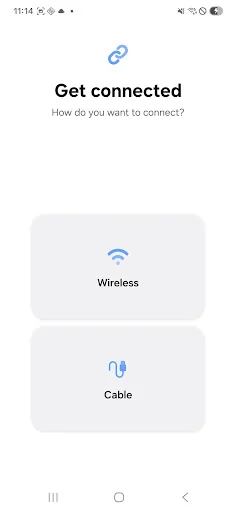
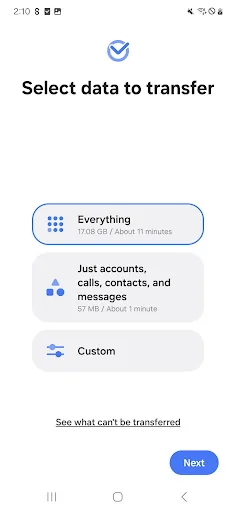
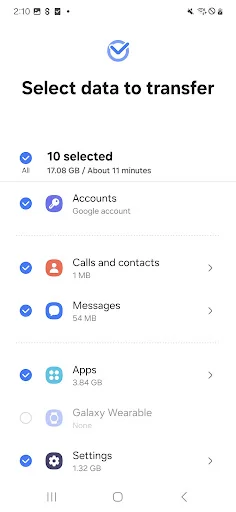
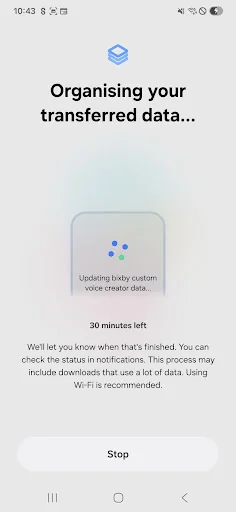
▣ Smart Switch gives you the freedom to move your contacts, music, photos, calendar, text messages, device settings and more to your new Galaxy device. Plus, Smart Switch™ helps you find your favorite apps or suggest similar ones on Google Play™.
▣ Who can transfer?
• Android™ owners
- Android 5.0 or higher
• iOS™ owners - use the option that’s best for you:
- Wired transfer from your iOS device to your Galaxy: iOS 5.0 or above, iOS device cable (lightning or 30 pin), and a USB connector
- Import from iCloud™: iOS 4.2.1 or higher and Apple ID
- PC/Mac transfer using iTunes™: Smart Switch PC/Mac software – Get started http://www.samsung.com/smartswitch
▣ What can be transferred?
- Contacts, calendar(Device content only), messages, photos, music (DRM free content only, Not supported for iCloud), videos (DRM free content only), call logs, memos, alarms, Wi-Fi, wallpapers, documents, app data (Galaxy devices only), home layouts (Galaxy devices only)
- You can send app data and home layouts by upgrading your Galaxy device to M OS (Galaxy S6 or higher).
▣ Which devices are supported?
• Galaxy: Recent Galaxy mobile devices and tablets (From Galaxy S2)
• Other Android devices:
- HTC, LG, Sony, Huawei, Lenovo, Motorola, PANTECH, Panasonic, Kyocera, NEC, SHARP, Fujitsu, Xiaomi, Vivo, OPPO, Coolpad, RIM, YotaPhone, ZTE, Gionee, LAVA, MyPhone, Cherry Mobile, Google
* For reasons such as compatibility between devices, it may not be possible to install and use Smart Switch on certain devices.
1. To transfer data, both devices must have a minimum of 500 MB free space in their internal memory.
2. If you have a non-Samsung device that constantly disconnects from the wireless network, go to Advanced Wi-Fi on your device, turn off the “Wi-Fi initialize” and “Disconnect low Wi-Fi signal” options, and try again.
(The options described above may not be available, depending on your device manufacturer and OS version.)
The following permissions are required for the app service. For optional permissions, the default functionality of the service is turned on, but not allowed.
[ Required permissions ]
. Phone: Used to confirm your phone number (Android 12 or lower)
. Call logs: Used to transfer call log data (Android 9 or higher)
. Contacts: Used to transfer contacts data
. Calendar: Used to transfer calendar data
. Camera: Used to scan QR codes to connect to Galaxy phones and tablets
. SMS: Used to transfer SMS data
. Storage: Used to save the files necessary for data transfer (Android 11 or lower)
. Files and media: Used to save the files necessary for data transfer(Android 12)
. Photos and Videos: Used to save the files necessary for data transfer (Android 13 or higher)
. Nearby devices: Used to search for nearby devices using Wi-Fi or Bluetooth (Android 12 or higher)
. Location: Used to connect to devices using Wi-Fi Direct, which makes your location available to nearby devices (Android 12 or lower)
. Notifications: Used to provide information about the progress of data transfers (Android 13 or higher)
If your system software version is lower than Android 6.0, please update the software to configure App permissions.
Previously allowed permissions can be reset on Apps menu in device settings after software update.
▣ Who can transfer?
• Android™ owners
- Android 5.0 or higher
• iOS™ owners - use the option that’s best for you:
- Wired transfer from your iOS device to your Galaxy: iOS 5.0 or above, iOS device cable (lightning or 30 pin), and a USB connector
- Import from iCloud™: iOS 4.2.1 or higher and Apple ID
- PC/Mac transfer using iTunes™: Smart Switch PC/Mac software – Get started http://www.samsung.com/smartswitch
▣ What can be transferred?
- Contacts, calendar(Device content only), messages, photos, music (DRM free content only, Not supported for iCloud), videos (DRM free content only), call logs, memos, alarms, Wi-Fi, wallpapers, documents, app data (Galaxy devices only), home layouts (Galaxy devices only)
- You can send app data and home layouts by upgrading your Galaxy device to M OS (Galaxy S6 or higher).
▣ Which devices are supported?
• Galaxy: Recent Galaxy mobile devices and tablets (From Galaxy S2)
• Other Android devices:
- HTC, LG, Sony, Huawei, Lenovo, Motorola, PANTECH, Panasonic, Kyocera, NEC, SHARP, Fujitsu, Xiaomi, Vivo, OPPO, Coolpad, RIM, YotaPhone, ZTE, Gionee, LAVA, MyPhone, Cherry Mobile, Google
* For reasons such as compatibility between devices, it may not be possible to install and use Smart Switch on certain devices.
1. To transfer data, both devices must have a minimum of 500 MB free space in their internal memory.
2. If you have a non-Samsung device that constantly disconnects from the wireless network, go to Advanced Wi-Fi on your device, turn off the “Wi-Fi initialize” and “Disconnect low Wi-Fi signal” options, and try again.
(The options described above may not be available, depending on your device manufacturer and OS version.)
The following permissions are required for the app service. For optional permissions, the default functionality of the service is turned on, but not allowed.
[ Required permissions ]
. Phone: Used to confirm your phone number (Android 12 or lower)
. Call logs: Used to transfer call log data (Android 9 or higher)
. Contacts: Used to transfer contacts data
. Calendar: Used to transfer calendar data
. Camera: Used to scan QR codes to connect to Galaxy phones and tablets
. SMS: Used to transfer SMS data
. Storage: Used to save the files necessary for data transfer (Android 11 or lower)
. Files and media: Used to save the files necessary for data transfer(Android 12)
. Photos and Videos: Used to save the files necessary for data transfer (Android 13 or higher)
. Nearby devices: Used to search for nearby devices using Wi-Fi or Bluetooth (Android 12 or higher)
. Location: Used to connect to devices using Wi-Fi Direct, which makes your location available to nearby devices (Android 12 or lower)
. Notifications: Used to provide information about the progress of data transfers (Android 13 or higher)
If your system software version is lower than Android 6.0, please update the software to configure App permissions.
Previously allowed permissions can be reset on Apps menu in device settings after software update.
Profile & Insights
Everything we know — and don't — about this app and its company.
Identification
- App name
- Samsung Smart Switch Mobile
- Developer
- Samsung Electronics Co., Ltd.
- Bundle ID
- com.sec.android.easyMover
- App Store URL
- Open in App Store
- Category
- Tools
- Content rating
- Not found
- Languages
- Not found
Company
- Website
- Not found
- Tagline
- Not found
- Description
- Not found
- Founded
- Not found
- HQ / Address
- Not found
- Employees
- Not found
- Logo
- Not found
Revenue
- Verified revenue / mo
- Not found
- AI revenue estimate / mo
- Not found
- AI annual estimate
- Not found
- ML model estimate / mo
- $3.8K/mo
- Top-grossing rank
- Not found
- All-time revenue
- Not found
- Pricing
- Not found
Founder
- Name
- Not found
- X / Twitter
- Not found
- Not found
- GitHub
- Not found
- X followers
- Not found
- Public statements
- Not found
Funding
- Total raised
- Not found
- Last round
- Not found
- Investors
- Not found
- Crunchbase
- Not found
- AngelList
- Not found
Press & Links
- Articles found
- Not found
- Listed on
- Not found
- Blog
- Not found
- Press / News
- Not found
Contacts & Socials
- Socials
- Not found
- Not found
- Phone
- Not found
- Contact page
- Not found
- About page
- Not found
Profile is built from iTunes Lookup + developer site scrape + ML revenue model. Empty fields show "Not found" — additional sources (Crunchbase, X, IndieHackers, Acquire.com) coming.
More by Samsung Electronics Co., Ltd.
View all →Samsung Notes
★ 4.8 · 13,870,333 reviews
Samsung Internet Browser
★ 3.6 · 5,886,044 reviews
SmartThings
★ 4.6 · 4,704,565 reviews
Samsung Email
★ 4.4 · 2,513,926 reviews
Samsung Gallery
★ 4.5 · 2,508,082 reviews
Samsung Members
★ 4.5 · 1,855,958 reviews
Galaxy Wearable
★ 3.8 · 1,790,609 reviews
Samsung Push Service
★ 3.9 · 1,603,995 reviews
More Tools
Phone by Google
★ 4.5 · 47,248,471 reviews
Google Play services
★ 4.3 · 44,619,167 reviews
★ 4.1 · 29,135,018 reviews
Gboard - the Google Keyboard
★ 4.5 · 18,500,531 reviews
SHAREit: Transfer, Share Files
★ 4.3 · 18,247,718 reviews
gov.br
★ 4.5 · 12,551,225 reviews
MyTelkomsel – Buy Internet
★ 3.7 · 11,917,556 reviews
myIM3: Data Plan & Buy Package
★ 4.4 · 10,992,500 reviews
Browse BU Analytics
📚 All 55,000+ Books
🜍 Alchemy & Hermeticism
🔮 Magic & Ritual
🌙 Witchcraft & Paganism
⭐ Astrology & Cosmology
🃏 Divination & Tarot
📜 Tools
✡️ Kabbalah & Jewish Mysticism
🕉️ Mysticism & Contemplation
🕊️ Theosophy & Anthroposophy
🏛️ Freemasonry & Secret Societies
👻 Spiritualism & Afterlife
📖 Sacred Texts & Gnosticism
👁️ Supernatural & Occult Fiction
🧘 Spiritual Development
📚 Esoteric History & Biography
Info
About BU Analytics