51
BU Score
Solid
テレビ局公認!タレント出演情報満載-Gガイド番組表(ドコモ)
✍️ BU Analytics Review
“
テレビ局公認!タレント出演情報満載-Gガイド番組表(ドコモ) is an Android app from IPG Inc in the Video Players & Editors category, currently rated 2.5★ across 17,070 ratings. Initial signal reads as mixed reviews — supporters praise core features while critics cite stability/value gaps.
Our BU Score puts it at 51 — Solid (established niche player). For a Video Players & Editors app, that means established niche player.
Track changes month-over-month in the Performance section below — live snapshot history and revenue forecast included.
📊 Performance Tracking LIVE
Loading…
Rating
—
Reviews
—
Forecast Revenue / mo
—
Snapshots tracked
0
since first record
Range:
💰 Forecast Revenue / mo
MODELRevenue forecast computed from BU's 234 trigger model on each snapshot. Calibrated against ground-truth from 58 verified-revenue apps.
🔬Forecast Breakdown — Why This Estimate?Top 3 of 3 triggers
Our ML model uses 200+ signals from public data. These are the most influential for this app:
| Mid install base (17,070 ratings)METRIC | +$5,500 | |
| Below-average rating (2.5★)METRIC | −$1,500 | |
| Ad-supported / freemiumMETRIC | +$600 |
METRIC = structural app data · REVIEW = mined from user reviews · ✓ VERIFIED = Stripe-verified anchor (TrustMRR)
📈 Reviews Growth
LIVECumulative review count from first BU snapshot. Each point = a tracked update.
⭐ Rating Trend
LIVEAverage rating evolution. Updates with each new review batch.
🗓️ Snapshot Timeline
HISTORYEach bar shows a tracked update and the metric delta from the previous snapshot.
App Specs
🔐 Own this app? Claim & verify MRR →🔖 v12.0.1🔄 updated 2w ago📂 Video Players & Editors💰 Free
📝 About this app
[For those who do not need the app]
Depending on your device, it may not be possible to completely uninstall the app.
If you do not wish to use the app, please disable it. (Disabling it will prevent automatic updates.)
How to disable the app: Open the [Settings] app on your device → Select [Apps] from the screen → Select [All apps], [All], or [System] → Select "G Guide TV Program Guide" → Select [Disable].
This will disable the app and it will no longer appear in the Play Store.
For information regarding notifications for the daily "Today's TV Listings" and how to uninstall this app, please check the [Frequently Asked Questions] section within this description.
For any other issues, please contact us at help-dcm@ipg.jp.
====Official TV program guide usable in conjunction with your device's One-Seg app====
[Features]
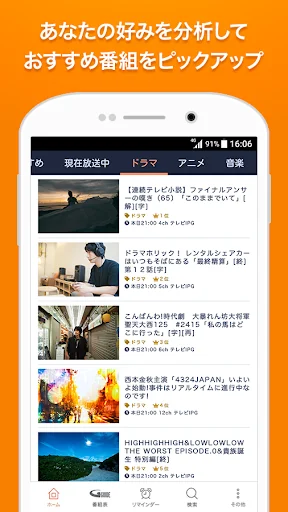
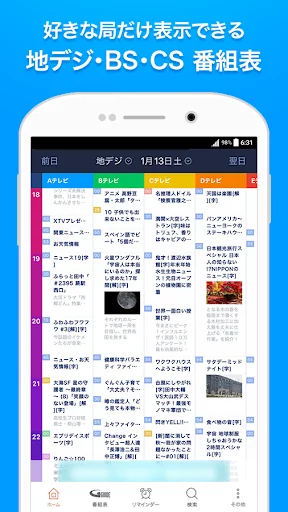
☆Official program guide with images and videos, designed for ease of use.
☆Compatible with CS (SKY PerfecTV!/SKY PerfecTV! Premium), BS4K/8K, and radiko!
☆Viewing/recording reservations via integration with the One-Seg viewing app.
*Limited to models compatible with the One-Seg integration function.
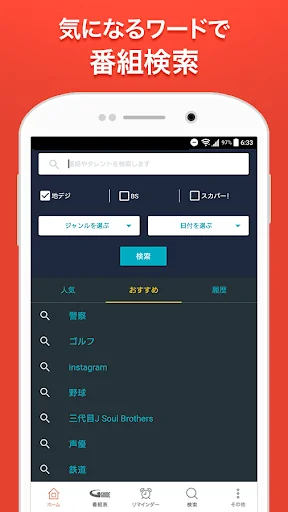
☆Check out featured programs and popular talents, and search conveniently!
【Frequently Asked Questions】
Q. How do I uninstall this app?
A. Depending on your device, the app may be pre-installed and cannot be completely removed. Please understand.
If you do not wish to use the app, please disable it. (Disabling it will prevent automatic updates.)
How to disable the app: Launch the [Settings] app on your device → Select [Apps] from the screen → Select [All apps], [All], or [System] → Select "G Guide TV Program Guide" → Select [Disable].
This will disable the app and it will no longer appear in the Play Store.
Q. Broadcasters that I've unchecked in "Display Channel Settings" are still appearing in "Favorites."
A. "Display Channel Settings" only affect "Program Guide," "Custom Program Guide," and "Search," not "Favorites."
To exclude channels from "Favorites," you can uncheck them under "Other" > "Favorite Target Broadcast Waves." *Note: "Favorite Target Broadcast Waves" cannot be set for individual broadcasters.
Q. BS and CS programs are appearing in "Favorites" and I'm receiving notifications.
A. You can configure the display and notifications for programs and talents registered in "Favorites" on a per-broadcaster basis.
You can exclude specific broadcast waves by tapping the gear icon in the upper left corner of "Favorites" or by unchecking them under "Other" > "Favorite Target Broadcast Waves."
Unchecking a broadcast wave will remove its programs from the "Favorites" list.
Also, you will no longer receive pre-broadcast notifications (push notifications) for programs on unchecked broadcast waves. Please adjust the settings according to your preference.
Q. I want to stop push notifications for "Today's TV Guide".
A. Please adjust the settings using the following method:
① Launch the TV guide app
② Tap "Other" in the bottom menu
③ Tap "Push Notifications"
④ Tap "Today's TV Guide" within "Push Notifications"
⑤ Turn off the "ON" switch
Q. Which recording devices support remote recording?
A. Only Panasonic recording devices are supported.
[Function Overview]
* View TV program guides for terrestrial/BS/CS (SKY PerfecTV!/SKY PerfecTV! Premium)/4K8K/radiko
* Accurate information using "SI-EPG," a program guide operated by broadcasting stations
* Supports broadcasting stations throughout Japan and in various regions
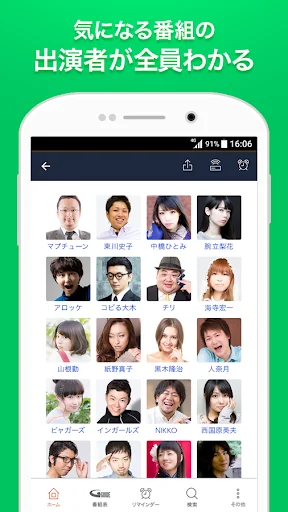
* Talent profiles and search by talent
* Check programs featuring talents from their profiles
* Program search by keyword
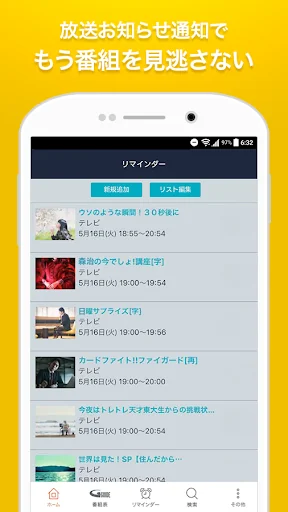
* Reminder function that notifies you just before broadcast
* Post to SNS (LINE, X, Facebook, etc.) from program details
* Viewing reservation/recording reservation through linkage with One-Seg viewing apps
* Limited to models compatible with One-Seg linkage function
* Remote recording reservation
* Only Panasonic is supported.
Please check the list of compatible models on the website below. https://ggm.bangumi.org/web/v6/forward.action?name=remote_recording
= [Important Notes]
* Using this application (including application downloads/updates) will incur separate data charges.
* Data charges may be high. For peace of mind, please use a flat-rate data plan.
* This application does not support TV remote control functionality.
Depending on your device, it may not be possible to completely uninstall the app.
If you do not wish to use the app, please disable it. (Disabling it will prevent automatic updates.)
How to disable the app: Open the [Settings] app on your device → Select [Apps] from the screen → Select [All apps], [All], or [System] → Select "G Guide TV Program Guide" → Select [Disable].
This will disable the app and it will no longer appear in the Play Store.
For information regarding notifications for the daily "Today's TV Listings" and how to uninstall this app, please check the [Frequently Asked Questions] section within this description.
For any other issues, please contact us at help-dcm@ipg.jp.
====Official TV program guide usable in conjunction with your device's One-Seg app====
[Features]
☆Official program guide with images and videos, designed for ease of use.
☆Compatible with CS (SKY PerfecTV!/SKY PerfecTV! Premium), BS4K/8K, and radiko!
☆Viewing/recording reservations via integration with the One-Seg viewing app.
*Limited to models compatible with the One-Seg integration function.
☆Check out featured programs and popular talents, and search conveniently!
【Frequently Asked Questions】
Q. How do I uninstall this app?
A. Depending on your device, the app may be pre-installed and cannot be completely removed. Please understand.
If you do not wish to use the app, please disable it. (Disabling it will prevent automatic updates.)
How to disable the app: Launch the [Settings] app on your device → Select [Apps] from the screen → Select [All apps], [All], or [System] → Select "G Guide TV Program Guide" → Select [Disable].
This will disable the app and it will no longer appear in the Play Store.
Q. Broadcasters that I've unchecked in "Display Channel Settings" are still appearing in "Favorites."
A. "Display Channel Settings" only affect "Program Guide," "Custom Program Guide," and "Search," not "Favorites."
To exclude channels from "Favorites," you can uncheck them under "Other" > "Favorite Target Broadcast Waves." *Note: "Favorite Target Broadcast Waves" cannot be set for individual broadcasters.
Q. BS and CS programs are appearing in "Favorites" and I'm receiving notifications.
A. You can configure the display and notifications for programs and talents registered in "Favorites" on a per-broadcaster basis.
You can exclude specific broadcast waves by tapping the gear icon in the upper left corner of "Favorites" or by unchecking them under "Other" > "Favorite Target Broadcast Waves."
Unchecking a broadcast wave will remove its programs from the "Favorites" list.
Also, you will no longer receive pre-broadcast notifications (push notifications) for programs on unchecked broadcast waves. Please adjust the settings according to your preference.
Q. I want to stop push notifications for "Today's TV Guide".
A. Please adjust the settings using the following method:
① Launch the TV guide app
② Tap "Other" in the bottom menu
③ Tap "Push Notifications"
④ Tap "Today's TV Guide" within "Push Notifications"
⑤ Turn off the "ON" switch
Q. Which recording devices support remote recording?
A. Only Panasonic recording devices are supported.
[Function Overview]
* View TV program guides for terrestrial/BS/CS (SKY PerfecTV!/SKY PerfecTV! Premium)/4K8K/radiko
* Accurate information using "SI-EPG," a program guide operated by broadcasting stations
* Supports broadcasting stations throughout Japan and in various regions
* Talent profiles and search by talent
* Check programs featuring talents from their profiles
* Program search by keyword
* Reminder function that notifies you just before broadcast
* Post to SNS (LINE, X, Facebook, etc.) from program details
* Viewing reservation/recording reservation through linkage with One-Seg viewing apps
* Limited to models compatible with One-Seg linkage function
* Remote recording reservation
* Only Panasonic is supported.
Please check the list of compatible models on the website below. https://ggm.bangumi.org/web/v6/forward.action?name=remote_recording
= [Important Notes]
* Using this application (including application downloads/updates) will incur separate data charges.
* Data charges may be high. For peace of mind, please use a flat-rate data plan.
* This application does not support TV remote control functionality.
Profile & Insights
Everything we know — and don't — about this app and its company.
Identification
- App name
- テレビ局公認!タレント出演情報満載-Gガイド番組表(ドコモ)
- Developer
- IPG Inc
- Bundle ID
- com.uievolution.gguide.android
- App Store URL
- Open in App Store
- Category
- Video Players & Editors
- Content rating
- Not found
- Languages
- Not found
Company
- Website
- Not found
- Tagline
- Not found
- Description
- Not found
- Founded
- Not found
- HQ / Address
- Not found
- Employees
- Not found
- Logo
- Not found
Revenue
- Verified revenue / mo
- Not found
- AI revenue estimate / mo
- Not found
- AI annual estimate
- Not found
- ML model estimate / mo
- $1.1K/mo
- Top-grossing rank
- Not found
- All-time revenue
- Not found
- Pricing
- Not found
Founder
- Name
- Not found
- X / Twitter
- Not found
- Not found
- GitHub
- Not found
- X followers
- Not found
- Public statements
- Not found
Funding
- Total raised
- Not found
- Last round
- Not found
- Investors
- Not found
- Crunchbase
- Not found
- AngelList
- Not found
Press & Links
- Articles found
- Not found
- Listed on
- Not found
- Blog
- Not found
- Press / News
- Not found
Contacts & Socials
- Socials
- Not found
- Not found
- Phone
- Not found
- Contact page
- Not found
- About page
- Not found
Profile is built from iTunes Lookup + developer site scrape + ML revenue model. Empty fields show "Not found" — additional sources (Crunchbase, X, IndieHackers, Acquire.com) coming.