77
BU Score
Strong
Crop, Cut & Trim Video Editor
✍️ bumetric analysis
“
Crop, Cut & Trim Video Editor is an Android app from ZipoApps in the Video Players & Editors category, currently rated 4.4★ across 357,427 ratings. Initial signal reads as largely positive sentiment, users highlighting consistency and feature depth.
Our BU Score puts it at 77: Strong (healthy traction). For a Video Players & Editors app, that means healthy traction.
Track changes month-over-month in the Performance section below: live snapshot history and revenue forecast included.
📊 Performance Tracking LIVE
Loading…
Rating
—
Reviews
—
Forecast Revenue / mo
—
Snapshots tracked
0
since first record
Range:
💰 Forecast Revenue / mo
MODELRevenue forecast computed from BU's 234 trigger model on each snapshot. Calibrated against ground-truth from 58 verified-revenue apps.
🔬Forecast Breakdown — Why This Estimate?Top 3 of 3 triggers
Our ML model uses 200+ signals from public data. These are the most influential for this app:
| High install base (357,427 ratings)METRIC | +$12,000 | |
| Good rating (4.4★)METRIC | +$800 | |
| Ad-supported / freemiumMETRIC | +$600 |
METRIC = structural app data · REVIEW = mined from user reviews · ✓ VERIFIED = Stripe-verified anchor (TrustMRR)
📈 Reviews Growth
LIVECumulative review count from first BU snapshot. Each point = a tracked update.
⭐ Rating Trend
LIVEAverage rating evolution. Updates with each new review batch.
🗓️ Snapshot Timeline
HISTORYEach bar shows a tracked update and the metric delta from the previous snapshot.
App Specs
🔐 Own this app? Claim & verify MRR →🔖 v3.4.14🔄 updated 7mo ago📂 Video Players & Editors💰 Free
📝 About this app
Ultimate Video Editor - the easiest way to Cut, Crop, Blur and Trim Videos. Edit Videos like a PRO with Video Cutter and Video Trimmer features!
<h1>The easiest way to Cut, Crop, and Trim Videos!</h1>
<b>Video Cutter & Trimmer</b> helps you trim and crop video, removing unwanted portions. You can blur video as well, or avoid cropping and enhance video colors easily like in Photoshop. Simple video editor for all your needs!
<h1>Edit Videos like a PRO</h1>
Simple to use drag and scale part of the video that you want to crop, blur or select the trim interval. You can <b>crop, trim, blur video, and enhance colors for the social networks</b>. Create a masterpiece and share it with friends on social media with ease. All video editing tools that you need in one place!
<h2>Cool Features of Trim & Crop Video Editor:</h2>
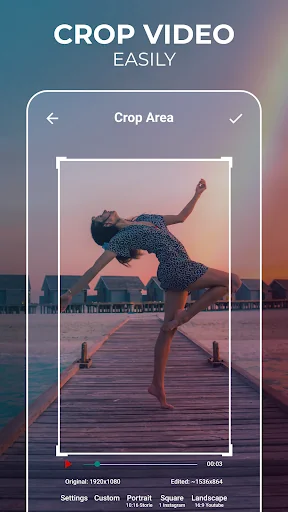
<b>Crop video</b> - Use the video resizer feature to resize the video to the size that meets your needs. There are various options available, where you can choose from predefined sizes to any custom size!
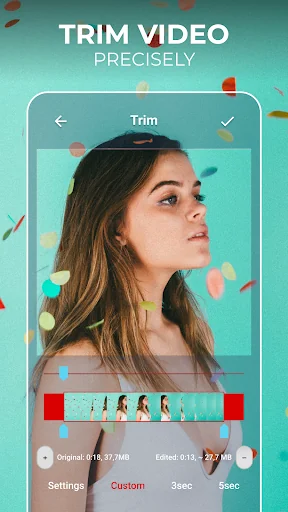
<b>Trim and cut video</b> - The video trimmer feature enables you to set the video's interval that you want to trim. When you set it, tap the button and get it done!
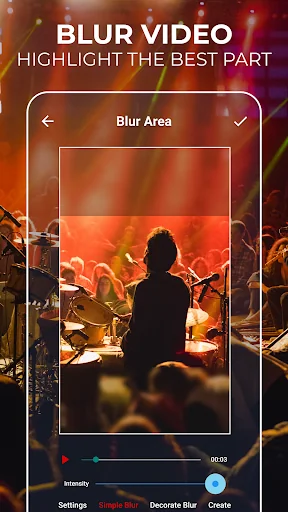
<b>Blur video</b> - Do you want to blur video parts, some faces, or any other area of the video? Just use the blur video feature, and the problem is solved!
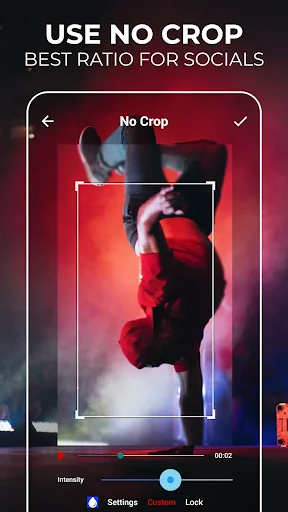
<b>No crop video</b> - Use the video's full size and make it fit without cropping. No crop video feature offers you more predefined and most often used aspect ratios, but you can also set a custom one.
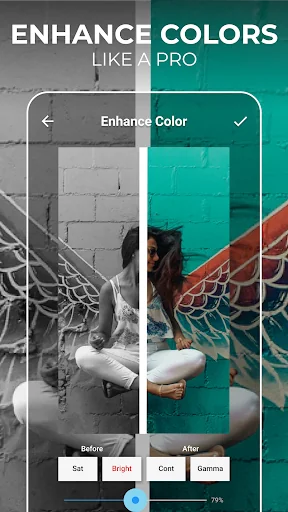
<b>Enhance video color</b> - Select specific parts of your video and adjust colors. Change the saturation and make it more vibrant!
<b>No watermark</b> - You can edit videos without any watermark!
<b>Social networks</b> - Post your creative usage of our app on social networks, get followers or views, and you can get featured in our app! Crop and Cut Video for your social media!
<b>Share videos</b> - Share your video editing creations with your friends or with your community and let them know about your creative work.
<b>Unique Video Cutter & Trimmer</b>
If you need a quick and easy way to cut videos - you found it! Video Cutter with all the editing tools you need. Most importantly, it's easy to use! Edit videos easily with the best video editing tool. Cut & Crop Video instantly!
<b>Blur Video Easily</b>
Yes, we have this great feature as well! Blur video parts easily and create unique content.
<b>Video Trimmer</b>
Set the video's interval that you want to trim, and it's done!
Video crop, cut & trim - How to edit videos?
✔ Select the video
✔ Set trim or blur position with width and height or select the interval to cut videos
✔ Click on the crop, trim, enhance colors or blur video
✔ Preview and share
✔ Easy video cutter, cropper, trimmer, or enhancer
For any suggestions, contact us at support.videocrop@zipoapps.com
The only video cutter and trimmer you'll ever need!
<h2>Edit Video like a PRO and share it with your friends on Instagram and TikTok easily!</h2>
Start using a video editor app with amazing features and make your video more engaging! Blur video parts, enhance colors, trim, crop video, or use the no crop video feature - Show your video editing skills!
<i>Disclaimer
All product names, logos, brands, trademarks and registered trademarks, which are not owned by us, are property of their respective owners.
All company, product and service names used in this app are for identification purposes only. Use of these names, trademarks and brands does not imply endorsement.
The Crop, Cut & Trim Video Editor app is owned by us. We are not affiliated, associated, authorized, endorsed by, or in any way officially connected with any 3rd party apps or companies.</i>
<h1>The easiest way to Cut, Crop, and Trim Videos!</h1>
<b>Video Cutter & Trimmer</b> helps you trim and crop video, removing unwanted portions. You can blur video as well, or avoid cropping and enhance video colors easily like in Photoshop. Simple video editor for all your needs!
<h1>Edit Videos like a PRO</h1>
Simple to use drag and scale part of the video that you want to crop, blur or select the trim interval. You can <b>crop, trim, blur video, and enhance colors for the social networks</b>. Create a masterpiece and share it with friends on social media with ease. All video editing tools that you need in one place!
<h2>Cool Features of Trim & Crop Video Editor:</h2>
<b>Crop video</b> - Use the video resizer feature to resize the video to the size that meets your needs. There are various options available, where you can choose from predefined sizes to any custom size!
<b>Trim and cut video</b> - The video trimmer feature enables you to set the video's interval that you want to trim. When you set it, tap the button and get it done!
<b>Blur video</b> - Do you want to blur video parts, some faces, or any other area of the video? Just use the blur video feature, and the problem is solved!
<b>No crop video</b> - Use the video's full size and make it fit without cropping. No crop video feature offers you more predefined and most often used aspect ratios, but you can also set a custom one.
<b>Enhance video color</b> - Select specific parts of your video and adjust colors. Change the saturation and make it more vibrant!
<b>No watermark</b> - You can edit videos without any watermark!
<b>Social networks</b> - Post your creative usage of our app on social networks, get followers or views, and you can get featured in our app! Crop and Cut Video for your social media!
<b>Share videos</b> - Share your video editing creations with your friends or with your community and let them know about your creative work.
<b>Unique Video Cutter & Trimmer</b>
If you need a quick and easy way to cut videos - you found it! Video Cutter with all the editing tools you need. Most importantly, it's easy to use! Edit videos easily with the best video editing tool. Cut & Crop Video instantly!
<b>Blur Video Easily</b>
Yes, we have this great feature as well! Blur video parts easily and create unique content.
<b>Video Trimmer</b>
Set the video's interval that you want to trim, and it's done!
Video crop, cut & trim - How to edit videos?
✔ Select the video
✔ Set trim or blur position with width and height or select the interval to cut videos
✔ Click on the crop, trim, enhance colors or blur video
✔ Preview and share
✔ Easy video cutter, cropper, trimmer, or enhancer
For any suggestions, contact us at support.videocrop@zipoapps.com
The only video cutter and trimmer you'll ever need!
<h2>Edit Video like a PRO and share it with your friends on Instagram and TikTok easily!</h2>
Start using a video editor app with amazing features and make your video more engaging! Blur video parts, enhance colors, trim, crop video, or use the no crop video feature - Show your video editing skills!
<i>Disclaimer
All product names, logos, brands, trademarks and registered trademarks, which are not owned by us, are property of their respective owners.
All company, product and service names used in this app are for identification purposes only. Use of these names, trademarks and brands does not imply endorsement.
The Crop, Cut & Trim Video Editor app is owned by us. We are not affiliated, associated, authorized, endorsed by, or in any way officially connected with any 3rd party apps or companies.</i>
Profile & Insights
Everything we know — and don't — about this app and its company.
Identification
- App name
- Crop, Cut & Trim Video Editor
- Developer
- ZipoApps
- Bundle ID
- fnzstudios.com.videocrop
- App Store URL
- Open in App Store
- Category
- Video Players & Editors
- Content rating
- Not found
- Languages
- Not found
Company
- Website
- Not found
- Tagline
- Not found
- Description
- Not found
- Founded
- Not found
- HQ / Address
- Not found
- Employees
- Not found
- Logo
- Not found
Revenue
- Verified revenue / mo
- Not found
- AI revenue estimate / mo
- Not found
- AI annual estimate
- Not found
- ML model estimate / mo
- $3.4K/mo
- Top-grossing rank
- Not found
- All-time revenue
- Not found
- Pricing
- Not found
Founder
- Name
- Not found
- X / Twitter
- Not found
- Not found
- GitHub
- Not found
- X followers
- Not found
- Public statements
- Not found
Funding
- Total raised
- Not found
- Last round
- Not found
- Investors
- Not found
- Crunchbase
- Not found
- AngelList
- Not found
Press & Links
- Articles found
- Not found
- Listed on
- Not found
- Blog
- Not found
- Press / News
- Not found
Contacts & Socials
- Socials
- Not found
- Not found
- Phone
- Not found
- Contact page
- Not found
- About page
- Not found
Profile is built from iTunes Lookup + developer site scrape + ML revenue model. Empty fields show "Not found" — additional sources (Crunchbase, X, IndieHackers, Acquire.com) coming.
Full revenue analysis
Read the article-style breakdown for Crop, Cut & Trim Video Editor: category rank, percentile, growth signal, comparable apps, and how the forecast is calibrated against verified-MRR anchors in this niche.