50
BU Score
Solid
Cubit — AR Ruler Toolkit
✍️ bumetric analysis
“
Cubit — AR Ruler Toolkit is an iOS app from Loopware in the Utilities category, currently rated 4.1★ across 74 ratings. Initial signal reads as mostly critical sentiment so far: users flag rough edges and unmet expectations.
Our BU Score puts it at 50: Solid (established niche player). For a Utilities app, that means established niche player.
Track changes month-over-month in the Performance section below: live snapshot history and revenue forecast included.
📊 Performance Tracking LIVE
Loading…
Rating
—
Reviews
—
Forecast Revenue / mo
—
Snapshots tracked
0
since first record
Range:
💰 Forecast Revenue / mo
MODELRevenue forecast computed from BU's 234 trigger model on each snapshot. Calibrated against ground-truth from 58 verified-revenue apps.
🔬Forecast Breakdown — Why This Estimate?Top 5 of 5 triggers
Our ML model uses 200+ signals from public data. These are the most influential for this app:
| Paid app ($0.00)METRIC | +$2,800 | |
| Mature app (8y old)METRIC | +$1,500 | |
| Good rating (4.1★)METRIC | +$800 | |
| Single-language (English only)METRIC | −$400 | |
| Pre-traction phase (74 ratings)METRIC | −$300 |
METRIC = structural app data · REVIEW = mined from user reviews · ✓ VERIFIED = Stripe-verified anchor (TrustMRR)
📈 Reviews Growth
LIVECumulative review count from first BU snapshot. Each point = a tracked update.
⭐ Rating Trend
LIVEAverage rating evolution. Updates with each new review batch.
🗓️ Snapshot Timeline
HISTORYEach bar shows a tracked update and the metric delta from the previous snapshot.
App Specs
🔐 Own this app? Claim & verify MRR →💾 14 MB🔞 4+📱 iOS 11.0+🔖 v1.5.5🔄 updated 6y ago🌐 EN📂 Utilities💰 Paid🚀 Launched 2017 (8y old)
📝 About this app
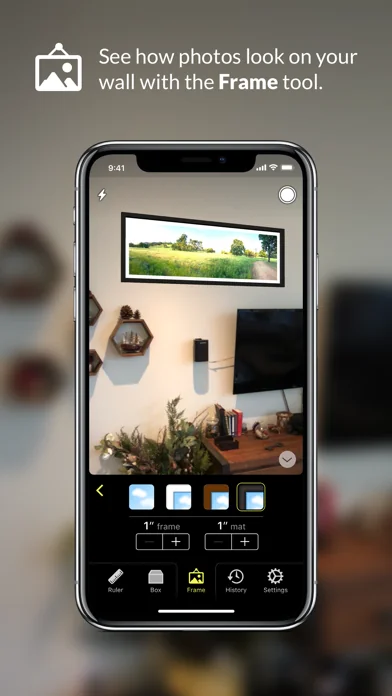
Cubit lets you measure distances with its Ruler tool, visualize the size of objects with its Box tool, and see how your photos look on a wall with its Photo Frame tool. Everything you do is saved in the History tool. Unlike other “AR ruler” apps, Cubit's intuitive UI makes it easy to take accurate measurements.
Cubit features include:
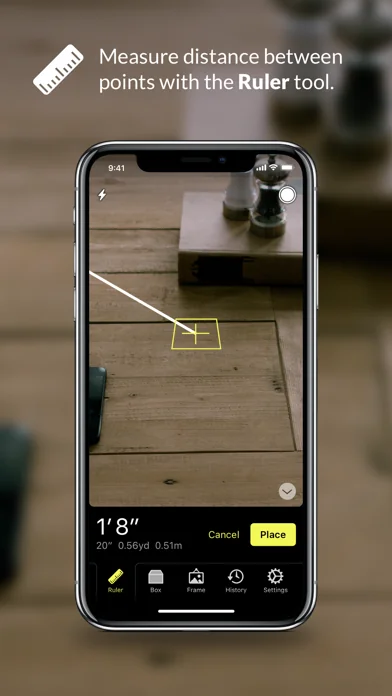
• Ruler tool - measures distance between points. You can put as many ruler lines in the scene as you like and they're tappable so they can be deleted. The measurement label on the line follows the camera so that it's always visible.
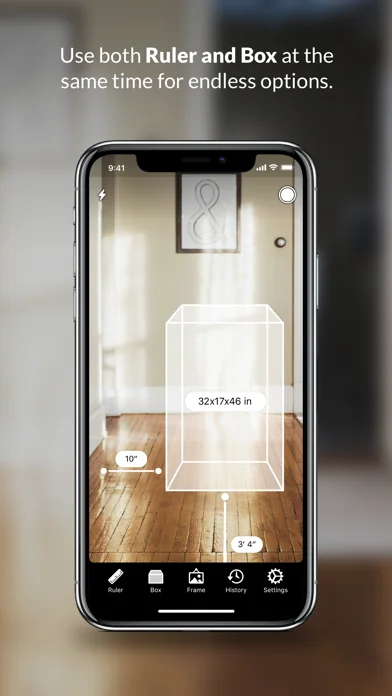
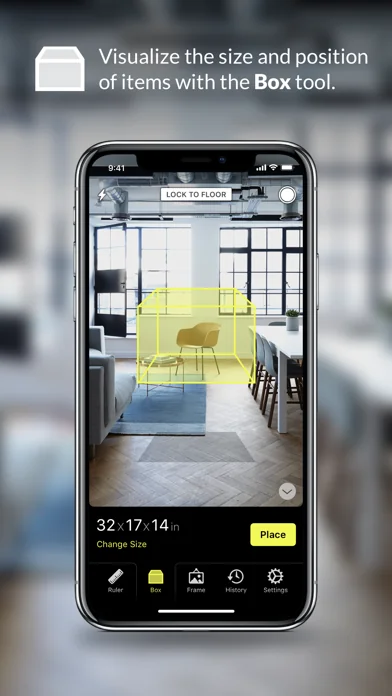
• Box tool - visualize the size and position of objects of all kinds. For example, if you're thinking about buying a couch, you can lay a box down of that exact size to see if it will fit in your space. You can then measure around it with the Ruler tool.
• Photo Frame tool – put your photos in a virtual frame and see how they look on your wall. Choose from 4 different frame styles.
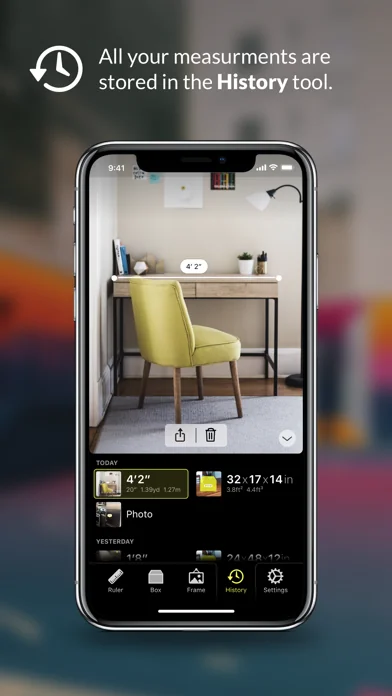
• History tool - see all your previous measurements. Any time you create a ruler line or a box, a photo is automatically taken and stored in History. You can also snap a photo of the scene to History at any time.
• Boxes and ruler lines can be placed next to each other so, for example, you could see how much room you'd have from your new couch to the wall next to it.
• All lines and boxes are selectable and removable.
FAQ:
— What kinds of things can Cubit measure?
Cubit is best at measuring across horizontal flat surfaces, but can also measure vertical surfaces with less accuracy.
— What devices does Cubit work with?
Cubit uses Apple's ARKit technology which requires iOS 11 or newer on an iPhone SE, iPhone 6s/6s Plus, iPhone 7/7 Plus, iPhone 8/8 Plus, iPhone X, iPhone XS, iPhone XS Max, iPhone 11, iPad Pro, or 9.7-inch iPad (2017 or newer).
— How accurate is Cubit?
In our testing with ideal conditions (flat horizontal surface and good lighting), measuring accuracy is around 99%. For vertical surfaces, double-check that the start and end points are correct as you measure. If they are, the measurement should have the same accuracy.
— How can I access previous measurements or virtual boxes I placed?
Use the included History tool! Cubit automatically takes photos of lines and boxes as you place them, and is even smart enough to automatically update its snapshots if it sees a better photo opportunity arise.
— Why “Cubit”?
Glad you asked! The cubit is a unit of measurement used by multiple ancient civilizations.
Cubit features include:
• Ruler tool - measures distance between points. You can put as many ruler lines in the scene as you like and they're tappable so they can be deleted. The measurement label on the line follows the camera so that it's always visible.
• Box tool - visualize the size and position of objects of all kinds. For example, if you're thinking about buying a couch, you can lay a box down of that exact size to see if it will fit in your space. You can then measure around it with the Ruler tool.
• Photo Frame tool – put your photos in a virtual frame and see how they look on your wall. Choose from 4 different frame styles.
• History tool - see all your previous measurements. Any time you create a ruler line or a box, a photo is automatically taken and stored in History. You can also snap a photo of the scene to History at any time.
• Boxes and ruler lines can be placed next to each other so, for example, you could see how much room you'd have from your new couch to the wall next to it.
• All lines and boxes are selectable and removable.
FAQ:
— What kinds of things can Cubit measure?
Cubit is best at measuring across horizontal flat surfaces, but can also measure vertical surfaces with less accuracy.
— What devices does Cubit work with?
Cubit uses Apple's ARKit technology which requires iOS 11 or newer on an iPhone SE, iPhone 6s/6s Plus, iPhone 7/7 Plus, iPhone 8/8 Plus, iPhone X, iPhone XS, iPhone XS Max, iPhone 11, iPad Pro, or 9.7-inch iPad (2017 or newer).
— How accurate is Cubit?
In our testing with ideal conditions (flat horizontal surface and good lighting), measuring accuracy is around 99%. For vertical surfaces, double-check that the start and end points are correct as you measure. If they are, the measurement should have the same accuracy.
— How can I access previous measurements or virtual boxes I placed?
Use the included History tool! Cubit automatically takes photos of lines and boxes as you place them, and is even smart enough to automatically update its snapshots if it sees a better photo opportunity arise.
— Why “Cubit”?
Glad you asked! The cubit is a unit of measurement used by multiple ancient civilizations.
🆕 What's New · v1.5.5
• Improved support for iPadOS
• Fixed bugs with missing controls when using Dark Mode
• Frame size controls should work more consistently now
• Other small changes & bug fixes
• Fixed bugs with missing controls when using Dark Mode
• Frame size controls should work more consistently now
• Other small changes & bug fixes
Profile & Insights
Everything we know — and don't — about this app and its company.
Identification
- App name
- Cubit — AR Ruler Toolkit
- Developer
- Loopware
- Bundle ID
- com.madebywindmill.Cubit
- App Store URL
- Open in App Store
- Category
- Utilities
- Content rating
- 4+
- Languages
- EN
Company
- Website
- www.mcgavern.com
- Tagline
- Not found
- Description
- Not found
- Founded
- Not found
- HQ / Address
- Not found
- Employees
- Not found
- Logo
- Not found
Revenue
- Verified revenue / mo
- Not found
- AI revenue estimate / mo
- Not found
- AI annual estimate
- Not found
- ML model estimate / mo
- $144/mo
- Top-grossing rank
- Outside top 100 in US Utilities
- All-time revenue
- Not found
- Pricing
- Not found
Founder
- Name
- Not found
- X / Twitter
- Not found
- Not found
- GitHub
- Not found
- X followers
- Not found
- Public statements
- Not found
Funding
- Total raised
- Not found
- Last round
- Not found
- Investors
- Not found
- Crunchbase
- Not found
- AngelList
- Not found
Press & Links
- Articles found
- Not found
- Listed on
- Not found
- Blog
- Not found
- Press / News
- Not found
Contacts & Socials
- Socials
- Not found
- Not found
- Phone
- Not found
- Contact page
- Not found
- About page
- Not found
⭐Recent App Store Reviews10 latest · avg 3.6★ · 60.0% 5★ · 20.0% 1★
5★6 (60%)
4★0 (0%)
3★0 (0%)
2★2 (20%)
1★2 (20%)
+0 ratings/week
Praise: great ×2 best ×1 perfect ×1
Top positive
★★★★★ Clean UI
Simple features with a clean UI. Can be tricky sometimes to pick a corner of an object for measuring - but the bullseye will shift in orientation which can help visualize if there will be an issue. Hope to fiddle around with it some more wh…
★★★★★ Super useful!
This beautiful app is the most useful thing on my iPhone after the flashlight.
Super handy for taking quick measurements around the house and visualizing how different sized rugs and furniture will fit into a room.…
Top negative
★☆☆☆☆ Stuck on calibration
App keeps telling me to look around to calibrate. Message never goes away or indicates that calibration is working.…
★☆☆☆☆ Can’t get decent readings
On an iPhone 7+ I tried to measure a table. It took about 10 tries to get it to measure the table instead of the floor underneath. My best attempt got it to measure 4’8” when I table is exactly 5’ wide.…
📈Ratings growth74 ratings+7300% lifetimeShow 3-year history estimate ▾
Tracked (9 weeks) Pre-tracking estimate (37 weeks) · model-based, ±5% noise · anchored to release date and current value
🌍Geographic ReachNot ranked
This app is currently outside the top 100 grossing in all 9 countries we monitor (US, UK, DE, FR, JP, CA, AU, BR, IN). Niche or new apps often launch this way — popularity rankings appear once daily revenue clears the regional threshold.
Profile is built from iTunes Lookup + developer site scrape + ML revenue model. Empty fields show "Not found" — additional sources (Crunchbase, X, IndieHackers, Acquire.com) coming.
Full revenue analysis
Read the article-style breakdown for Cubit — AR Ruler Toolkit: category rank, percentile, growth signal, comparable apps, and how the forecast is calibrated against verified-MRR anchors in this niche.