64
BU Score
Solid
Pedometer app — Step Counter
✍️ BU Analytics Review
“
Pedometer app — Step Counter is an Android app from Zeopoxa in the Health & Fitness category, currently rated 4.4★ across 9,453 ratings. Initial signal reads as largely positive sentiment, users highlighting consistency and feature depth.
Our BU Score puts it at 64 — Solid (established niche player). For a Health & Fitness app, that means established niche player.
Track changes month-over-month in the Performance section below — live snapshot history and revenue forecast included.
creator
📊 Performance Tracking LIVE
Loading…
Rating
—
Reviews
—
Forecast Revenue / mo
—
Snapshots tracked
0
since first record
Range:
💰 Forecast Revenue / mo
MODELRevenue forecast computed from BU's 234 trigger model on each snapshot. Calibrated against ground-truth from 58 verified-revenue apps.
🔬Forecast Breakdown — Why This Estimate?Top 3 of 3 triggers
Our ML model uses 200+ signals from public data. These are the most influential for this app:
| Low install base (9,453 ratings)METRIC | +$1,500 | |
| Good rating (4.4★)METRIC | +$800 | |
| Ad-supported / freemiumMETRIC | +$600 |
METRIC = structural app data · REVIEW = mined from user reviews · ✓ VERIFIED = Stripe-verified anchor (TrustMRR)
📈 Reviews Growth
LIVECumulative review count from first BU snapshot. Each point = a tracked update.
⭐ Rating Trend
LIVEAverage rating evolution. Updates with each new review batch.
🗓️ Snapshot Timeline
HISTORYEach bar shows a tracked update and the metric delta from the previous snapshot.
App Specs
🔐 Own this app? Claim & verify MRR →🔖 vVaries with device🔄 updated 1w ago📂 Health & Fitness💰 Free
📝 About this app
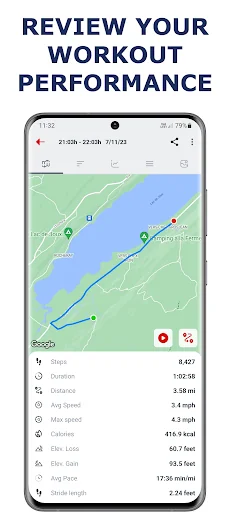
Count your steps with the free Pedometer & Step Counter app for Android and find out how many calories you burn or walking distance. Start your personal accurate step counter & step tracker and walking tracker on your phone with just one click - it’s as easy as that! Once you push the Start button, all you have to do is put your smartphone in your pocket and walk.
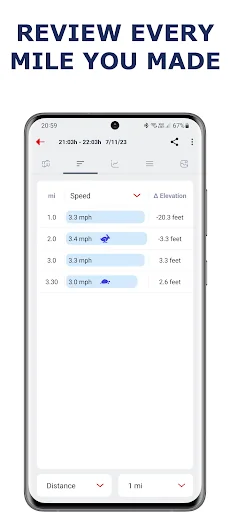
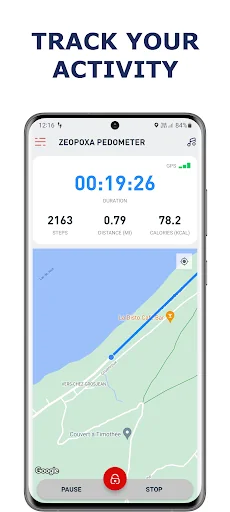
Pedometer app records the number of steps you have made and displays them along with the number of calories that you have burned, distance, time and current speed and much more with this walking app.
More steps and longer distances equals more calories burned, too! Take your first step today, download the free Pedometer app on your phone and push yourself to a fitter and healthier lifestyle with your personal step counter, walking tracker and steps tracker, walking app!
APP FEATURES & BENEFITS:
* Map workouts in real-time with GPS & monitor your outdoor exercise progress
* Count steps, calculate route distance, duration, speed and calorie burn for your activity - in high accuracy and real time with this step tracker
* Export your workouts in CSV (Excel format), KML (Google Earth format) or in GPX format
* Add name and notes for a workout and much more with this Pedometer, walking app
* Create a video animation of your workout that you can watch, save or share with your friends.
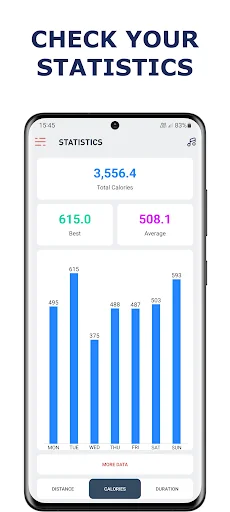
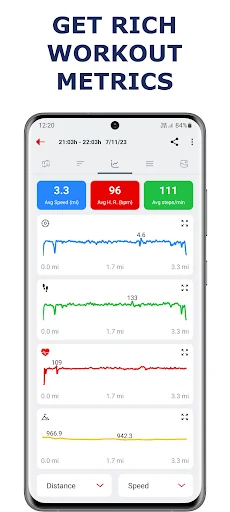
* Advanced graphs for steps, distance, time and calories burned, in 4 different intervals (week, month, year and all)
* Share your workouts, statistics or records with your friends, from this step tracker
* Pedometer & Step Counter app allows you to set a goal that's right for you (number of steps made, number of calories burned, distance traveled or walking time during the day) and get notification when they accomplish.
* No wristband or other hardware required, no website login, just download Pedometer app for free and start tracking your exercise right away. Our step counter and walking tracker works entirely from your phone.
* No locked Features, all features are 100% FREE. You can use all features in this step tracker without having to pay for them.
* Set a privacy zone and places where your workout starts and ends will be hidden (moved to a different location if they are in the privacy zone) when sharing your workouts or workout animation
* Fast, light and user-friendly Pedometer app, small size (below 6MB)
* Complete challenges that this walking app provide and stay motivated
* Keep track of your personal records in the Pedometer & Step Counter app.
* Voice feedback letting you know your progress as you walk. A motivating voice that you can customize to relay your step count, speed, pace, distance, time and calories burned, also customizable per distance / time.
* Train smarter with this step tracker app – get data insights to understand your progress and see how you improve.
* Auto pause workout when you stop moving (if you enable it in app settings)
Important
- Some devices will not record the number of steps when they are locked. This depends exclusively on the specifications of each device and it is not a bug of the app.
- if the step counter is not accurately tracking steps, please adjust the sensitivity in Pedometer app settings.
This Step counter app have Wear OS version too that enable you to control workout from your watch (pause, resume or stop workout). You can see all details about workout on your watch. App also measure heart rate from your watch and sending it to the phone app.
To use both apps (app on the watch and app on the phone) together, you need to have app installed on both your phone and your watch and you need to have your phone and your watch connected and to do these 3 steps:
- Open watch app and click on green button
- Open phone app and click on "Workout setup" button (right of the "Start" button) and click on "Connect the Android watch"
- Start workout on phone app (click on "Start" button).
Pedometer app records the number of steps you have made and displays them along with the number of calories that you have burned, distance, time and current speed and much more with this walking app.
More steps and longer distances equals more calories burned, too! Take your first step today, download the free Pedometer app on your phone and push yourself to a fitter and healthier lifestyle with your personal step counter, walking tracker and steps tracker, walking app!
APP FEATURES & BENEFITS:
* Map workouts in real-time with GPS & monitor your outdoor exercise progress
* Count steps, calculate route distance, duration, speed and calorie burn for your activity - in high accuracy and real time with this step tracker
* Export your workouts in CSV (Excel format), KML (Google Earth format) or in GPX format
* Add name and notes for a workout and much more with this Pedometer, walking app
* Create a video animation of your workout that you can watch, save or share with your friends.
* Advanced graphs for steps, distance, time and calories burned, in 4 different intervals (week, month, year and all)
* Share your workouts, statistics or records with your friends, from this step tracker
* Pedometer & Step Counter app allows you to set a goal that's right for you (number of steps made, number of calories burned, distance traveled or walking time during the day) and get notification when they accomplish.
* No wristband or other hardware required, no website login, just download Pedometer app for free and start tracking your exercise right away. Our step counter and walking tracker works entirely from your phone.
* No locked Features, all features are 100% FREE. You can use all features in this step tracker without having to pay for them.
* Set a privacy zone and places where your workout starts and ends will be hidden (moved to a different location if they are in the privacy zone) when sharing your workouts or workout animation
* Fast, light and user-friendly Pedometer app, small size (below 6MB)
* Complete challenges that this walking app provide and stay motivated
* Keep track of your personal records in the Pedometer & Step Counter app.
* Voice feedback letting you know your progress as you walk. A motivating voice that you can customize to relay your step count, speed, pace, distance, time and calories burned, also customizable per distance / time.
* Train smarter with this step tracker app – get data insights to understand your progress and see how you improve.
* Auto pause workout when you stop moving (if you enable it in app settings)
Important
- Some devices will not record the number of steps when they are locked. This depends exclusively on the specifications of each device and it is not a bug of the app.
- if the step counter is not accurately tracking steps, please adjust the sensitivity in Pedometer app settings.
This Step counter app have Wear OS version too that enable you to control workout from your watch (pause, resume or stop workout). You can see all details about workout on your watch. App also measure heart rate from your watch and sending it to the phone app.
To use both apps (app on the watch and app on the phone) together, you need to have app installed on both your phone and your watch and you need to have your phone and your watch connected and to do these 3 steps:
- Open watch app and click on green button
- Open phone app and click on "Workout setup" button (right of the "Start" button) and click on "Connect the Android watch"
- Start workout on phone app (click on "Start" button).
Profile & Insights
Everything we know — and don't — about this app and its company.
Identification
- App name
- Pedometer app — Step Counter
- Developer
- Zeopoxa
- Bundle ID
- com.zeopoxa.pedometer
- App Store URL
- Open in App Store
- Category
- Health & Fitness
- Content rating
- Not found
- Languages
- Not found
Company
- Website
- Not found
- Tagline
- Not found
- Description
- Not found
- Founded
- Not found
- HQ / Address
- Not found
- Employees
- Not found
- Logo
- Not found
Revenue
- Verified revenue / mo
- Not found
- AI revenue estimate / mo
- Not found
- AI annual estimate
- Not found
- ML model estimate / mo
- $983/mo
- Top-grossing rank
- Not found
- All-time revenue
- Not found
- Pricing
- Not found
Founder
- Name
- Not found
- X / Twitter
- Not found
- Not found
- GitHub
- Not found
- X followers
- Not found
- Public statements
- Not found
Funding
- Total raised
- Not found
- Last round
- Not found
- Investors
- Not found
- Crunchbase
- Not found
- AngelList
- Not found
Press & Links
- Articles found
- Not found
- Listed on
- Not found
- Blog
- Not found
- Press / News
- Not found
Contacts & Socials
- Socials
- Not found
- Not found
- Phone
- Not found
- Contact page
- Not found
- About page
- Not found
Profile is built from iTunes Lookup + developer site scrape + ML revenue model. Empty fields show "Not found" — additional sources (Crunchbase, X, IndieHackers, Acquire.com) coming.
More by Zeopoxa
View all →More Health & Fitness
WeightWatchers Program
★ 4.8 · 2,340,314 reviews
MyFitnessPal: Kalorien Tracker
★ 4.7 · 2,329,701 reviews
Calm: Meditation und Schlaf
★ 4.8 · 1,952,102 reviews
Flo Perioden- & Zyklus-Tracker
★ 4.8 · 1,862,244 reviews
Motivation - Tägliche Zitate
★ 4.8 · 1,048,916 reviews
AllTrails: Hike, Run & Walk
★ 4.9 · 1,026,602 reviews
Kaiser Permanente
★ 4.8 · 997,620 reviews
Headspace: Meditation & Schlaf
★ 4.8 · 974,051 reviews
Browse BU Analytics
📚 All 55,000+ Books
🜍 Alchemy & Hermeticism
🔮 Magic & Ritual
🌙 Witchcraft & Paganism
⭐ Astrology & Cosmology
🃏 Divination & Tarot
📜 Health & Fitness
✡️ Kabbalah & Jewish Mysticism
🕉️ Mysticism & Contemplation
🕊️ Theosophy & Anthroposophy
🏛️ Freemasonry & Secret Societies
👻 Spiritualism & Afterlife
📖 Sacred Texts & Gnosticism
👁️ Supernatural & Occult Fiction
🧘 Spiritual Development
📚 Esoteric History & Biography
Info
About BU Analytics