67
BU Score
Solid
Quadcopter FX Simulator
✍️ BU Analytics Review
“
Quadcopter FX Simulator is an Android app from 3D CREATIVE WORLD in the Simulation category, currently rated 4.0★ across 23,234 ratings. Initial signal reads as largely positive sentiment, users highlighting consistency and feature depth.
Our BU Score puts it at 67 — Solid (established niche player). For a Simulation app, that means established niche player.
Track changes month-over-month in the Performance section below — live snapshot history and revenue forecast included.
📊 Performance Tracking LIVE
Loading…
Rating
—
Reviews
—
Forecast Revenue / mo
—
Snapshots tracked
0
since first record
Range:
💰 Forecast Revenue / mo
MODELRevenue forecast computed from BU's 234 trigger model on each snapshot. Calibrated against ground-truth from 58 verified-revenue apps.
🔬Forecast Breakdown — Why This Estimate?Top 3 of 3 triggers
Our ML model uses 200+ signals from public data. These are the most influential for this app:
| Mid install base (23,234 ratings)METRIC | +$5,500 | |
| Good rating (4.0★)METRIC | +$800 | |
| Ad-supported / freemiumMETRIC | +$600 |
METRIC = structural app data · REVIEW = mined from user reviews · ✓ VERIFIED = Stripe-verified anchor (TrustMRR)
📈 Reviews Growth
LIVECumulative review count from first BU snapshot. Each point = a tracked update.
⭐ Rating Trend
LIVEAverage rating evolution. Updates with each new review batch.
🗓️ Snapshot Timeline
HISTORYEach bar shows a tracked update and the metric delta from the previous snapshot.
App Specs
🔐 Own this app? Claim & verify MRR →🔖 vVaries with device🔄 updated 10y ago📂 Simulation💰 Free
📝 About this app
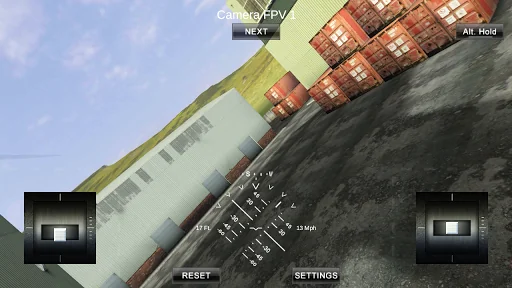
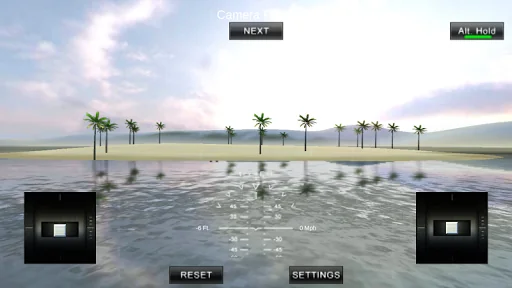
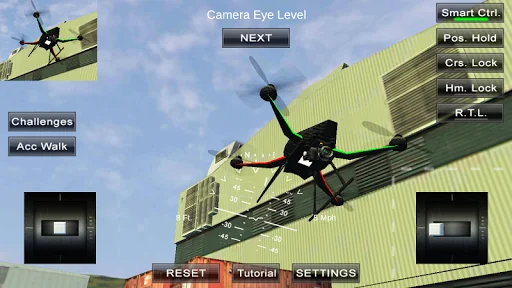
A Quadcopter / Multirotor RC Drone simulator with First Person View (FPV), HUD, Return Home, Course Lock, Home Lock, Camera Gimbal, Acro mode, Acro 3D mode and more..
Now Google Cardboard VR is also supported for immersive flying and FPV experience.
Support for Controllers
Please note that this a simulator and Not a game. It is designed for RC enthusiasts to practice Flying skills.
Basic Tutorial for beginner is in the above description video.
Minimum Screen resolution required is 800 x 480 px. Minimum Recommended RAM is 1 GB. We are open to suggestions and problems. You can always email us at our support email.
Features:
1) Based on real physics Model of Quadcopter
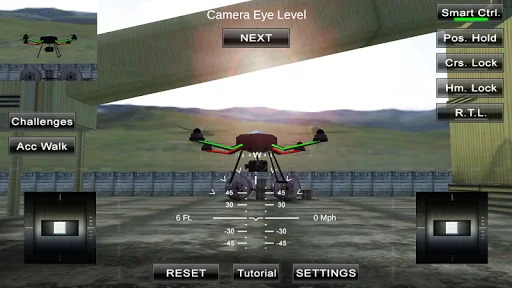
2) Interactive selection of different cameras modes:
* Eye level Camera
* First Person View Camera
* Stabilized Gimbal Camera
* Follow Camera
You can walk around while flying, looking at the quad either by dragging the middle of screen or by enabling accelerometer button on the left side in the Eye level Camera Mode..
3) Return to Location (RTL)
When on the Quad will automatically Return and Land back in its Landing Position. It will Automatically switch on when the Quad goes out of range.
4) Position Hold
When ON the Quad will try to Hold its position when both control sticks are released.
5) Course Lock
When ON the Forward, Backward, Left and Right will remain same regardless of orientation of Quad. e.g. Moving Right stick Forward will always make the Quad go forward in East Direction even if its pointing towards north.
6) Home Lock
When ON the Forward will always be Away from you and Backwards will always be towards you regardless of Quads Orientation.
7) Heads up Display(HUD)
Displaying real-time Pitch, Roll, Heading, Altitude and Speed.
8) Adjustable Control sensitivity Settings
9) Auto Stabilizing adjustable
10) Altitude Hold Switch
If ON the quad will try to maintain the altitude when it was switched on.
11) Advanced Settings
If enabled users can change the Total Weight, Static / Dynamic thrust, PID setting and Aerodynamic Drag values.
12) Multiple Quad / Scene Selection / Some basic Challenges for Time Pass..
13) Multiple mode Input Support.
Now it supports mode1, mode2. mode3, mode4 and accelerometers. You can change via settings page
14) Camera rotation in FPV and Gimbal camera.
Click and Drag from center of screen on FPV or Gimbal camera. Double click in center to reset.
15) Dynamic Wind
Wind effect will reduce when behind the building.
16) Google cardboard Support for immersive virtual reality and FPV experience.
Make sure that you have a controller attached to the device because the only way you can control the quadcopter is by controller once the Cardboard VR is enabled. After enabling you have to gaze at the buttons on the UI and press the trigger button on the cardboard to click it. Once you are flying then pressing the trigger anywhere will open the settings page. You can also touch on screen anywhere to execute trigger event instead of pressing the trigger button.
17) Max Tilt Angle / Auto Stabilize Sensitivity Slider
In Normal Mode the slider changes the Maximum Tilt angle setting. This settings determines the maximum roll / pitch angle the quadcopter will tilt. In Sports Mode it changes the Auto Stabilize sensitivity. The higher the settings the more force is applied to stabilize the quadcopter.
18) Acro / Acro 3d mode for expert flying
Auto stabilize will not be applied in these modes. You need to be expert to fly in this mode.In 3D Mode is mode in which the Quadcopter can fly upside down also. The throttle sticks will produce reverse thrust when moved down from the center position.
Enjoy Flying..
Credits: Some Arteria content is in use.
Now Google Cardboard VR is also supported for immersive flying and FPV experience.
Support for Controllers
Please note that this a simulator and Not a game. It is designed for RC enthusiasts to practice Flying skills.
Basic Tutorial for beginner is in the above description video.
Minimum Screen resolution required is 800 x 480 px. Minimum Recommended RAM is 1 GB. We are open to suggestions and problems. You can always email us at our support email.
Features:
1) Based on real physics Model of Quadcopter
2) Interactive selection of different cameras modes:
* Eye level Camera
* First Person View Camera
* Stabilized Gimbal Camera
* Follow Camera
You can walk around while flying, looking at the quad either by dragging the middle of screen or by enabling accelerometer button on the left side in the Eye level Camera Mode..
3) Return to Location (RTL)
When on the Quad will automatically Return and Land back in its Landing Position. It will Automatically switch on when the Quad goes out of range.
4) Position Hold
When ON the Quad will try to Hold its position when both control sticks are released.
5) Course Lock
When ON the Forward, Backward, Left and Right will remain same regardless of orientation of Quad. e.g. Moving Right stick Forward will always make the Quad go forward in East Direction even if its pointing towards north.
6) Home Lock
When ON the Forward will always be Away from you and Backwards will always be towards you regardless of Quads Orientation.
7) Heads up Display(HUD)
Displaying real-time Pitch, Roll, Heading, Altitude and Speed.
8) Adjustable Control sensitivity Settings
9) Auto Stabilizing adjustable
10) Altitude Hold Switch
If ON the quad will try to maintain the altitude when it was switched on.
11) Advanced Settings
If enabled users can change the Total Weight, Static / Dynamic thrust, PID setting and Aerodynamic Drag values.
12) Multiple Quad / Scene Selection / Some basic Challenges for Time Pass..
13) Multiple mode Input Support.
Now it supports mode1, mode2. mode3, mode4 and accelerometers. You can change via settings page
14) Camera rotation in FPV and Gimbal camera.
Click and Drag from center of screen on FPV or Gimbal camera. Double click in center to reset.
15) Dynamic Wind
Wind effect will reduce when behind the building.
16) Google cardboard Support for immersive virtual reality and FPV experience.
Make sure that you have a controller attached to the device because the only way you can control the quadcopter is by controller once the Cardboard VR is enabled. After enabling you have to gaze at the buttons on the UI and press the trigger button on the cardboard to click it. Once you are flying then pressing the trigger anywhere will open the settings page. You can also touch on screen anywhere to execute trigger event instead of pressing the trigger button.
17) Max Tilt Angle / Auto Stabilize Sensitivity Slider
In Normal Mode the slider changes the Maximum Tilt angle setting. This settings determines the maximum roll / pitch angle the quadcopter will tilt. In Sports Mode it changes the Auto Stabilize sensitivity. The higher the settings the more force is applied to stabilize the quadcopter.
18) Acro / Acro 3d mode for expert flying
Auto stabilize will not be applied in these modes. You need to be expert to fly in this mode.In 3D Mode is mode in which the Quadcopter can fly upside down also. The throttle sticks will produce reverse thrust when moved down from the center position.
Enjoy Flying..
Credits: Some Arteria content is in use.
Profile & Insights
Everything we know — and don't — about this app and its company.
Identification
- App name
- Quadcopter FX Simulator
- Developer
- 3D CREATIVE WORLD
- Bundle ID
- com.Creativeworld.QuadcopterFX
- App Store URL
- Open in App Store
- Category
- Simulation
- Content rating
- Not found
- Languages
- Not found
Company
- Website
- Not found
- Tagline
- Not found
- Description
- Not found
- Founded
- Not found
- HQ / Address
- Not found
- Employees
- Not found
- Logo
- Not found
Revenue
- Verified revenue / mo
- Not found
- AI revenue estimate / mo
- Not found
- AI annual estimate
- Not found
- ML model estimate / mo
- $1.3K/mo
- Top-grossing rank
- Not found
- All-time revenue
- Not found
- Pricing
- Not found
Founder
- Name
- Not found
- X / Twitter
- Not found
- Not found
- GitHub
- Not found
- X followers
- Not found
- Public statements
- Not found
Funding
- Total raised
- Not found
- Last round
- Not found
- Investors
- Not found
- Crunchbase
- Not found
- AngelList
- Not found
Press & Links
- Articles found
- Not found
- Listed on
- Not found
- Blog
- Not found
- Press / News
- Not found
Contacts & Socials
- Socials
- Not found
- Not found
- Phone
- Not found
- Contact page
- Not found
- About page
- Not found
Profile is built from iTunes Lookup + developer site scrape + ML revenue model. Empty fields show "Not found" — additional sources (Crunchbase, X, IndieHackers, Acquire.com) coming.
More Simulation
Dragon City: Mobile Adventure
★ 4.7 · 10,670,394 reviews
The Sims™ FreePlay
★ 4.6 · 5,796,034 reviews
Idle Miner Tycoon: Gold Games
★ 4.5 · 5,762,123 reviews
SimCity BuildIt
★ 4.2 · 5,567,443 reviews
Episode - Choose Your Story
★ 4.3 · 4,291,400 reviews
Plague Inc.
★ 4.7 · 4,018,591 reviews
Fallout Shelter
★ 4.6 · 3,879,741 reviews
Craftsman: Building Craft
★ 3.5 · 3,693,870 reviews
Browse BU Analytics
📚 All 55,000+ Books
🜍 Alchemy & Hermeticism
🔮 Magic & Ritual
🌙 Witchcraft & Paganism
⭐ Astrology & Cosmology
🃏 Divination & Tarot
📜 Simulation
✡️ Kabbalah & Jewish Mysticism
🕉️ Mysticism & Contemplation
🕊️ Theosophy & Anthroposophy
🏛️ Freemasonry & Secret Societies
👻 Spiritualism & Afterlife
📖 Sacred Texts & Gnosticism
👁️ Supernatural & Occult Fiction
🧘 Spiritual Development
📚 Esoteric History & Biography
Info
About BU Analytics